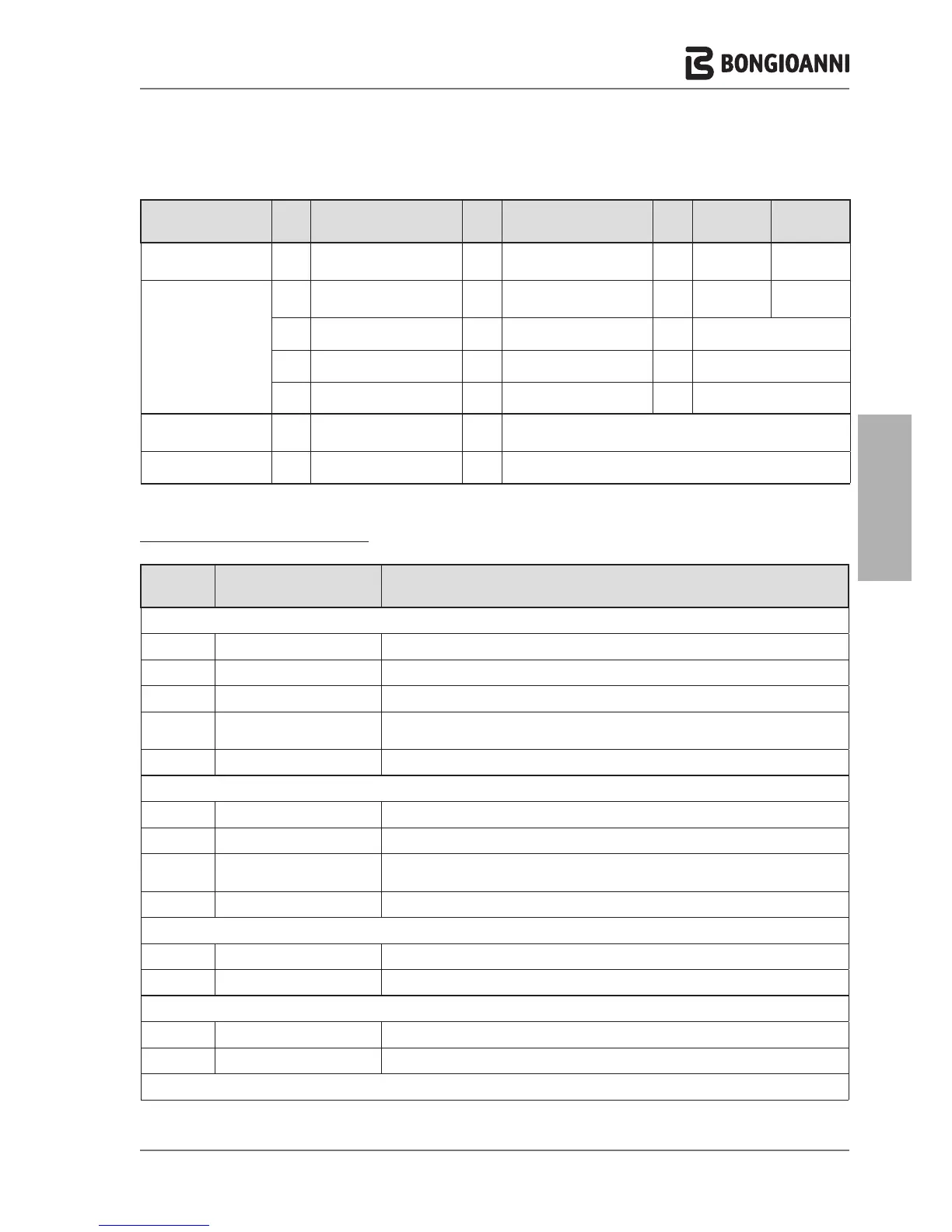
Key to the USER menu LINES
USER MENU
Keys
Sub-menu
Keys
Lines
Keys
Factory
settings
Field
5. SETTINGS
C
1. Select Language
C
English / Italiano
C
Italiano
English/
Italiano
D B
D
2. Select Units
C
Fahrenheit / Celsius
C
Celsius
Fahrenheit/
Celsius
D
3. Set date
C
---> --->
day / month / year
D
4. Set time
C
24 hour / 12 hour
C
hours : minutes
D
5. Restore factory settings
C
---> --->
OK to reset
6. DIAGNOSTICS
C
1. Boiler information
C
Read-only display of boiler status,
temperature readings and blower rpm
D
2. Lockout history
C
read-only display of lockout/fault history
Ref. menu
line
Line title Meaning
1. HEATING
1.1.1 CH temperature/OTC set Entry of setpoint of supply temperature (heating)
1.1.2 Outside temperature for CH off Entry of setpoint of outside temperature for automatic switchover to "Summer mode"
1.2 ECO setpoint reduction Entry of value to reduce temperature on supply in "energy saving" mode (day or night time)
1.3.1
Enable/disable on board
scheduler
Enable or Disable implementation of the "heating time bands" set for the various week days
1.3.2 Scheduler set Settings of the "heating time bands" applied for the various week days
2. DOMESTIC HOT WATER
2.1 DHW setpoint Entry of the setpoint for DHW temperature
2.2 ECO setpoint reduction Entry of value to reduce temperature of DHW in "energy saving" mode (day or night time)
2.3.1
Enable/disable on board
scheduler
Enable or Disable implementation of the "DHW production time bands" set for the vari-
ous week days
2.3.2 Scheduler set Settings of the "DHW production time bands" applied for the various week days
3. HOLIDAY
3.1 CH holiday setpoint Entry of the setpoint for supply temperature during the holiday period.
3.2 Instant DHW setpoint Entry of the setpoint for DHW during the holiday period.
4. MAINTENANCE
4.1 Service information Display of services contact phone number
4.2 Service due date Display of date for next maintenance due
5. SETTINGS
- 31 -



 To Next Page