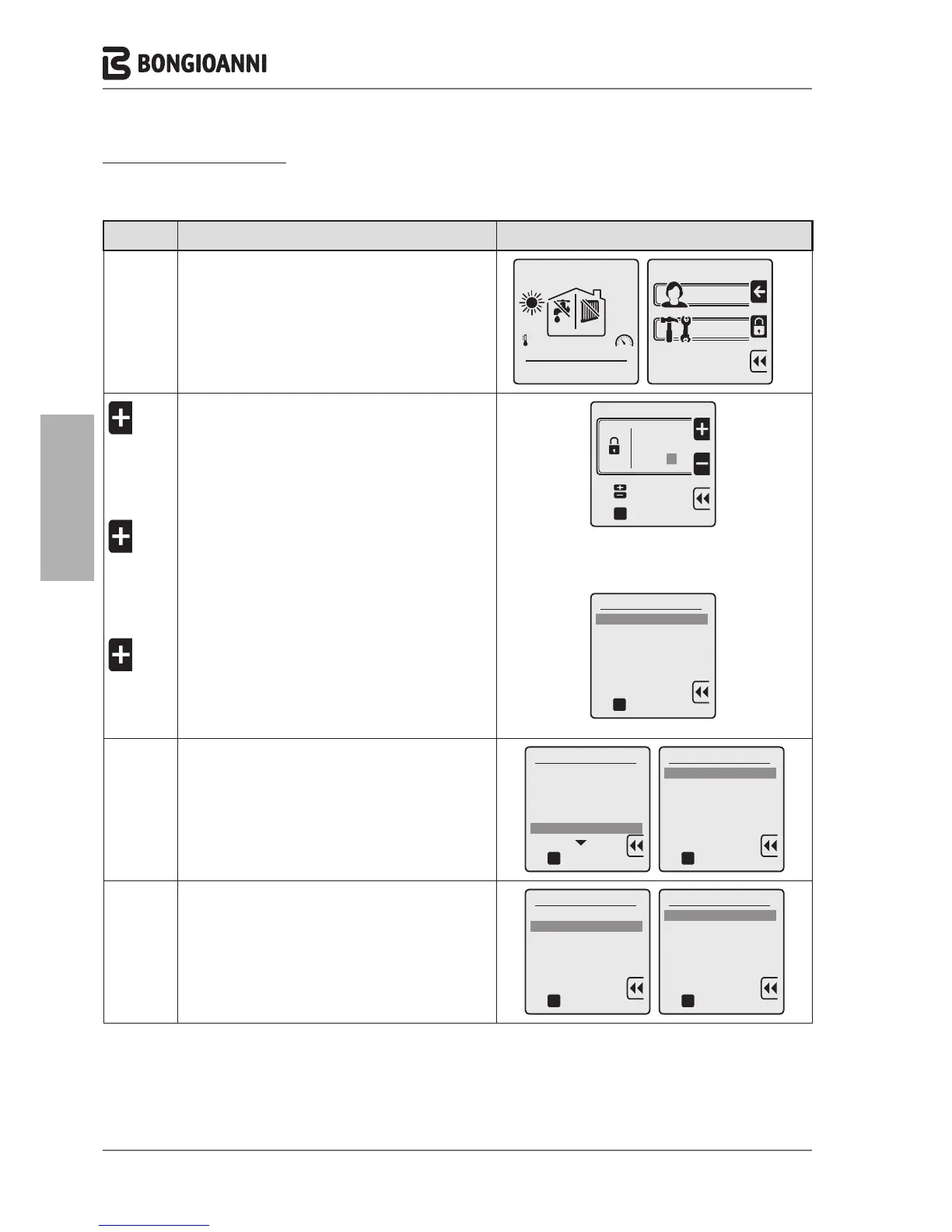
CHANGE OF GAS TYPE
Multidea Evo boilers leave the factory set up to operate with G20. They can also operate with LPG, using the accessory
kit available on request. Once the kit is installed, perform the procedures described below.
Key to
press
Description Display
F
A
to display the MENU screens
to enter the TECHNICIAN menu, which requires
entry of the PASSWORD
date
OUTSIDE
7
o
C
69
o
0.0
OFF OFF
time
A
a
A
A
TWICE
C
A
THREE TIMES
C
A
ONCE
C
To enter the PASSWORD “231”:
to enter the first digit “2”
to confirm and move to the second digit
to enter the second digit “3”
to confirm and move to the third digit
to enter the third digit “1”
to confirm the password and enter the menu
2 3 1
oK
Technician menu
Insert code
to select
to confirm
oK
Technician menu
1. ADVANCED CH SETTINGS
2. ADVANCED DHW SETTINGS
3. SYSTEM SETTINGS
4. DIAGNOSTICS
5. USER SETTINGS
6. CASCADE
7. RESTORE FACTORY SETTINGS
to confirm
D
7 TIMES
C
to select "8. BOILER TYPE"
to confirm and access the selected line
Technician menu
3. SYSTEM SETTINGS
4. DIAGNOSTICS
5. USER SETTINGS
6. CASCADE
7. RESTORE FACTORY SETTINGS
8. BOILER TYPE
oK
to confirm
BOILER TYPE
1. Wall Hung Boiler
2. Floor standing boiler 1
3. Floor standing boiler 2
oK
to confirm
D
C
to select "2. Floor standing boiler 1"
to confirm and access the selected line
BOILER TYPE
1. Wall Hung Boiler
2. Floor standing boiler 1
3. Floor standing boiler 2
oK
to confirm
Floor standing boiler 1
1. G20
2. G31
oK
to confirm



 To Next Page