1 689 989 091 2014-05-14| Robert Bosch GmbH
Product description | DCU 130 | 23 en
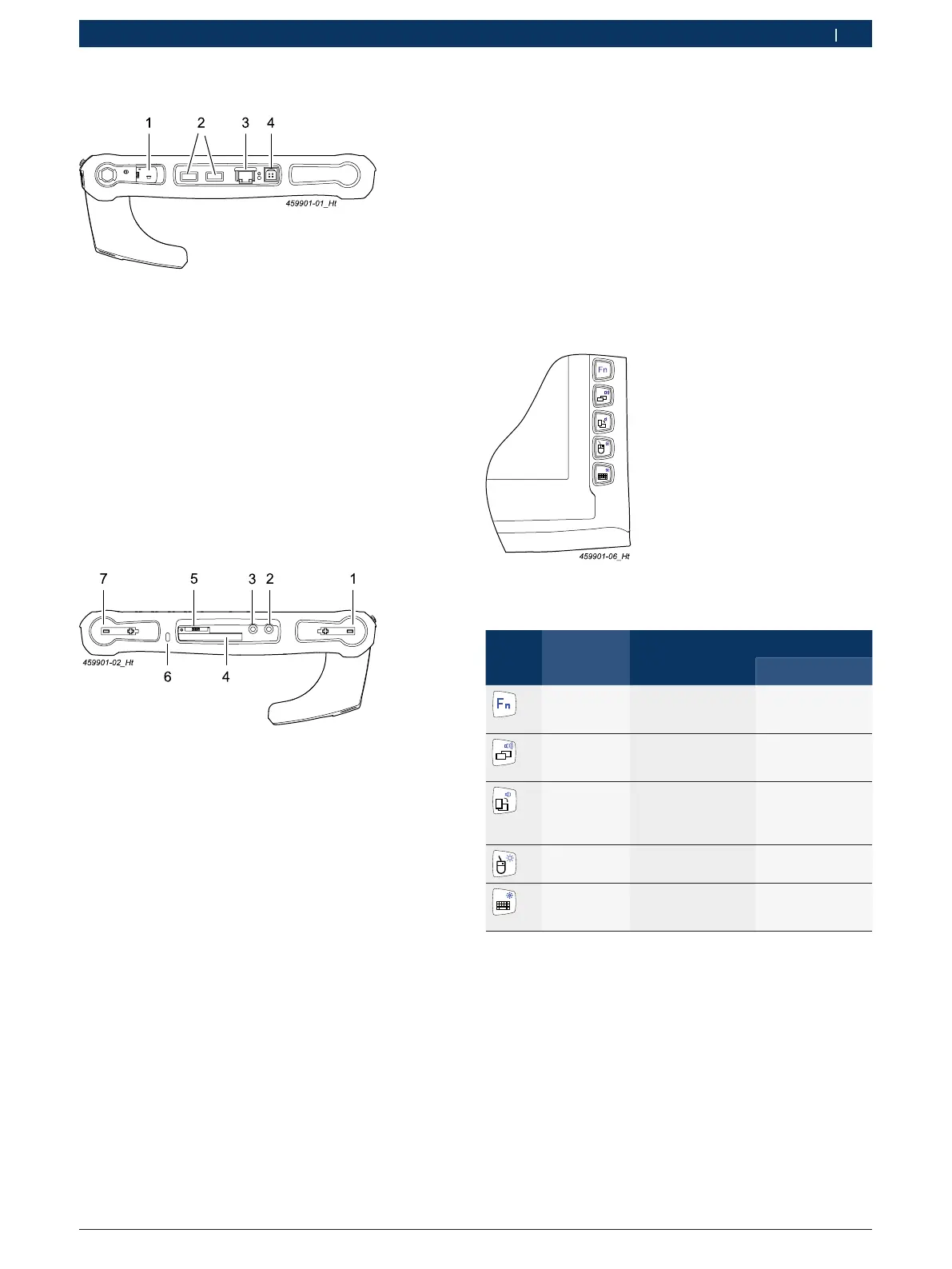
3.5.1 Interfaces
Fig. 4: View of DCU 130 interfaces (left side)
1 USB slot (recessed, e.g. for USB stick), max. 0,5 A
2 USB ports, max. 2 A
3 RJ-45 network connection (LAN)
4 Power supply unit connection (19 Volt DC)
i To connect the USB stick to the recessed USB port,
rotate the device by 180° compared to the two visib-
le USB ports.
i With a recessed USB port, it is not possible to con-
nect a DVD drive without its own power supply.
Fig. 5: View of DCU 130 interfaces (right side)
1 Battery slot 2 (battery 2)
2 Headphone connection
3 Microphone connection
4 Express card reader
5 FDR (SIM card slot)
6 Kensington lock
7 Battery slot 1 (battery 1)
3.5.2 Function of front keys
! Press the front keys by hand, not with the touch pen.
i With the exception of the Fnkey, all the front keys
have two function levels. The primary function (Level
1) can be activated simply by pressing the approp-
riate key. The second function level (Level 2) can be
activated by first pressing the Fn key and then the
function key required.
i The Fnkey must always be held down to activate
Level2.
The functions of the front keys on the DCU 130 are as
follows:
Symbol Designation Function
Level 1 Level 2
Function key Activation of front
key Level 2
(hold key down)
–
Change of
application
Change of
application
<Alt> + <Esc>
Increase system
volume
View
switching
Switching from
horizontal to
vertical view and vi-
ce versa
Reduce system
volume
Right mouse
key
Function of right
mouse key
Increase display
brightness
Keypad Opening/closing
of virtual screen
keypad
Reduce display
brightness


 To Next Page
 Loading...