1 689 989 091 2014-05-14| Robert Bosch GmbH
26 | DCU 130 | Operationen
5.7 Virtual screen keypad
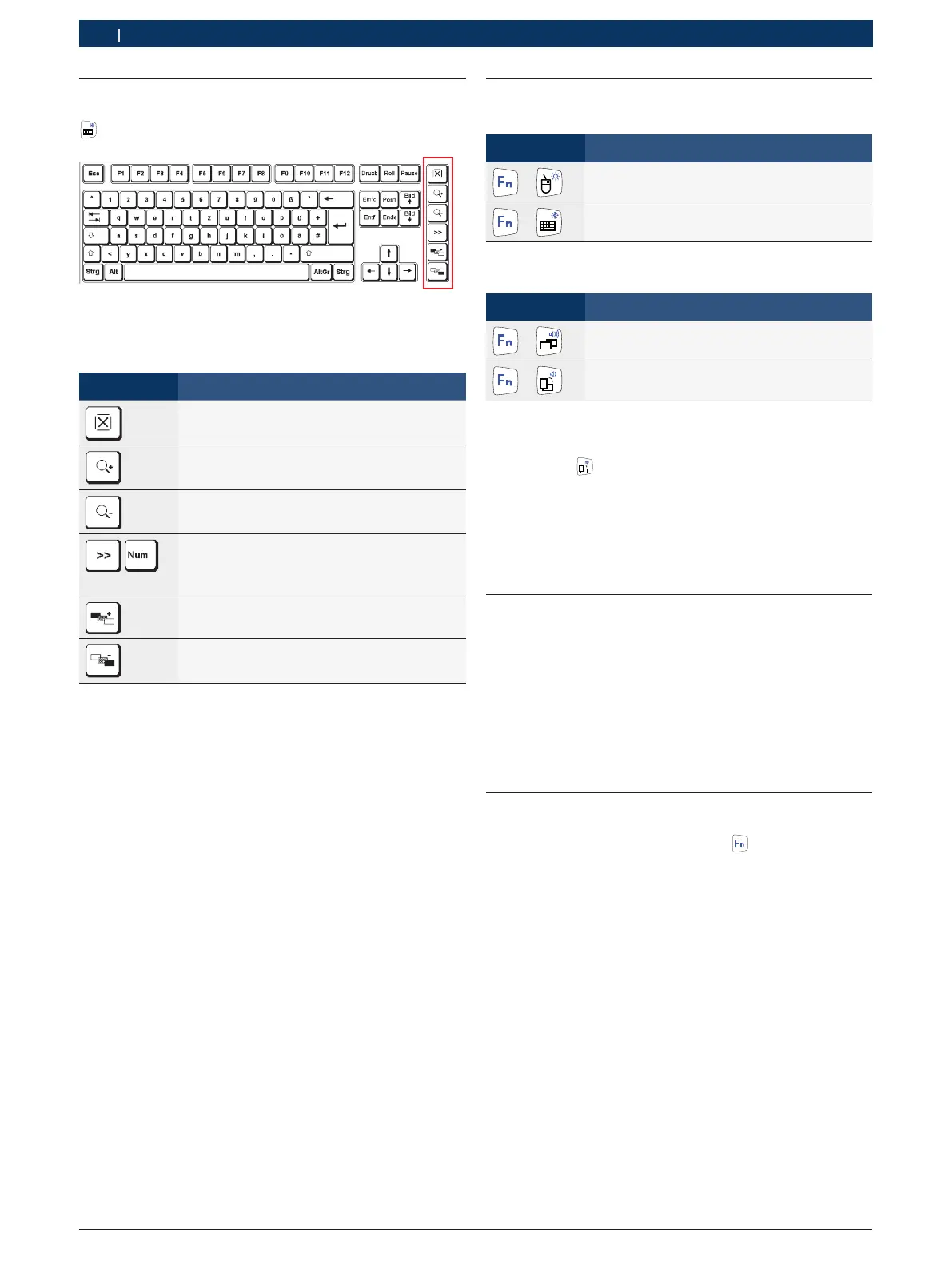
The DCU 130 features a virtual keypad. Pressing the
Keypad key opens the virtual screen keypad.
The virtual screen keypad functions in the same way as
a conventional keypad. The following setting options
are available:
Symbol Function
Closing of virtual screen keypad
Enlarges the display of the virtual keypad
Reduces the display of the virtual keypad
Switching between standard view and display
of numeric block. After switching to the nume-
ric block, the function block is opened by pres-
sing <Num> again
Increases the transparency of the virtual
screen keypad
Reduces the transparency of the virtual screen
keypad
i If calling up a function on a standard keypad would
involve pressing two keys simultaneously
(e.g. <Alt> + <F4>), these keys are to be pressed
consecutively on the virtual screen keypad. The
special keys <Shift>, <Alt> and <Ctrl> must always
be pressed first.
! On account of software programming differences, it
cannot be guaranteed that the virtual screen keypad
will work with every type of software.
i When the virtual screen keypad is closed, the status
last activated (alpha/numeric block or function keys)
will be retained and displayed again the next time
the keypad is called up.
5.8 System settings
5.8.1 Brightness adjustment
Symbol Function
+
Increases the brightness of the display
+
Reduces the brightness of the display
5.8.2 Volume adjustment
Symbol Function
+
Increases the volume
+
Reduces the volume
5.8.3 Switching between horizontal and verti-
calview
Pressing the key effects switching from 0° (horizon-
tal) to 90° (vertical). Pressing the key again returns the
view to 0°.
i Calibration must be performed after switching the
view (refer to Section 6.2).
5.9 Printing
A printer (e.g. PDR 374) can be connected by way
ofthe USB interface of the DCU 130.
i Refer to the printer manufacturer's information for
details of printer drivers and installation.
i Information on printing can be found in the On-
lineHelp for the Bosch applications.
5.10 Camera
1. Double-click "Camera" to start camera program..
2. Pressing and holding the button (approx. two
seconds) will trigger the camera.
"The recorded image is displayed briefly and saved.
i Go to "C:\USERS\PUBLIC\PUBLIC PICTURES" to
view saved images.
i Do not operate another front button to create an
image!


 To Next Page
 Loading...