Display Configuration | 10
Bosch Motorsport DDU 9 63/148
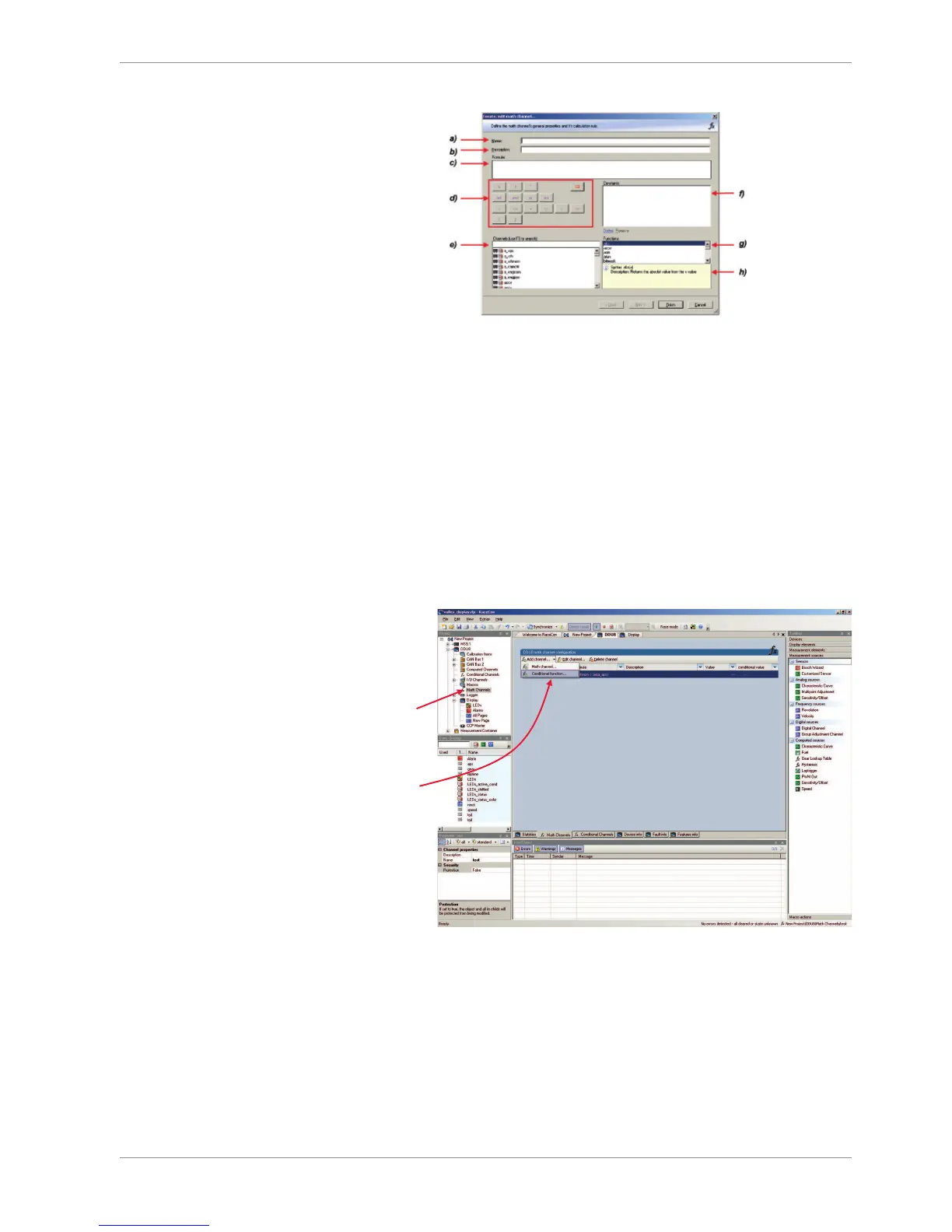
a) Enter the name of the math channel.
b) Enter a description of the math channel.
c) Enter the formula.
d) Select the logical operator.
e) Choose a measurement channel.
f) Define a value that can be used as a constant in the formula.
g) Choose a function.
h) Describes the function selected above.
2. Click ‘Finish’ when done. The math channel is displayed in the DDU 9 math channel
window.
10.5.3 Creating a new conditional function
1. Follow the steps shown in the screenshot.
2
nd
: Click on
the dropdown
arrow beside
‘Add channel’
3
rd
: Choose
‘Conditional
Function’
1
st
: Double-
click on ‘Math
Channels’ in
Project Tree
The ‘create/edit conditional function’ window appears.
Create/Edit Conditional Function Window
1. Define the conditional function using the following configuration possibilities:













 To Next Page