13 | Online Measurement
108/148 DDU 9 Bosch Motorsport
13.4 Online calibration of multipoint adjustment
channels
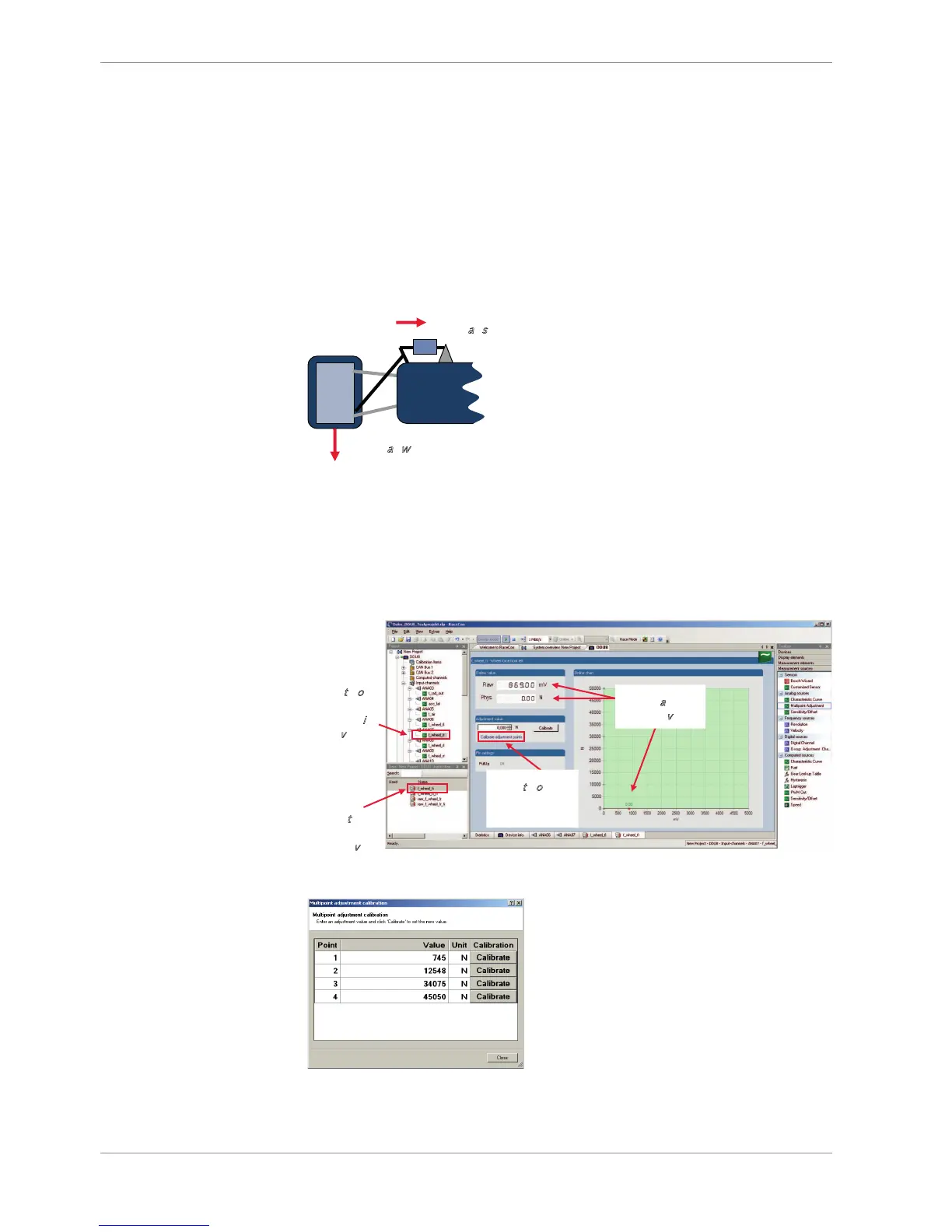
Example: measurement of wheel force
– Physical property ‘wheel force’ not directly measureable
– Load transfer through suspension kinematics
– Physical value at sensor position defined by vehicle
– Curve definition by online adjustment at vehicle
1. Create a multipoint adjustment measurement channel. To create a multipoint channel,
see chapter ‘Configuring a multipoint adjustment’.
2. Download the configuration on the DDU 9. To connect the DDU 9 to RaceCon, see
chapter ‘Connecting the Unit to RaceCon’.
3. Click on the desired channel in the DDU 9 Project Tree.
4. Double-click on a measurement channel in the Data Area to open the online view.
Click to open
c
alibration
w
indow
Analog and
p
hysical value
Click to open
m
easurement
c
hannels in
d
ata view
Double-
click to
o
pen
o
nline view
5. Click on ‘Calibrate adjustment points’ to open calibration window.
6. Apply the desired physical condition to the sensor (e.g. by applying a force on the
wheel).













 To Next Page