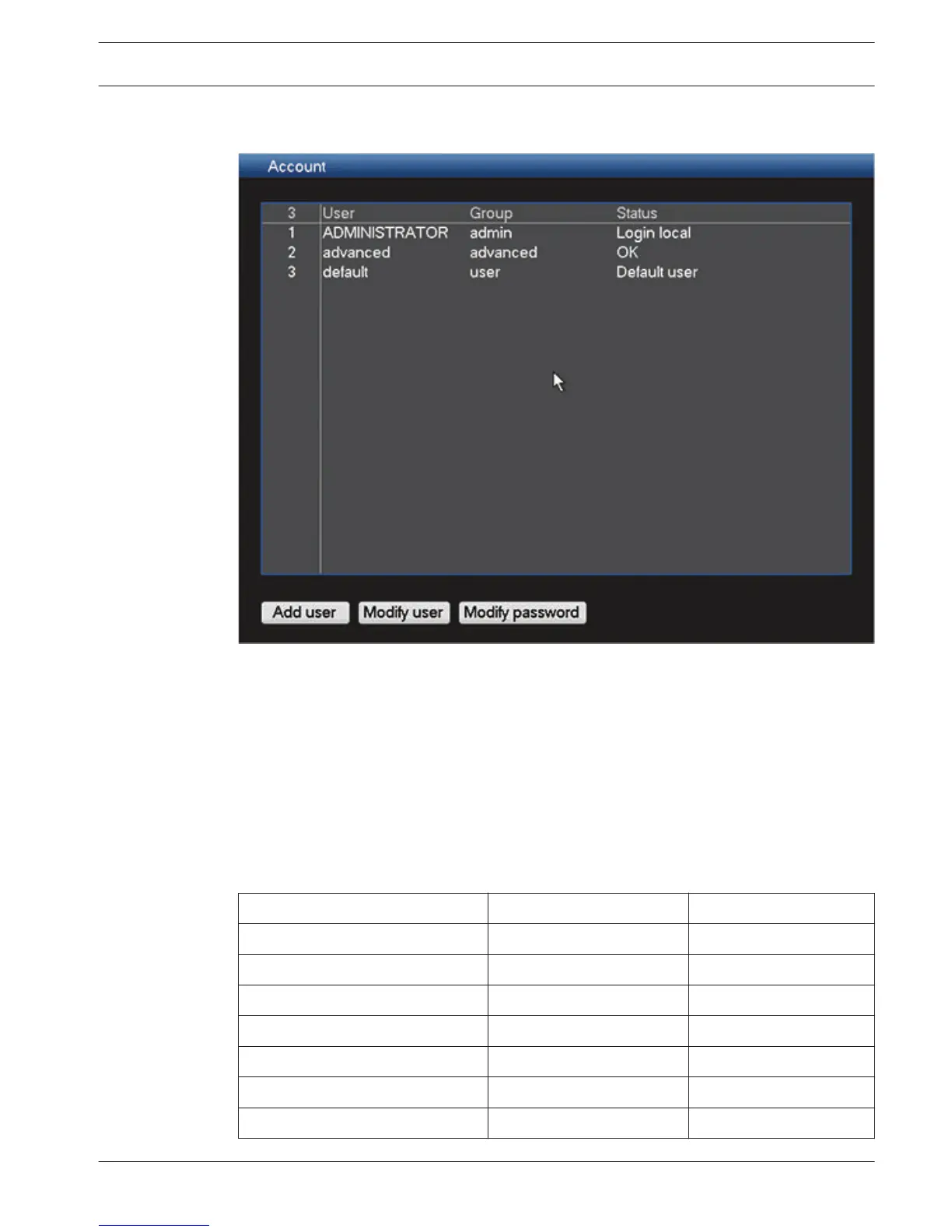
Account/Users
Figure 6.33: Account
General
The system contains a permanent Admin account with Administrator permissions. This user is
logged in by default, e.g. after powering up the unit.
The DIVAR has the following login account levels:
– User name:
ADMINISTRATOR. Default password: 000000 (six zeros)
– User name: Advanced. Default password: 000000
– User name: User. Default password: 000000
The operating functions available to each user can be limited by setting passwords (max. 6
characters) for user levels at the log in screen; see following table for the default user levels
and available functions.
Administrator authority Advanced User authority User authority
View (all channels) View (all channels) View (all channels)
Pan/Tilt/Zoom Control Pan/Tilt/Zoom Control Pan/Tilt/Zoom Control
Color Setting Color Setting
Search/Play (all channels) Search/Play (all channels) Search/Play (all channels)
Playback on all channels Playback on all channels Playback on all channels
Sequence on/off Sequence on/off Sequence on/off
Alarm output
6.17
DIVAR 3000/5000 Digital Video
Recorder
Configuration | en 71
Bosch Security Systems Operator Manual 2013.05 | 1.0 | DIVAR 3000/5000 Digital Video
Recorder











 To Next Page