– Alarm output
– see Alarm Output, page 69
– Main menu – see Main menu, page 88
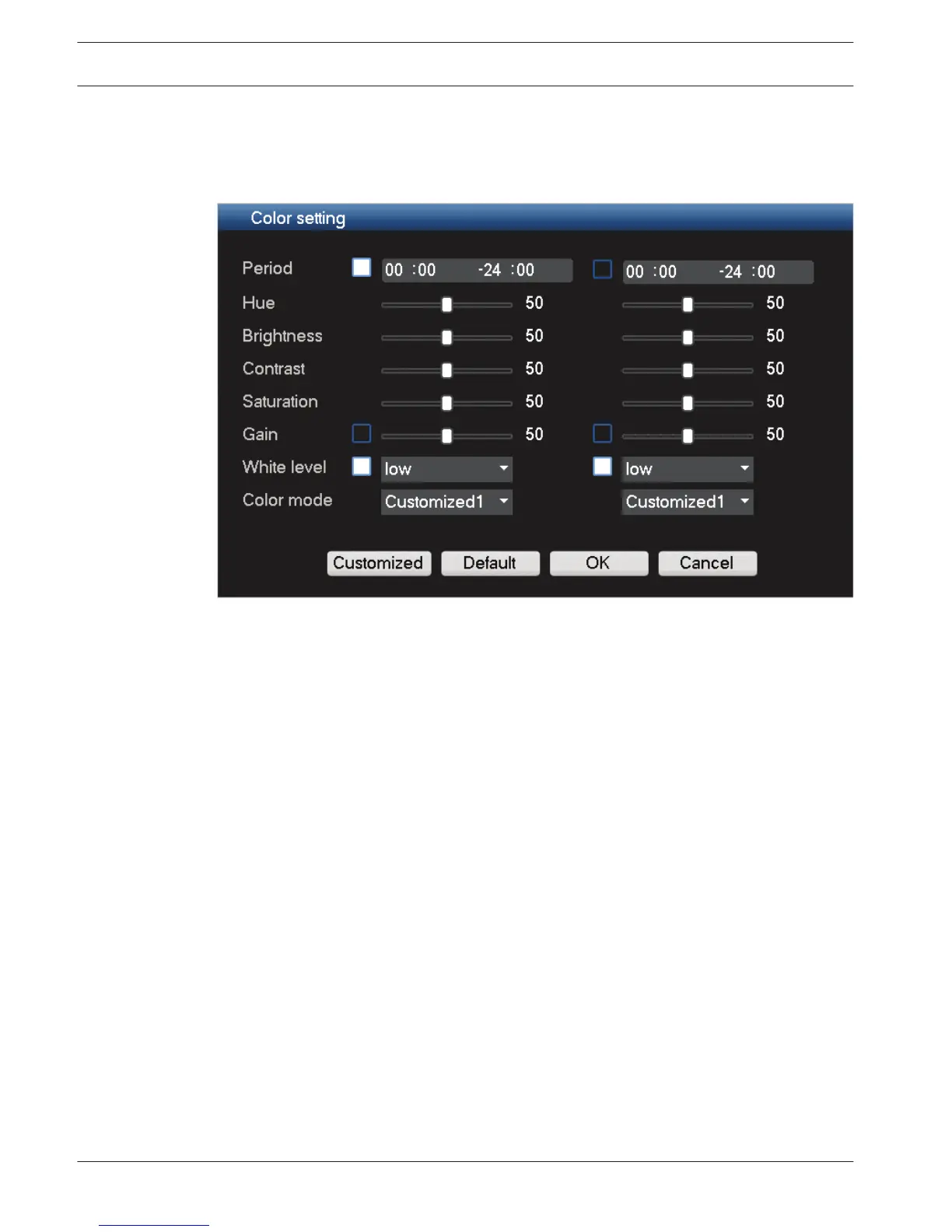
Color setting
Figure 7.5: Color setting
Use the slider bars here to move the color settings to the desired levels for your display(s):
–
You can setup two different time periods to adjust your settings (this is very useful to
automatically change the screen brightness for day and night situations).
– You can create a maximum 4 customized settings to be stored and used later. See
following steps:
– Click <Customized>
– In the new ‘Customized color’ dialog screen, choose Customized 1, 2, 3 or 4 from the
drop-down menu.
– Adjust the settings
– Click <OK> to save the settings
– Choose the desired Customized 1, 2, 3 or 4 from the drop-down menu in the field
‘Color mode’
See also
– Search/Play, page 93
– Alarm Output, page 69
– Main menu, page 88
Main menu
Access the Main menu as follows:
–
Use the Enter key and the direction buttons on the front panel or the remote control
– Right-click the mouse for the Quick menu and select ‘Main menu’
The Main menu has six menu selections, each with further submenus. See following figure.
7.1.5
88 en | Operating instructions
DIVAR 3000/5000 Digital Video
Recorder
2013.05 | 1.0 | DIVAR 3000/5000 Digital Video
Recorder
Operator Manual Bosch Security Systems











 To Next Page