Pack201 | Operator Interface | Section 4
EN | 15
© Bosch Packaging Technology, Inc.
All rights reserved 2012
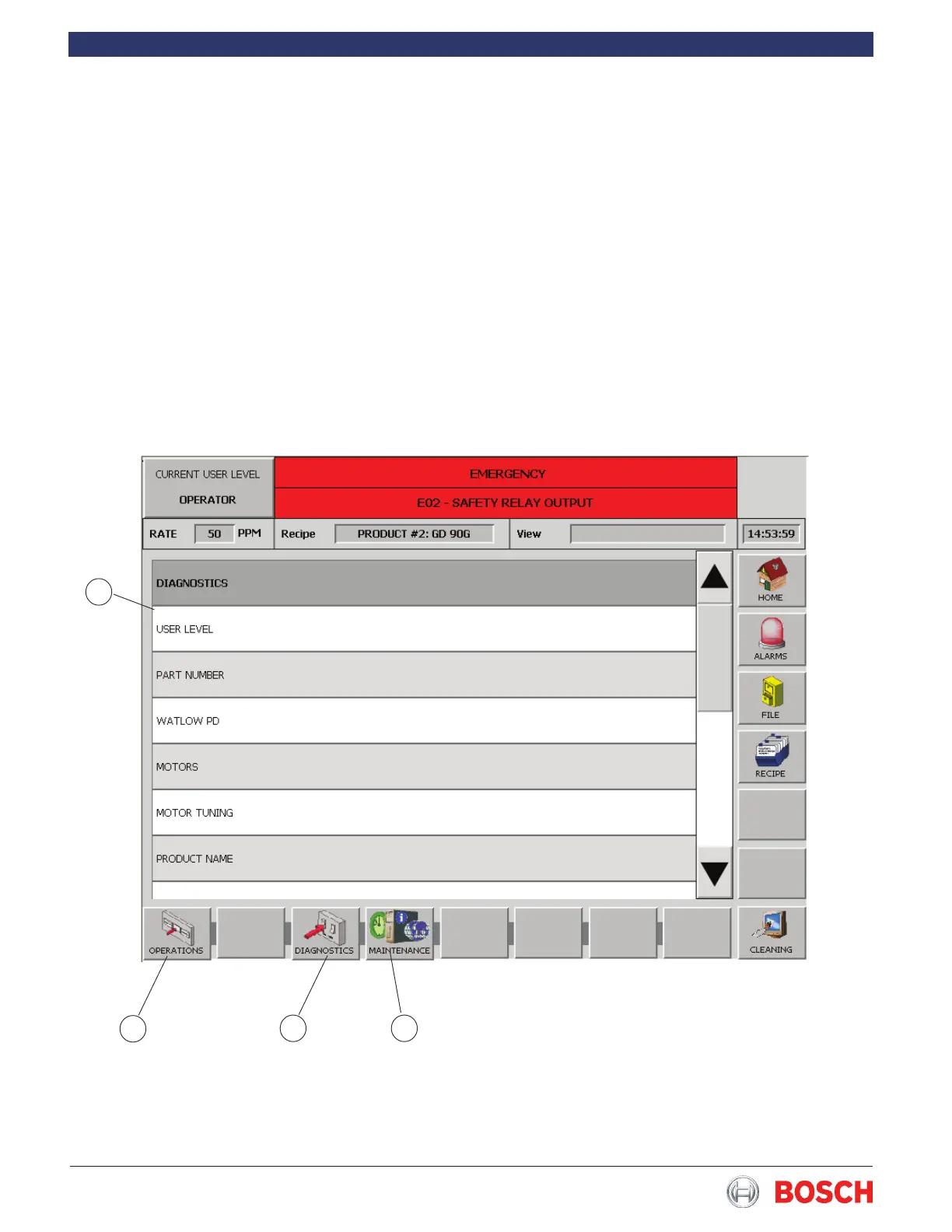
4.6.7 Diagnostics Screen
The Diagnostics screen allows proper level personnel
access to the machine diagnostics�
• Touch the desired diagnostic from the list (1
Figure 12) to display the selected diagnostic
screen�
• Touch the Operation button (2 Figure 12) to re-
turn to the Home screen�
• Touch the Diagnostics button (3 Figure 12) to
return to the Diagnostics screen
• Touch the Maintenence button (4 Figure 12) to
display the Maintenence screen�
1
3 4
2
Note: In the User Level and Product Name diagnostics
it is necessary to close the diagnostic screen by touch-
ing the red X on the keypad to exit or the green check
to save�
The dignostics listed will change according to the cur-
rent user level� Supervisor level has access to all diag-
nostics, Maintenence level has access to slightly fewer
and Operator level has access to a limited number�
Refer to the Diagnostics screens at the end of this sec-
tion for a description of each one�
Figure 12


 To Next Page