20 en | Installation VIP XD
DOC | V4.0 | 2009.06 Installation and Operating Manual Bosch Security Systems
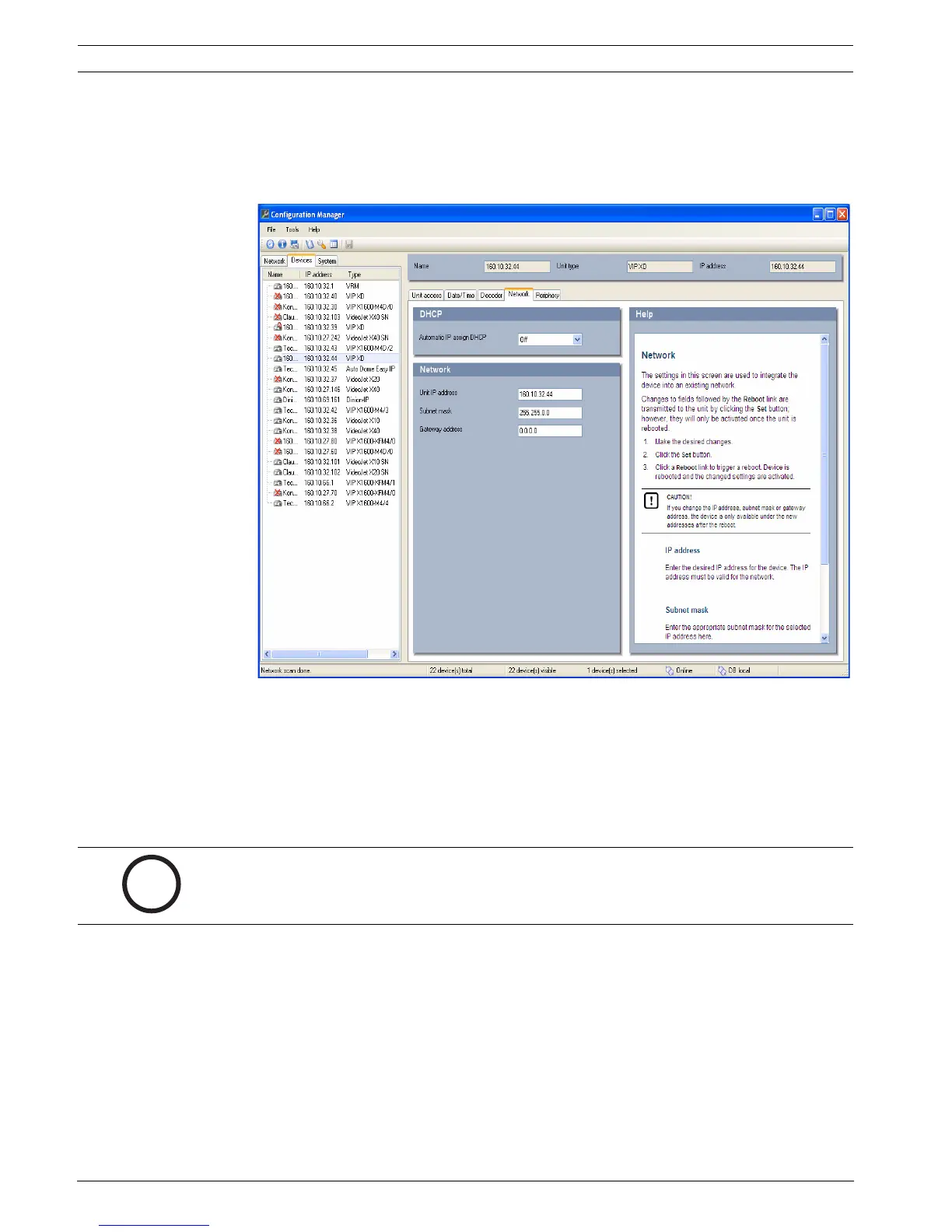
Configuring the VIP XD
You can start the Configuration Manager immediately after installation.
1. Double-click the icon on the desktop or start the program via the Start menu. After the
program has started, the network is immediately searched for compatible video servers.
2. You can start the configuration if a VIP XD is shown in the list in the left section of the
window. To do this, right-click the entry for the unit.
3. Click Unit network settings... in the popup menu.
4. In the Unit IP address field, enter a valid IP address for your network (for example
192.168.0.32) and click OK. The unit reboots and the IP address is valid.
5. If required, enter an appropriate subnet mask for the IP address, and additional network
data.
Reboot
You can trigger the reboot directly with the assistance of the Configuration Manager.
X Right-click the entry for the unit in the list in the left section of the window and select the
Reset command from the context menu.
Additional Parameters
You can check and set additional parameters with the assistance of the Configuration
Manager. You can find detailed information on this in the documentation for this program.




 To Next Page