13
Importing performances from external
rhythm machines as rhythm patterns
In Ver. 2 you can now load performance data from external
rhythm machines through the MIDI IN connector and use
the data as rhythm patterns.
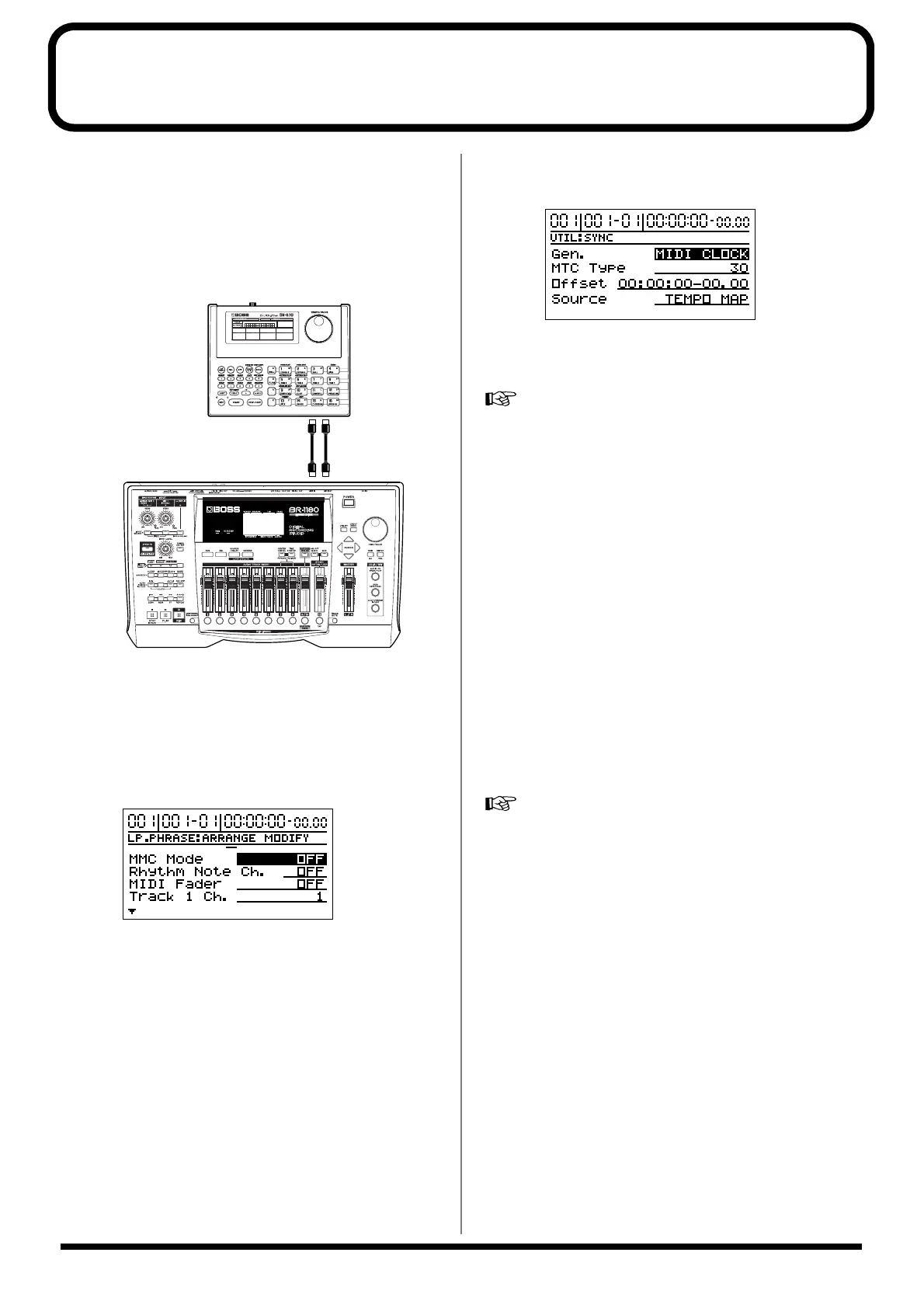
1. Connect the BR-1180/BR-1180CD and the external
rhythm machine with MIDI cables as shown in the
figure.
fig.17_e
At this time, set it so that the external rhythm machine is
synchronized to the MIDI Clock from the BR-1180/BR-
1180CD (for instructions on setting the rhythm machine,
refer to the owner’s manual provided with that device).
2. Press [UTILITY], press [CURSOR] to move the cursor
to “MIDI,” then press [ENTER].
fig.18
3. Use [CURSOR] to move the cursor to “Rhythm Note
Ch.,” then with the TIME/VALUE dial select the same
channel used for the rhythm machine’s MIDI OUT
channel.
Many rhythm machines have this set to Channel 10, so
you can probably set this to 10 as well.
4. Press [EXIT] to return to the immediately preceding
screen, press [CURSOR] to move the cursor to “SYNC,”
and press [ENTER].
5. Use [CURSOR] to move the cursor to “Gen.,” then
select the “MIDI CLOCK” with the TIME/VALUE dial.
fig.19
6. Carry out Realtime Recording to record the rhythm
pattern.
“Creating rhythm patterns using Realtime Recording”; p. 86
in the Owner’s Manual
When Realtime Recording begins, the external rhythm
machine is simultaneously synchronized, and
automatically starts playing. The performance data
played by the rhythm machine is received through the
BR-1180/BR-1180CD’s MIDI IN and is recorded into the
rhythm pattern.
When the number of measures set for Realtime
Recording have passed, the external rhythm machine
automatically stops playing.
7. Press [STOP] to end Realtime Recording.
You’re returned to the Rhythm Pattern screen.
8. If you want to store the recorded rhythm pattern,
continue by writing the rhythm pattern to the disk.
Steps 7–8 in the “Creating rhythm patterns using Realtime
Recording”; p. 87 in the Owner’s Manual
* If you don’t set quantization to “OFF” during Realtime
Recording, the performance from the external rhythm machine
will end up being quantized when recorded, and the resulting
performance may sound different than intended. If this occurs,
set Quantize to “OFF.”
* You may be unable to reproduce the performance exactly if the
external rhythm machine’s rhythm sounds differ from the BR-
1180/BR-1180CD’s.
* Note that the timing of the resulting recorded data could
exhibit inaccuracies if an excessively large number of MIDI
messages have occurred together at one single point in time
during the external rhythm machine’s performance.
Rhythm Machine
MIDI IN
MIDI OUT
MIDI IN
MIDI OUT



 To Next Page