Panel Descriptions
4
Top Panel
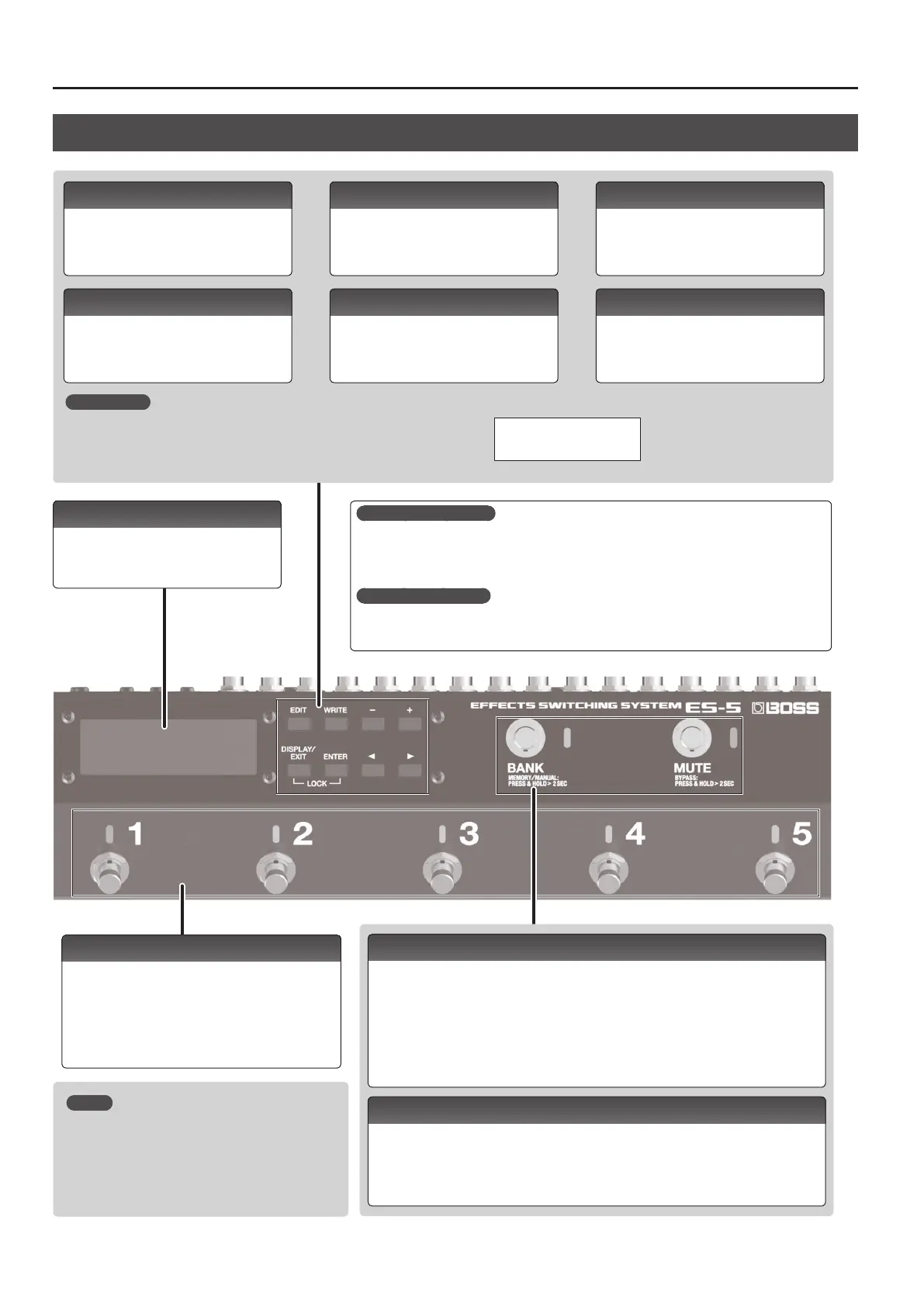
What is memory mode?
In this mode, you can select “patches,” where each patch is a combination of eect loops and various
settings.
You can select from 200 patches by using the buttons or switches to specify the group, bank, and
number.
What is manual mode?
In this mode you can turn the eect loops (1–5) on/o individually.
MEMO
You can also assign a dierent function to each switch (p.
10).
Lock function
When you press the [DISPLAY/EXIT] button and [ENTER] button simultaneously to activate
Lock function, all buttons will be disabled.
This prevents settings from being changed when you inadvertently press a button.
The Lock function turns o when you press the two buttons simultaneously once again.
[EDIT] button
Press this to make patch settings or system
settings.
[DISPLAY/EXIT] button
Press this to switch the play screen, to cancel an
operation, or to return to the previous screen.
[WRITE] button
Press this to save patch settings.
[ENTER] button
Press this to conrm an operation.
[–] [+] buttons
Use these to edit the value of a setting.
* Hold down one button while pressing the
other button to make the value change
rapidly.
[
K
] [
J
] buttons
Use these to move the cursor or to select a
category or parameter.
LOCKED!
Display
The ES-5 shows various information here.
[BANK] switch
In memory mode, use this switch to change banks. Each time you press the switch, you’ll cycle
through the banks in the order of 1
0
2
0
3
0
4
0
5
0
1
0
...
If you hold down this switch for two seconds or longer, you’ll switch between memory mode
(indicator lit blue) and manual mode (indicator lit red).
If you like, you can make this indicator blink in time with the tempo (p. 12).
* You can also change the way in which banks are switched (p. 12).
[MUTE] switch
Mutes the sound that is output from the ES-5. If mute is on, the indicator is lit blue.
Hold down the switch for two seconds or longer to enter the bypass state (indicator lit red); the
input is output without change.
Number switches [1]–[5]
Use these to select a patch number. The indicator of the
currently selected number is lit blue.
In manual mode, these switches turn each eect loop (1–5)
on/o individually. When an eect loop is on, its number
indicator is lit red.











 To Next Page