Creating a Patch
8
Changing the Eect Loop Settings
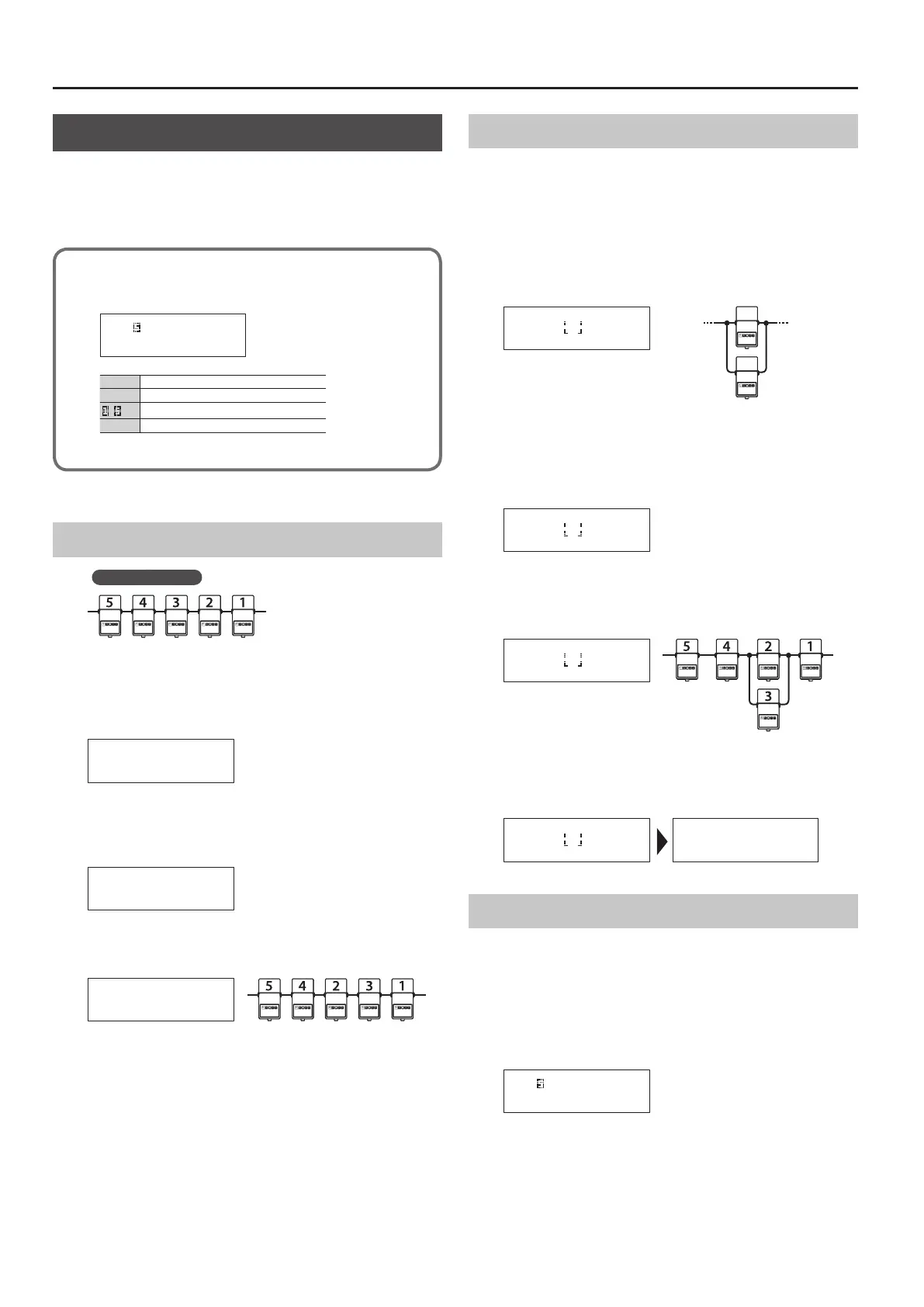
In the Loop Structure screen you can make the following settings.
5 Change the connection order of the eect loops
5 Create a parallel connection
5 Specify Carryover
Loop Structure screen
The Loop Structure screen shows the following content.
O- -4-3-2-1-I _
I
INPUT
1
–
5
Loop number
–
A loop for which Carryover is specied
O
OUTPUT
Changing the Eect Loop Connection Order
Before the change
Example: Change the order of eect loops 2 and 3
1. In play mode, press the [DISPLAY/EXIT] button several
times to access the Loop Structure screen.
O-5-4-3-2-1-I _
2. Use the [
K
] [
J
] buttons to select the loop whose
connection you want to change.
Move the cursor to eect loop 2.
O-5-4-3-2-1-I _
3. Use the [–] [+] buttons to move the loop number.
When you press the [–] button, eect loops 2 and 3 change places.
O-5-4-2-3-1-I _
Making a Parallel Connection
Example: Connect eect loops 2 and 3 in parallel
4. Use the [
K
] [
J
] buttons to move the cursor to the merge
point of the parallel connection, and press the [ENTER]
button.
Move the cursor between eect loops 2 and 4, and press the [ENTER]
button; the parallel loop is created.
INPUTOUTPUT
Split pointMerge point
O-5-4-2-3-1-I
-
_
* Depending on the settings, there might be cases in which parallel
connection is not possible (p. 7).
5. Use the [
J
] button to select the loop whose connection
you want to change.
Move the cursor to eect loop 3.
O-5-4-2-3-1-I
-
_
6. Use the [–] button to move the loop number.
When you press the [–] button three times to move eect loop 3,
eect loops 2 and 3 are connected in parallel.
O-5-4-2-1-I
3
_
Cancelling a Parallel Connection
Use the [
K
] [
J
] buttons to move the cursor to the merge point of
the parallel connection, and press the [ENTER] button; the parallel
connection is cancelled.
O-5-4-3-2-1-I _ O-5-4-2-1-I
3
_
Specifying Carryover
Example: You can specify Carryover for eect loop 5
7. Use the [
K
] [
J
] buttons to select the loop for which you
want to specify Carryover, and press the [ENTER] button.
Move the cursor to eect loop 5 and press the [ENTER] button;
Carryover is specied.
O- -4-3-2-1-I _
* Depending on the settings, there are cases in which Carryover
does not work (p. 7).














 To Next Page