Creating a Patch
9
Editing the Settings of a Patch (Memory
Edit Mode)
MEMO
Once you’re in memory edit mode, you won’t be able to switch
between memory mode and manual mode.
Also, the number switches [1]–[5] will turn each eect loop on/
o.
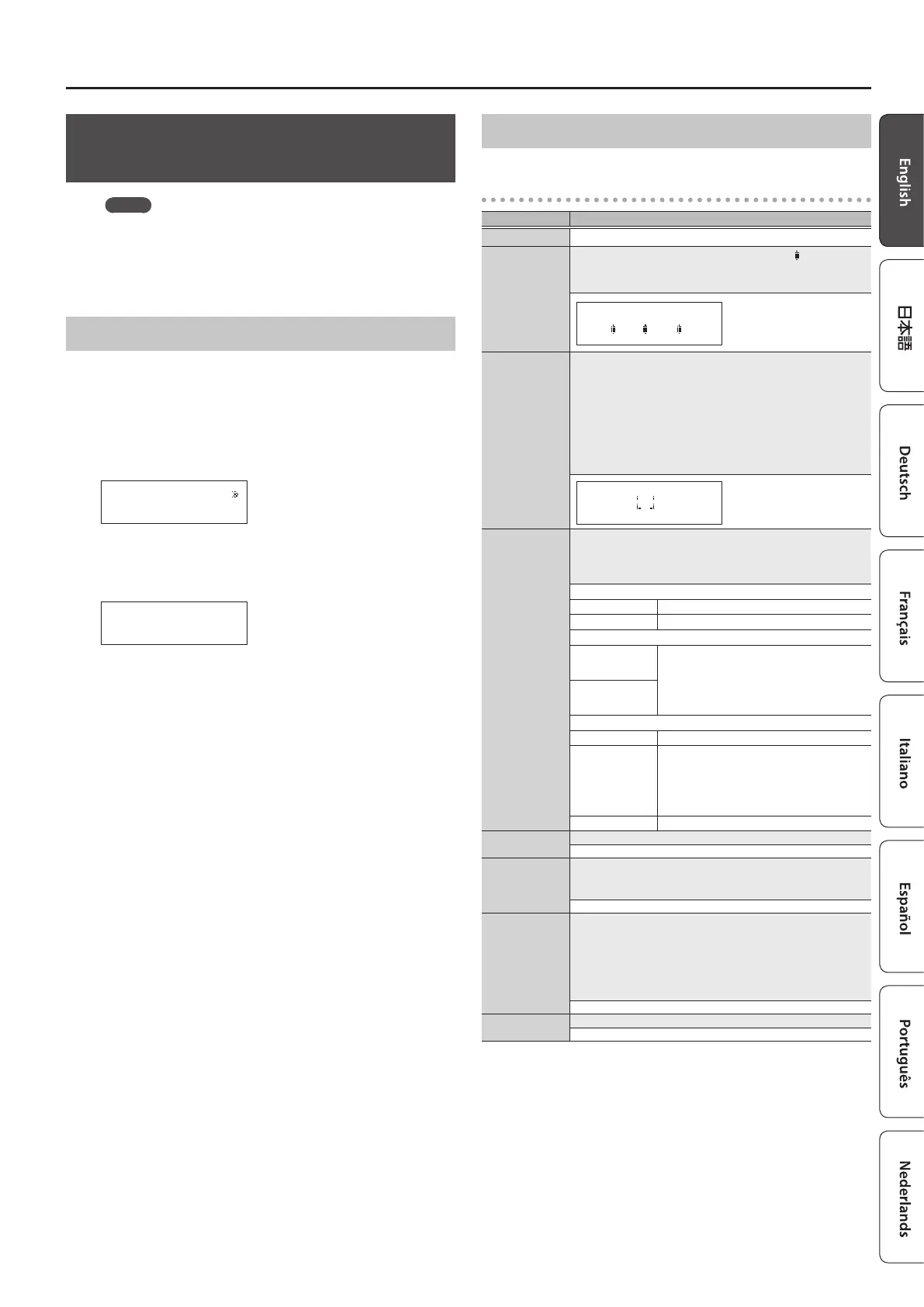
Basic Operation
1. Recall the patch that you want to edit.
2. Press the [EDIT] button.
3. Use the [
K
] [
J
] buttons to select “Patch” or “CTL/EXP,” and
press the [ENTER] button.
(Example)
Loop On/Off
[ENTER]
4. Use the [
K
] [
J
] buttons to select a parameter, and press
the [ENTER] button.
(Example)
Input Buffer
ON _
5. Use the [
K
] [
J
] buttons to move the cursor, and use the [–]
[+] buttons to specify its value.
6. To save the edited settings, write the patch.
To cancel without saving, press the [DISPLAY/EXIT] button several
times.
Parameter List
Patch
Parameter Value/Explanation
Patch Name Up to 12 characters
Loop On/O
You can turn each eect loop on/o. When on, a “
” icon is shown.
* You can also turn them on/o by pressing the number
switches [1]–[5].
5 4 3 2 1
Loop Structure
Carryover
You can make the following settings. For details on operation,
refer to “Changing the Eect Loop Settings” (p. 8).
5 Connection order of each eect loop
5 Parallel connection settings
5 Carryover setting
* Depending on the settings, there are cases in which parallel
connection is not possible, or in which Carryover does not
work.
O-5-4-2-1-I
3
_
C1–4
Specify the control signals that are sent from the EXT CTL CTL 1/2,
3/4 jacks when you switch patches.
The available control signals depend on the Play Option/C1–4
setting (p. 12).
For LAT
OFF Sends “o”
ON Sends “on”
For PLS, INV
OFF
Sends a short (100 ms) pulse when changing
between “o” and “on.”
* If the display of the ES-5 diers from the
state of the connected equipment, switch
the state of the connected equipment.
ON
For TP2–4
OFF Sends nothing
ª
–
˜
Sends tempo at the interval of the specied
note value according to the Master BPM value
* Depending on the Master BPM setting,
there are cases in which this cannot be
sent.
20–500
Sends the specied tempo (
¸
=)
Input Buer
Turns the input buer on/o.
ON, OFF
Mixer Sw
Turns the mixer on/o.
If you connect a loop in parallel or use the Carryover function, the
mixer turns on automatically.
ON, OFF
Mixer Gain
This is the output gain of the mixer. It is available only if Mixer Sw
is ON.
* If Mixer Sw is ON, the signal is output through the ES-5’s op-
amp.
* If Input Buer is o and all eect loops are o, turning Mixer
Sw on might lower the volume.
-12 dB, -9 dB, -6 dB, -3 dB, 0 dB, +3 dB, +6 dB
Master BPM
Species the patch’s BPM.
20–500











 To Next Page