EasyManua.ls Logo

Boss ES-5 - User Manual

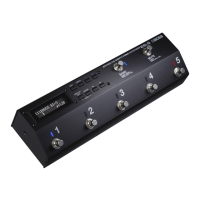
Boss ES-5
22 pages
Print Icon
To Next Page IconTo Next Page
Loading...
Owners Manual
Before using this unit, carefully read “USING THE UNIT SAFELY” and “IMPORTANT NOTES” (leaet “USING THE UNIT SAFELY” and Owner’s Manual (p.
21)). After reading, keep the document(s) including those sections where it will be available for immediate reference.
Copyright © 2016 ROLAND CORPORATION
Contents
Panel Descriptions . . . . . . . . . . . . . . . . . . . . . . . . . . . . . . . . . . . . . . . . 2
Rear Panel (Connecting Your Equipment) . . . . . . . . . . . . . . . . . . . 2
Top Panel . . . . . . . . . . . . . . . . . . . . . . . . . . . . . . . . . . . . . . . . . . . . . . . 4
Attaching the Rubber Feet . . . . . . . . . . . . . . . . . . . . . . . . . . . . . . . . 5
Turning the Power On and O . . . . . . . . . . . . . . . . . . . . . . . . . . . . 5
Switching the Play Screen . . . . . . . . . . . . . . . . . . . . . . . . . . . . . . . . 5
Saving/Recalling a Combination of Eect Units
(Memory Mode)
. . . . . . . . . . . . . . . . . . . . . . . . . . . . . . . . . . . . . . . . . . 6
Patch Structure . . . . . . . . . . . . . . . . . . . . . . . . . . . . . . . . . . . . . . . . . . 6
Switching Between Memory and Manual Modes . . . . . . . . . . . . 6
Saving a Patch (Patch Write) . . . . . . . . . . . . . . . . . . . . . . . . . . . . . . 6
Recalling a Patch (Patch Change) . . . . . . . . . . . . . . . . . . . . . . . . . . 6
Creating a Patch . . . . . . . . . . . . . . . . . . . . . . . . . . . . . . . . . . . . . . . . . . 7
Block Diagram . . . . . . . . . . . . . . . . . . . . . . . . . . . . . . . . . . . . . . . . . . 7
Tips for Creating Patches (Sounds) . . . . . . . . . . . . . . . . . . . . . . . . . 7
Changing the Eect Loop Settings . . . . . . . . . . . . . . . . . . . . . . . . . 8
Changing the Eect Loop Connection Order. . . . . . . . . . . 8
Making a Parallel Connection . . . . . . . . . . . . . . . . . . . . . . . . 8
Specifying Carryover . . . . . . . . . . . . . . . . . . . . . . . . . . . . . . . 8
Editing the Settings of a Patch (Memory Edit Mode) . . . . . . . . . 9
Basic Operation . . . . . . . . . . . . . . . . . . . . . . . . . . . . . . . . . . . . 9
Parameter List . . . . . . . . . . . . . . . . . . . . . . . . . . . . . . . . . . . . . 9
Making Global Settings (System Setting) . . . . . . . . . . . . . . . . . 12
List of Parameters . . . . . . . . . . . . . . . . . . . . . . . . . . . . . . . . . . . . . . . 12
Patch/Data Operations (Utility) . . . . . . . . . . . . . . . . . . . . . . . . . . . 13
Copying a Patch (Patch Copy) . . . . . . . . . . . . . . . . . . . . . . . . . . . . . 13
Exchanging Patches (Patch Exchange). . . . . . . . . . . . . . . . . . . . . . 13
Initializing a Patch (Patch Init) . . . . . . . . . . . . . . . . . . . . . . . . . . . . . 13
Copying a Bank (Bank Copy) . . . . . . . . . . . . . . . . . . . . . . . . . . . . . . 13
Exchanging Banks (Bank Exchange) . . . . . . . . . . . . . . . . . . . . . . . . 13
Copying a Group (Group Copy) . . . . . . . . . . . . . . . . . . . . . . . . . . . . 13
Exchanging Groups (Group Exchange) . . . . . . . . . . . . . . . . . . . . . 13
Transmitting Data to an External MIDI Device (Bulk Dump) . . . 13
Restoring the Factory Settings (Factory Reset) . . . . . . . . . . . . . . . 14
Advanced Applications . . . . . . . . . . . . . . . . . . . . . . . . . . . . . . . . . . . 15
Adjusting the Level of Each Patch . . . . . . . . . . . . . . . . . . . . . . . . . . 15
Switching the Amps Channels . . . . . . . . . . . . . . . . . . . . . . . . . . . . 15
Changing the BOSS DD-7’s Delay Time for Each Patch . . . . . . . . 16
Using the External Footswitch (BOSS FS-7’s B Switch) to Turn
Delay On/O . . . . . . . . . . . . . . . . . . . . . . . . . . . . . . . . . . . . . . . . . . . . 16
Using the External Footswitch (BOSS FS-7’s A Switch) to
Change the Delay Time . . . . . . . . . . . . . . . . . . . . . . . . . . . . . . . . . . . 17
Applying Phaser Only While the Currently Selected Number
Switch Is Held Down . . . . . . . . . . . . . . . . . . . . . . . . . . . . . . . . . . . . . 18
Switching a MIDI-Equipped Eect Unit’s Memory When a
Patch Is Changed . . . . . . . . . . . . . . . . . . . . . . . . . . . . . . . . . . . . . . . . 18
Using the Expression Pedal to Control a MIDI-Equipped Eect
Unit . . . . . . . . . . . . . . . . . . . . . . . . . . . . . . . . . . . . . . . . . . . . . . . . . . . . 19
Connecting a Wah or Fuzz (Input Buer O) . . . . . . . . . . . . . . . . 19
Appendix . . . . . . . . . . . . . . . . . . . . . . . . . . . . . . . . . . . . . . . . . . . . . . . . . 20
Troubleshooting . . . . . . . . . . . . . . . . . . . . . . . . . . . . . . . . . . . . . . . . 20
Error Messages . . . . . . . . . . . . . . . . . . . . . . . . . . . . . . . . . . . . . . . . . . 20
Main Specications . . . . . . . . . . . . . . . . . . . . . . . . . . . . . . . . . . . . . . 21
USING THE UNIT SAFELY . . . . . . . . . . . . . . . . . . . . . . . . . . . . . . . . . . 21
IMPORTANT NOTES . . . . . . . . . . . . . . . . . . . . . . . . . . . . . . . . . . . . . . . 21
Main features
The ES-5 is a switching system that lets you connect eect pedals
and other eect units, and then store and recall up to 200 dierent
combinations of them.
It also provides a wide variety of external control functions for
controlling your amp and eects in real time.

Table of Contents

Questions and Answers

  • D
    Diana CunninghamAug 18, 2025
    What to do if the patch does not change on my Boss Music Pedal?
    • C
      cassandrahartAug 18, 2025
      If the patch on your Boss ES-5 Music Pedal doesn't change, it might be because: * Something other than the Play screen is shown in the display. Patches can only be selected when the Play screen is displayed. Press the [DISPLAY/EXIT] button several times to return to the Play screen. * You might have changed the function of the [BANK] switch or the number switches [1]–[5]. If the Func setting is set to OFF, change it to Bank, or Num1–5.
  • C
    Christine SheltonAug 21, 2025
    What to do if I can’t change the settings of a connected effect unit on my Boss ES-5 Music Pedal?
    • A
      andrea70Aug 22, 2025
      If you can’t change the settings of a connected effect unit on your Boss Music Pedal, check the EXT CTL jack connection and ensure the cable is the correct type (mono, TRS).
  • D
    Donald RamirezAug 25, 2025
    What to do if I can’t use a controller to modify a parameter on my Boss Music Pedal?
    • J
      Jeremiah AguilarAug 25, 2025
      If you're unable to modify a parameter using a controller on your Boss Music Pedal, here are a few things to investigate: * Ensure that the loop is turned on. * Set the Preference setting to PAT to change the settings for an individual patch. To change a specific setting for all patches in common, select a setting other than PAT. * Confirm that the MIDI channel settings of both devices match. * Verify that the controller number of both devices match.
  • J
    Jennifer HudsonAug 28, 2025
    Why are MIDI messages not transmitted/received on my Boss ES-5?
    • J
      Jim RichAug 28, 2025
      If MIDI messages are not being transmitted or received by your Boss Music Pedal, consider the following: * Try another set of MIDI cables to rule out broken cables. * Ensure that the MIDI cables are connected correctly (connect MIDI IN and MIDI OUT). * Verify that the MIDI channel settings match. The receive channel of the ES-5 should be set to MIDI Setting 0 Rx Ch, and the transmit channel should be set to Patch MIDI 1–8 0 Ch.
  • J
    james12Aug 31, 2025
    Why does the sound switch on its own on my Boss Music Pedal?
    • B
      brownjimmyAug 31, 2025
      If your Boss Music Pedal's sound switches on its own, it might be due to: * An external MIDI device being set to modify the parameters. Check the assignment settings. * “INT” or “WAV” being set as the Src in Assign. When the Src is set to “INT” or “WAV,” the effect parameter set as the Assign Target changes automatically.
  • F
    franklozanoSep 3, 2025
    Why oscillating sound occurs with my Boss Music Pedal?
    • A
      Andrew KelleySep 3, 2025
      If you're experiencing an oscillating sound with your Boss Music Pedal, the gain value or a volume-related parameter might be too high due to the settings of a connected amp or effect unit. Try lowering these values.
  • D
    Donna ReyesSep 5, 2025
    Why is the effect not applied on my Boss ES-5 Music Pedal?
    • M
      Manuel LinSep 6, 2025
      If the effect isn't being applied on your Boss Music Pedal, check the on/off setting of each effect to ensure the effect switch is on.
  • J
    Jared GriffinSep 9, 2025
    What to check if sound does not change when switching patches on Boss ES-5?
    • M
      Mary RiosSep 9, 2025
      If the sound doesn't change when you switch patches on your Boss Music Pedal, verify that the loop settings of each patch are correct.
  • K
    Katherine HernandezSep 12, 2025
    Why can’t I specify Carryover / Can’t specify parallel connection on my Boss ES-5 Music Pedal?
    • E
      Erica RamirezSep 12, 2025
      If you're unable to specify Carryover or a parallel connection on your Boss Music Pedal, it might be because you're already using the mixer. There is only one internal mixer, so turn off the mixer that you’re already using.
  • L
    Lisa MillsNov 15, 2025
    How to troubleshoot no sound or low volume on my Boss Music Pedal?
    • M
      mdavisNov 15, 2025
      If you're experiencing no sound or low volume with your Boss Music Pedal, there are several things to check: * Make sure the connection cables are not broken by trying a different set. * Verify that the ES-5 is correctly connected to the other devices. * Check the settings of your amp/mixer system to ensure they are turned on and the volume is at an audible level. * Advance the volume pedal, as it may have lowered the level. * Ensure that mute is turned off by pressing the [MUTE] switch. * Confirm that each effect is set correctly. * Check the settings for any external device connected to the SEND 1–5 and RETURN 1–5 jacks. * Use a connection cable that does not contain a resistor. * Turn on Input Buffer if you have turned it off and connected an effect loop in parallel, ...

Summary

Main Features of the BOSS ES-5

BOSS ES-5 Panel Descriptions

Rear Panel Connections

Details connections and jacks on the rear panel of the ES-5 effects switching system.

External Control (EXT CTL) Jacks

Explains control jacks for latch or momentary operation and connecting effect devices.

Control Input (CTL IN) Jack

Describes jacks for controlling effect units or amps connected to EXT CTL jacks.

Expression Pedal (EXP) Jack Usage

Instructions for connecting an expression pedal.

Footswitch (CTL 1;2) Jack Usage

Instructions for connecting a footswitch.

Top Panel Controls

Details the buttons and display on the top panel of the ES-5.

Number Switches [1]-[5]

Explains the function of the number switches for patch selection or loop control.

BANK Switch Functionality

Describes the BANK switch for changing banks and modes.

MUTE Switch Operation

Explains the MUTE switch for muting output and entering bypass state.

Attaching Rubber Feet

Instructions on how to attach the included rubber feet to the unit.

Powering the Unit On and Off

Procedures for safely powering the unit and connected equipment on and off.

Switching the Play Screen Display

Describes how to switch between different play screen displays on the ES-5.

Saving and Recalling Patches (Memory Mode)

Patch Structure Explained

Explains how patches are organized by group, bank, and number.

Switching Between Memory and Manual Modes

Details how to switch between memory and manual modes using the BANK switch.

Saving a Patch (Patch Write Operation)

Step-by-step guide for saving patch settings.

Recalling a Patch (Patch Change)

Instructions for selecting and recalling saved patches.

Creating a Patch

Block Diagram Overview

Visual representation of the ES-5's analog switch array and signal flow.

Tips for Creating Patches and Sounds

Advice on using the mixer, parallel connections, and Carryover for sound creation.

Carryover Function Explained

Explains the Carryover function for preserving sound during patch changes.

Changing Effect Loop Settings

How to modify loop connection order, create parallel connections, and specify Carryover.

Making Parallel Connections

Step-by-step guide for creating parallel connections between effect loops.

Cancelling Parallel Connections

Instructions on how to cancel an existing parallel connection.

Specifying Carryover Settings

How to enable the Carryover function for specific effect loops.

Editing Patch Settings (Memory Edit Mode)

Guide to editing individual patch parameters within memory edit mode.

Basic Patch Editing Operations

Steps for recalling and entering edit mode for a patch.

Patch Parameter List

Detailed list of parameters available for patch editing and their explanations.

Patch MIDI Settings (1-8)

Settings for transmitting MIDI messages for patches, including channel and program change.

CTL;EXP Jack Parameter Assignments

Configuration for footswitches and expression pedals connected to CTL/EXP jacks.

Target List for Assignments

Comprehensive list of targets and their explanations for MIDI and controller assignments.

Making Global Settings (System Setting)

List of System Parameters

Overview of system settings available for the ES-5.

Patch and Data Operations (Utility)

Copying a Patch

How to copy patch data from one location to another.

Exchanging Patches

How to swap patch data between two locations.

Initializing a Patch

How to reset a specific patch to its default state.

Copying a Bank

How to copy an entire bank of patches.

Exchanging Banks

How to swap entire banks of patches.

Copying a Group

How to copy a group of patches.

Exchanging Groups

How to swap groups of patches.

Transmitting Data (Bulk Dump)

How to send patch and system settings to MIDI devices.

Restoring Factory Settings (Factory Reset)

How to reset the ES-5 to its original factory default settings.

Advanced Applications

Adjusting Patch Levels

How to adjust mixer settings for individual patches.

Switching Amp Channels

How to use external control jacks to switch amp channels.

Controlling DD-7 Delay Time per Patch

How to configure patch settings to control DD-7 delay time.

FS-7 B Switch: Delay On;Off Control

Assigning an FS-7 footswitch to toggle delay on/off.

FS-7 A Switch: Changing Delay Time

Assigning an FS-7 footswitch to control delay time via tap tempo.

Phaser Control While Switch is Held

Configuring a patch to activate a phaser effect only when a switch is held.

MIDI Device Memory Switching with Patches

Setting up MIDI to change external device memory upon patch changes.

Expression Pedal Control of MIDI Devices

Using an expression pedal to control parameters on a MIDI device.

Wah;Fuzz Connection (Input Buffer Off)

Instructions for disabling the input buffer for specific wah/fuzz pedals.

Appendix and Troubleshooting

Troubleshooting Common Issues

Lists common problems and their solutions for the ES-5.

Understanding Error Messages

Explains various error messages displayed by the ES-5.

Using the Unit Safely

Critical Warnings

Critical warnings regarding power, voltage, and small parts.

Cautions for Safe Use

Cautions about keeping small items away from children and handling the unit.

Important Usage Notes

Notes on repairs, data backup, expression pedals, and connection precautions.

Boss ES-5 Specifications

General IconGeneral
Sound effects quantity-
DC-in jackYes
Connectivity technologyWired
6.35 mm (1⁄4-inch) input1
Display typeLCD
Power source typeAC
Weight and Dimensions IconWeight and Dimensions
Depth97 mm
Width337 mm
Height68 mm
Weight1300 g

Related product manuals