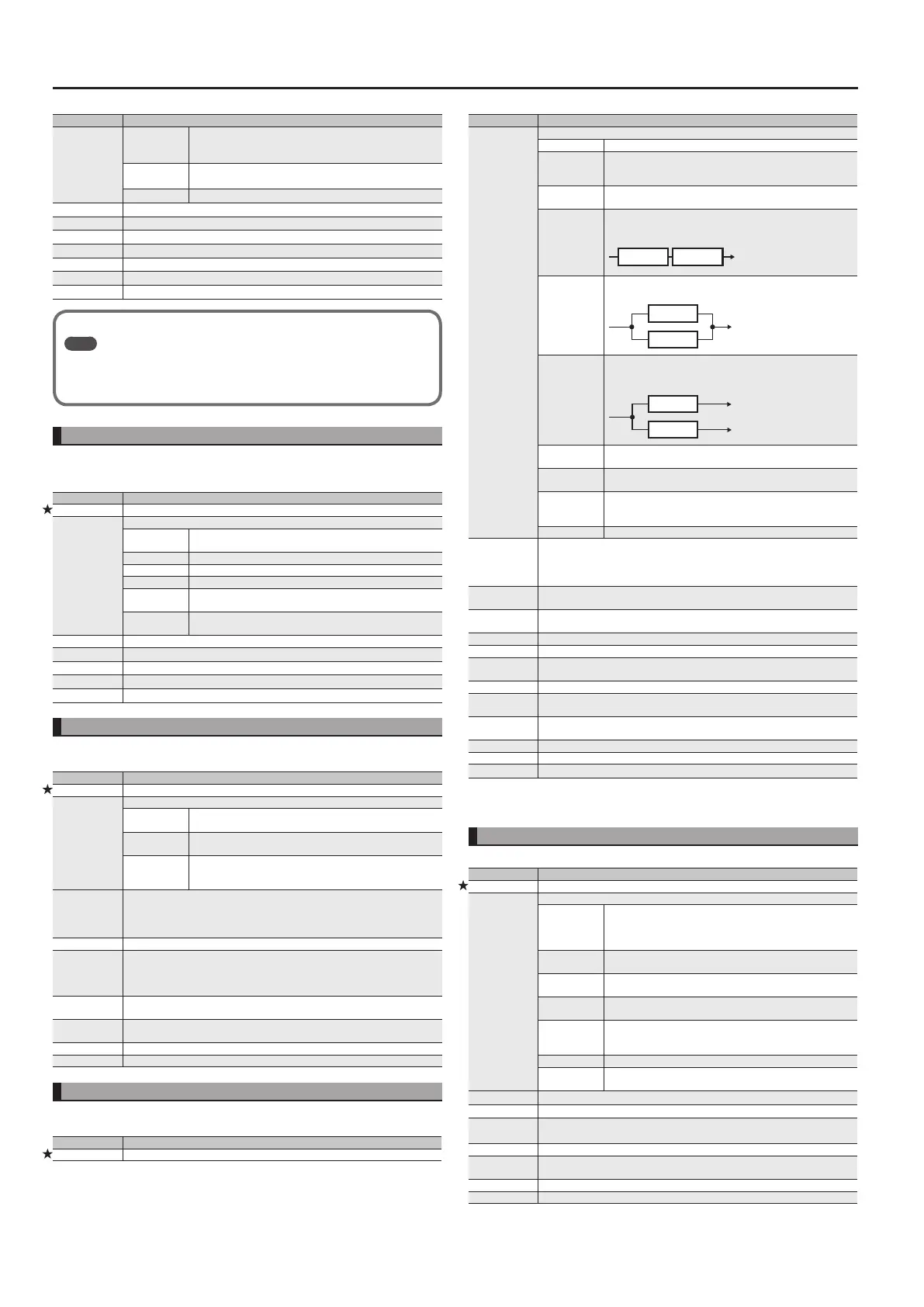
Eects/Patch Settings
10
Parameter Explanation
Type
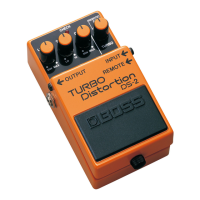
METAL ZONE
This models the sound of the BOSS MT-2.
It produces a wide range of metal sounds, from old style to
slash metal.
‘60S FUZZ
This models a Fuzz Face.
It produces a fat fuzz sound.
MUFF FUZZ This models an Electro-Harmonix Big Mu π.
Drive Adjusts the depth of distortion.
Tone Adjusts the tone.
Level Adjusts the volume of the eect sound.
Bottom Adjusts the tone for the low frequency range.
D. Level Adjusts the volume of the direct sound.
Solo Sw Switches the tone to one suitable for solos.
Solo Lv Adjusts the volume level when the Solo Sw is ON.
About the Other FX Parameters
Ref.
For details on all FX (eects) parameters, refer to the “Parameter Guide” (PDF
le) which you can download from the Roland website (http: //www.roland.
com/manuals/).”
Wah (Wah: )
You can control the wah eect in real time by adjusting the expression pedal.
* Assign a controller to the expression pedal. Set the Patch: Controller setting EXPPDL ON Func (p. 11)
to “WAH.” If you operate the expression pedal when it’s on, it functions as a wah.
Parameter Explanation
On/O Turns this eect on/o.
Type
Type of wah
CRY WAH
This models the sound of the Cry Baby wah pedal popular in
the ‘70s.
VO WAH This models the sound of the VOX V846.
FAT WAH This is a wah sound featuring a bold tone.
LIGHT WAH This wah has a rened sound with no unusual characteristics.
7-STRING WAH
This expanded wah features a variable range compatible with
seven-string and baritone guitars.
RESO WAH
This completely original eect oers enhancements on the
characteristic resonances produced by analog synth lters.
Pedal Position Adjusts the position of the wah pedal.
Pedal Min Selects the tone produced when the heel of the expression Pedal is depressed.
Pedal Max Selects the tone produced when the toe of the expression Pedal is depressed.
E. Level Adjusts the volume of the eect sound.
D. Level Adjusts the volume of the direct sound.
Chorus (Chorus: )
In this eect, a slightly detuned sound is added to the original sound to add depth
and breadth.
Parameter Explanation
On/O Turns this eect on/o.
Mode
Type of Chorus
MONO
This chorus eect outputs the same sound from both L channel
and R channel.
STEREO1
This is a stereo chorus eect that adds dierent chorus sounds
to L channel and R channel.
STEREO2
This stereo chorus uses spatial synthesis, with the direct sound
output in the L channel and the eect sound output in the R
channel.
Rate
Adjusts the rate of the chorus eect.
* When set to BPM, the value of each parameter will be set according to the
value of the “Patch: Tempo” specied for each patch. This makes it easier to
achieve eect sound settings that match the tempo of the song.
Depth Adjusts the depth of the chorus eect.
Pre Delay
Adjusts the time needed for the eect sound to be output after the direct sound
has been output. By setting a longer pre delay time, you can obtain an eect that
sounds like more than one sound is being played at the same time (doubling
eect).
Low Cut
This sets the frequency at which the low cut lter begins to take eect. When
FLAT is selected, the low cut lter will have no eect.
Hi Cut
This sets the frequency at which the high cut lter begins to take eect. When
FLAT is selected, the high cut lter will have no eect.
E. Level Adjusts the volume of the eect sound.
D. Level Adjusts the volume of the direct sound.
Delay (Delay: )
This eect adds delayed sound to the direct sound, giving more body to the sound or
creating special eects.
Parameter Explanation
On/O Turns this eect on/o.
Parameter Explanation
Type
Type of Delay
SINGLE This is a simple monaural delay.
PAN
This delay is specically for stereo output. This allows you to
obtain the tap delay eect that divides the delay time, then
deliver them to L and R channels.
STEREO
The direct sound is output from the left channel, and the eect
sound is output from the right channel.
DUAL-S
This is a delay comprising two dierent delays connected in
series. Each delay time can be set in a range from 1 to 1000 ms.
D1 D2
D1: DELAY 1
D2: DELAY 2
DUAL-P
This is a delay comprising two delays connected in parallel. Each
delay time can be set in a range from 1 to 1000 ms.
D1
D2
DUAL-L/R
This is a delay with individual settings available for the left and
right channels. Delay 1 goes to the left channel, Delay 2 to the
right.
D1
D2
L
R
REVERSE
This produces an eect where the sound is played back in
reverse.
ANALOG
This gives a mild analog delay sound. The delay time can be set
within the range of 1 to 2000 ms.
TAPE
This setting provides the characteristic wavering sound of the
tape echo. The delay time can be set within the range of 1 to
3400 ms.
MODULATE This delay adds a pleasant wavering eect to the sound.
Time
Determines the delay time.
* When set to BPM, the value of each parameter will be set according to the
value of the “Patch: Tempo” specied for each patch. This makes it easier to
achieve eect sound settings that match the tempo of the song.
Feedback
Sets the amount of delay sound returned to the input. A higher value will
increase the number of the delay repeats.
High Cut
Sets the frequency at which the high cut lter begins to take eect. When FLAT is
selected, the high cut lter will have no eect.
E. Level Adjusts the volume of the eect sound.
D. Level Adjusts the volume of the direct sound.
Pan Tap Time *1
Adjusts the delay time of the left channel delay. This setting adjusts the L channel
delay time relative to the R channel delay time (considered as 100%).
D1/2 Time *2 Determines the delay time.
D1/2 F. Back *2
Adjusts the amount of feedback of the DELAY 1 (or DELAY 2). A higher value will
increase the number of the delay repeats.
D1/2 HiCut *2
This sets the frequency at which the high cut lter begins to take eect. When
FLAT is selected, the high cut lter will have no eect.
D1/2 E. Level *2 Adjusts the volume of the DELAY 1 (or DELAY 2).
Mod Rate *3 Adjusts the modulation rate of the delay sound.
Mod Depth *3 Adjusts the modulation depth of the delay sound.
*1 PAN only
*2 DUAL-S, DUAL-P, DUAL-L/R only
*3 MOD only
Reverb (Reverb: )
This eect adds reverberation to the sound.
Parameter Explanation
On/O Turns this eect on/o.
Type
Type of Reverb
AMBIENCE
Simulates an ambience mic (o-mic, placed at a distance from
the sound source) used in recording and other applications.
Rather than emphasizing the reverberation, this reverb is used
to produce a sense of openness and depth.
ROOM
Simulates the reverberation in a small room. Provides warm
reverberations.
HALL1
Simulates the reverberation in a concert hall. Provides clear and
spacious reverberations.
HALL2
Simulates the reverberation in a concert hall. Provides mild
reverberations.
PLATE
Simulates plate reverberation (a reverb unit that uses the
vibration of a metallic plate). Provides a metallic sound with a
distinct upper range.
SPRING This simulates the sound of a guitar amp’s built-in spring reverb.
MODULATE
This reverb adds the wavering sound found in hall reverb to
provide an extremely pleasant reverb sound.
Time Adjusts the length (time) of reverberation.
Pre Delay Adjusts the time until the reverb sound appears.
Low Cut
High Cut
This sets the frequency at which the low/high cut lter begins to take eect.
When FLAT is selected, the low/high cut lter will have no eect.
Density Adjusts the density of the reverb sound.
Spring Sns *1
Adjusts the sensitivity of the spring eect. When the value is set higher, the eect
is obtained even with a weak picking.
E. Level Adjusts the volume of the eect sound.
D. Level Adjusts the volume of the direct sound.
*1 Type = SPRING only


 To Next Page