3
DeutschEnglish Français Italiano Español Português Nederlands
Initial Setup
Before using the GP-10 for the rst time, you’ll need to make the following initial
settings.
Basic procedure for initial setup
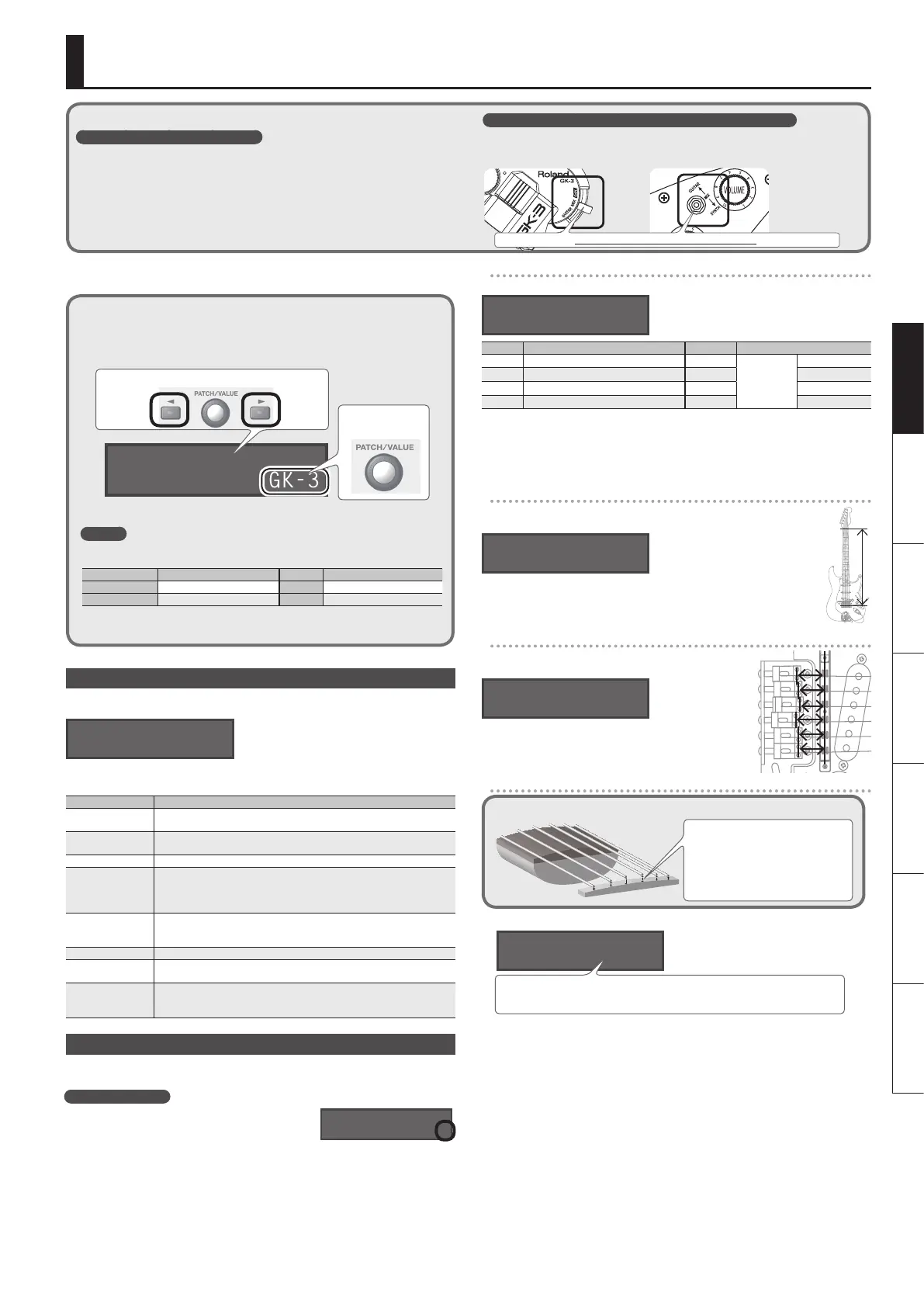
1. Press the [SYSTEM] button.
2. Use the [K] [J] buttons to select the desired parameter. Then use the
[VALUE] knob to edit the value.
GK1:Type
GK-3
Select a parameter
Edit the value
3. Press the [EXIT] button to return to the play screen.
MEMO
You can use the following button operations to jump to the +/, marks of this document
(p. 13–).
Buttons Jump destination Buttons Jump destination
[SYSTEM]
Next + mark [J] + [K] Next , + mark
[EXIT] + [SYSTEM]
Previous + mark [K] + [J] Previous , + mark
* [J] + [K] mean that you should “hold down [J] and press [K].”
Specifying the Output System (Sys: Output)
Choose “Sys: Output,” and specify the device (amp) that’s connected to the OUTPUT
jacks.
Sys:Output
LINE/PHONES
* If headphones are connected, this will automatically be “LINE/PHONES” regardless
of the Output setting.
Value Explanation
LINE/PHONES
This is the appropriate setting when using headphones, or for when the
GP-10 is connected to a keyboard amp, mixer, or digital recorder.
JC-120
Choose this setting if the GP-10 is connected to the guitar input of a Roland
JC-120 guitar amp.
SMALL AMP Choose this setting if the GP-10 is connected to a small guitar amp.
COMBO AMP
Choose this setting if the GP-10 is connected to the guitar input of a combo-
type guitar amp (i.e., an amp that contains the amp and speaker in a single
unit) other than the JC-120. Depending on the guitar amp you’re using,
using the “JC-120” setting might produce better results.
STACK AMP
Choose this setting if the GP-10 is connected to the guitar input of a stack-
type guitar amp (i.e., an amp in which the amp and speaker are separate
units).
JC-120 RETURN Choose this setting if the GP-10 is connected to the JC-120’s RETURN jack.
COMBO RETURN
Choose this setting if the GP-10 is connected to the RETURN jack of a combo-
type guitar amp.
STACK RETURN
Choose this setting if the GP-10 is connected to the RETURN jack of a stack-
type guitar amp. You should also choose the “STACK RETURN” setting when
using the GP-10 with a guitar power amp and a speaker cabinet.
Setting Up the GK Pickups
GK settings are extremely important in order to play the GP-10 with the best possible
sound. You must be sure to make these settings correctly.
MEMO: GK settings
You can store three dierent sets of GK settings
(GK Setting: 1–3). If you’re switching between three
dierent guitars to use with the GP-10, you can
make separate GK settings for each guitar. If you’re
using only one guitar with the GP-10, choose “1” (the default setting).
Specifying the pickup type
Choose “GK1: Type,” and specify the type of pickup that’s installed on your guitar.”
GK1:Type
GK-3
Value Explanation Value Explanation
GK-3 Roland GK-3 PIEZO F
Piezo Pickup
Fishman
GK-2A Roland GK-2A PIEZO G Graph Tech
GC-1 Roland V-Guitar GC-1 PIEZO L L.R. Baggs
PIEZO Piezo Pickup (at response) PIEZO R RMC
* A piezo pickup is a type of pickup that is mounted on the bridge of the guitar, and
uses a piezoelectric element to detect the vibrations of the strings.
* Choose “GK-2A” if you’re using a commercially available guitar that’s equipped with
GK pickup.
Specifying your guitar’s scale length
Choose “Scale,” and specify your guitar’s scale length (the distance between
the bridge and nut).
GK1:Scale
ST
Choose “ST” for a standard Stratocaster type, or choose “LP” for a Les Paul
type. Alternatively, choose the closest value in the range of 500–660 mm.
* This parameter is not shown if you select “GC-1” as the pickup type.
Specifying the distance from the bridge
Choose “Distance 1”–”Distance 6,” and specify the distance
(mm) from the center of the pickup to the bridge saddle.
GK1:Distance 1
20.0mm
* If the pickup type is set to “GC-1” or one of the piezo-
type pickups, this setting is not necessary.
Adjusting the pickup sensitivity
What is Pickup Sensitivity?
If the distance between each string
and the GK pickup is dierent, the
volume will also be dierent. The
pickup sensitivity adjustment allows
you to compensate for this dierence
in volume.
GK-pickup “
1. Choose “Sens,” and adjust the sensitivity for the 6th string.
GK1:Sens 6
[■■■■■■■■] 50
Play the 6th string as strongly as you ever expect to play it in actual performance, and
use the [VALUE] knob to adjust the sensitivity as high as possible without allowing the
meter to reach the full-scale position.
* If the level meter reaches the full-scale position, the level is excessive. Lower the
sensitivity.
* Depending on the guitar you’re using, the level meter might reach full-scale even
if the sensitivity is at minimum. If this is the case, adjust the distance between the
divided pickup and the string so it’s somewhat greater than the recommendation.
2. In the same way, adjust the sensitivity for the 5th through 1st strings as well.
3. Check the volume balance of the six strings.
Play each of the strings 6–1 at normal strength; if a string sounds unusually loud,
lower the sensitivity of that string to minimize any discrepancy in volume between
the strings.
This completes the initial setup. Now you’re ready to play the GP-10!
GK:Setting
1
Check the following points before using the GP-10
Is the GK-pickup correctly installed?
• After reading the instructions in the GK-pickup Owner’s Manual, check the
installation once more.
• On the Roland website, the “How to install the GK pickup” page provides an
explanation and photos on how to attach a GK pickup. Be sure to take a look!
http: //www.roland.com/GK/
You must set the GK pickup select switch to the “MIX” position!
If the switch is set to any position other than MIX, the unit won’t operate correctly
(there will be no sound).
Roland GK-3 users Roland V-Guitar GC-1 users
You must set this to the center (MIX) position!


 To Next Page