Modeling/Poly FX/Alternate Tuning Settings
7
DeutschEnglish Français Italiano Español Português Nederlands
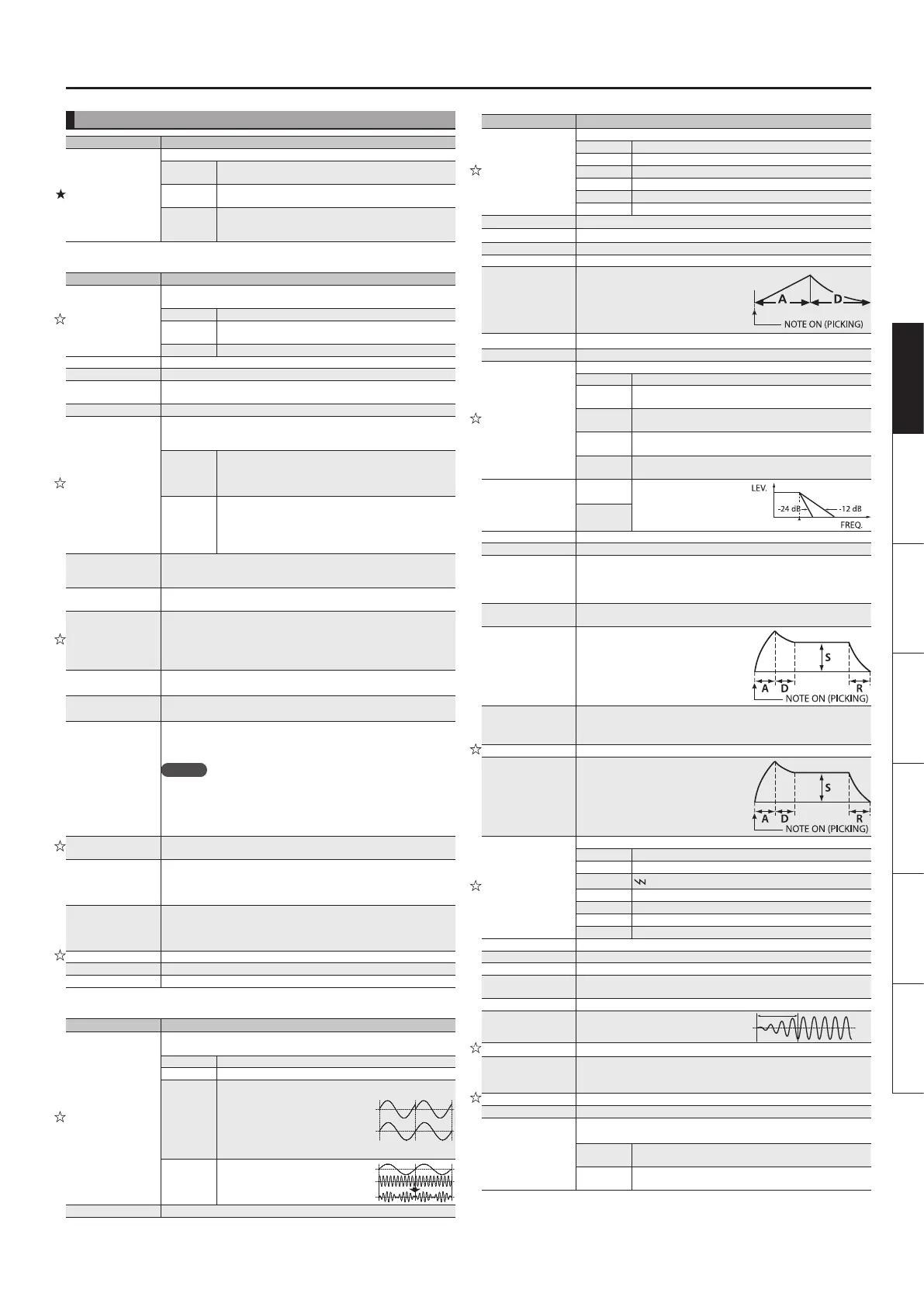
Synthesizer (Synth: )
Parameter Explanation
Type
Type of Synthesizer
GR-300
This models the Roland GR-300, the famed analog
polyphonic guitar synthesizer of yesteryear.
OSC SYNTH
This is an analog synth modeling sound generated by a DSP
oscillator.
WAVE
SYNTH
This algorithm creates synth sounds by directly processing
the string signal from the Divided pickup. It allows a natural
feeling of playability.
GR-300 (GR300: )
Parameter Explanation
Mode
This setting determines whether the HEXA-VCO (sawtooth wave) or the
HEXA-DISTORTION (rectangular wave) is played, or if both are played.
VCO The HEXA-VCO sound is played.
V+D
The HEXA-VCO and HEXA-DISTORTION sounds are played
simultaneously.
DIST The HEXA-DISTORTION sound is played.
Volume Sets the volume. With a setting of 0, there will be no sound.
Comp Sw When this is set to ON, the HEXA-VCO’s decay time is extended.
Cuto
Adjusts the cuto frequency, setting the brightness (hardness) of the
sound.
Resonance Adjusts the resonance (distinctiveness of the sound).
EnvModSw
This automatically changes the VCF cuto frequency according to the
amplitude of the string vibration. This allows you to change the tone with a
wah-like eect each time you pick a string.
ON
This causes the VCF cuto frequency to change from a
high to low frequency each time the string is picked. This
produces a wah-like eect, with the sound going from high
frequencies to low.
INV
As opposed to the ON setting, this allows you to have the
VCF cuto frequency change from a low to high frequency
each time the string is picked. This produces a reverse
wah-like eect, with the sound going from high frequencies
to low.
EnvModSens
Adjusts the input sensitivity for the envelope modulation function. As the
value is raised, the change from the envelope modulation broadens with
even weaker picking.
EnvModAtck
Adjusts the attack time for the change in the envelope modulation
produced by picking. Raising the value slows the attack for this change.
Pitch Sw
This setting allows you to switch A, B and OFF the pitch shift, which
enables the pitch of the HEXA-VCO sound to shift in response
* PITCH SHIFT is applied only to the HEXA-VCO, not the
HEXADISTORTION. Set MODE to VCO or V+D when using the pitch shift
function.
P. Shift A
P. Shift B
This sets the amount of shift in pitch from the original sound in semitone
increments.
P. Fine A
P. Fine B
This nely adjusts the pitch. A setting of -50 lowers the pitch one semitone;
+50 raises the pitch by one semitone.
P. Duet
When DUET is set to ON, then in addition to the HEXA-VCO, a sawtooth
wave is played at the same pitches as the source sound, adding greater
breadth to the sound.
MEMO
Setting HEXA-VCO pitch shifts to values such as PITCH+/-12 (up or down
an octave), +/-7 (perfect fth), or +/-5 (perfect fourth) produces a thicker
sound like that from a synthesizer.
You can add further depth to the sound by setting PITCH FINE to +/-5, thus
slightly shifting the pitch of the HEXA-VCO.
Sweep Sw
This SWEEP function smoothly changes the amount of pitch shift when the
amount of pitch shift is changed with “Pitch Sw.”
Sweep Rise
Adjusts the amount of time for the pitch to shift when the “Pitch Sw”
parameter is switched and the sound changes to a higher pitch. When set
to zero, the pitch changes instantly; at higher values, the pitch rises more
slowly.
Sweep Fall
Adjusts the amount of time for the pitch to shift when the “Pitch Sw”
parameter is switched and the sound changes to a lower pitch. When set
to zero, the pitch changes instantly; at higher values, the pitch falls more
slowly.
Vibrato Sw You can apply an electronic vibrato eect to the HEXA-VCO.
Vib Rate Adjusts the rate of the vibrato.
Vib Depth Adjusts the depth of the vibrato.
OSC synth (OSC: )
Parameter Explanation
Mode
This creates the waveform that determines the character of the sound, and
also species the pitch. The GP-10 has two oscillators: OSC 1 and OSC 2.
SINGLE Only OSC 1 is used.
DUAL OSC 1 and OSC 2 are used.
SYNC
This is oscillator sync.
It generates a complex
waveform by forcibly
resetting OSC 2 to the
beginning of its cycle in
synchronization with the
OSC 1 frequency.
OSC 2
OSC 1
RING
This is a ring modulator.
It generates a complex
waveform by multiplying
OSC 1 and OSC 2.
OSC 1
OSC 2
Volume Sets the volume. With a setting of 0, there will be no sound.
Parameter Explanation
Waveform 1/2
Selects the waveform that is the basis of the sound.
SIN
R Sine wave
SAW
T Sawtooth wave
TRI
S Triangle wave
SQR
U Square wave
PW
V Pulse width
NOISE Noise
Pitch 1/2
Adjusts the pitch.
Pitch Fine 1/2 Adjusts the pitch more nely than the Pitch parameter.
PW Width 1/2 Species the pulse width.
PW Mod Rate 1/2 Species the amount (depth) of LFO applied to Pulse Width.
P. Env Attck 1/2
P. Env Decay 1/2
Species the attack/decay time of the pitch
envelope.
P. Env Depth 1/2 Species the depth to which the envelope will modulate the pitch.
Level 1/2 Adjusts the volume of the OSC.
Filter Type
Type of lter
BYPASS The lter is not used.
LPF
This type of lter cuts the frequency range that is above the
cuto frequency, making the sound more mellow.
HPF
This type of lter cuts the frequency range that is below the
cuto frequency, emphasizing the high-frequency range.
BPF
This type of lter passes only the range of frequencies in the
region of the cuto frequency, cutting the other frequencies.
PKG
This type of lter boosts the range of frequencies in the
region of the cuto frequency.
Filter Slope
-12 dB
Selects the slope (steepness)
of the low-pass lter.
ex. LPF
-24 dB
Filter Cuto Species the cuto frequency.
FltrCtOFlw Species how the cuto frequency will be aected by the note position.
Fltr Reso
Resonance emphasizes the sound in the region of the lter cuto
frequency.
Increasing the resonance setting will increase this emphasis, producing a
distinctive sound that is characteristic of synthesizers.
FltrVeloSens
Species how the lter envelope depth is aected by your picking
dynamics.
FltrEnvAttck
FltrEnvDecay
FltrEnvSustn
FltrEnvRels
Species the attack/decay/sustain level/
release time of the lter envelope.
FltrEnvDepth
Species the depth and direction of the cuto frequency change.
Higher values make the cuto frequency move upward.
Lower values make the cuto frequency move downward.
AmpVeloSens Species how the volume is aected by your picking dynamics.
AmpEnvAttck
AmpEnvDecay
AmpEnvSustn
AmpEnvRels
Species the attack/decay/sustain level/
release time of the amp envelope.
LFO 1/2 Shape
Selects the LFO waveform.
SIN
R Sine wave
SAW UP
T Sawtooth wave
SAW DOWN
Sawtooth wave (negative polarity)
TRI
S Triangle wave
SQR
U Square wave
RANDOM Random wave
S&H
W Sample and Hold
LFO1/2 RATE Determines the speed of the LFO.
LFO1/2 PtchDpt1/2 Allows the LFO to modulate the pitch, producing a vibrato eect.
LFO1/2 FltDepth Allows the LFO to modulate the FILTER CUTOFF (cuto frequency),
LFO1/2 AmpDepth
Allows the LFO to modulate the AMP LEVEL (volume), producing a tremolo
eect.
LFO1/2 Dly Time Species the time from when a note is played until the LFO begins to apply.
LFO1/2 Fade Time
Species the time until the LFO reaches its
maximum amplitude.
Poly/Mono If this is set to MONO, only a single note will sound even if you play a chord.
Chromatic
Turn this “ON” if you want to play tones in semitone increments.
If this is “ON,” the pitch will change in semitone steps even when you bend
notes.
Portamento Allows you to create a smooth change in pitch from one note to the next.
Porta Rate Adjusts the speed at which the pitch changes.
Porta Mode
Selects how portamento is applied.
* This is valid only in POLY mode.
MODE 1
For each string, portamento starts from the pitch of the last
note played on that string
MODE 2
Portamento starts from the pitch of the last note played on
any string


 To Next Page