Basic Operation Guide
5
DeutschEnglish Français Italiano Español Português Nederlands
Basic Procedure for Editing the Settings
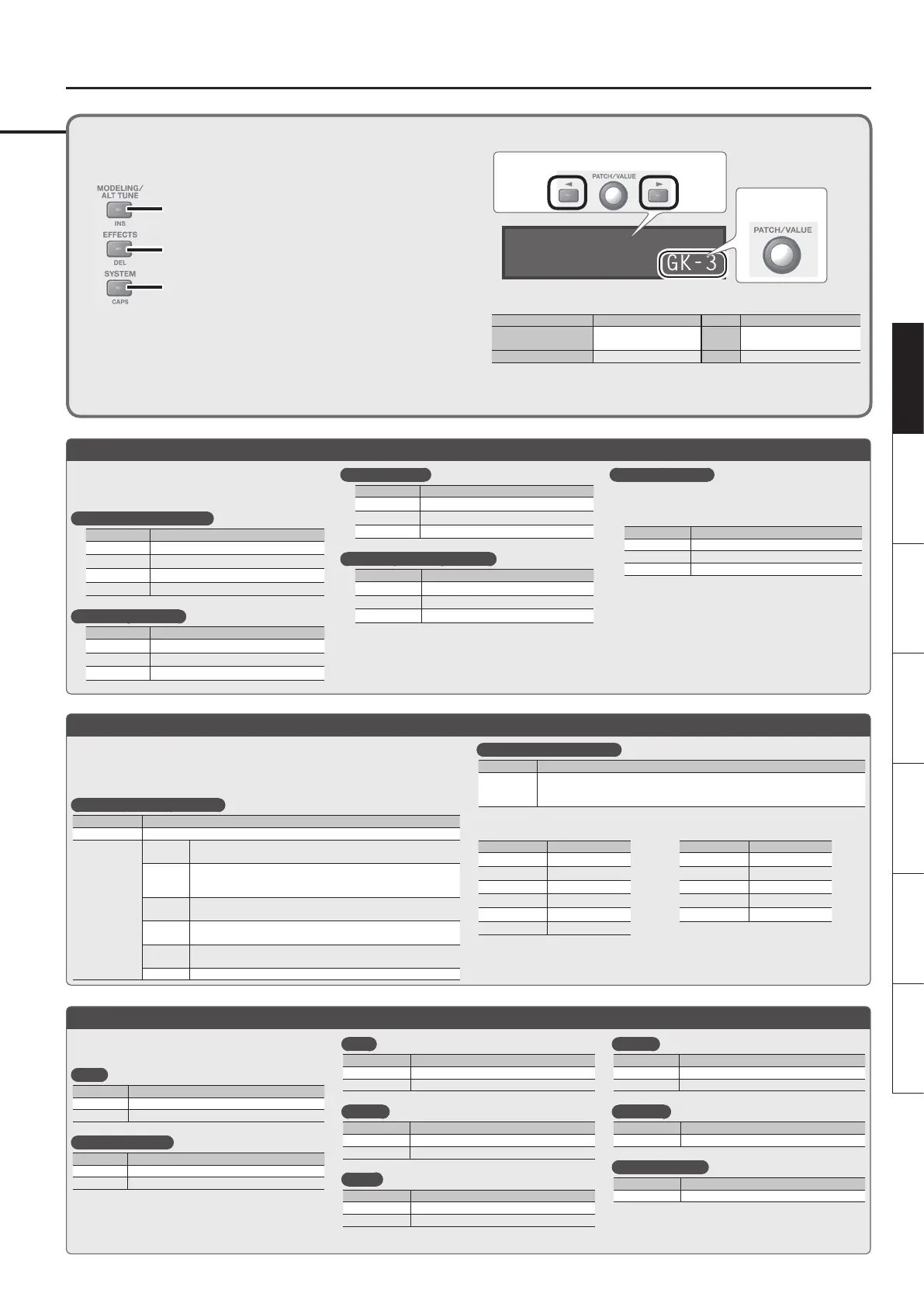
Editing the GP-10’s settings is a simple and consistent procedure. Before you
continue, please take a moment to learn the basic editing procedures.
1. Press the button for the type of item you want to edit.
Modeling/Poly FX/Alternate Tuning Settings&p. 6
Eects/Patch Settings&p. 9
System Settings (Settings for the Entire GP-10) &p. 13
2. Use the [K] [J] buttons to select the desired parameter. Then use the [VALUE]
knob to edit the value.
GK1:Type
GK-3
Select a parameter
Edit the value
You can use the following button operations to jump to the +/, marks of this document (p.
6–).
Buttons Jump destination Buttons Jump destination
[MODELING/ALT TUNE],
[EFFECTS],or [SYSTEM]
Next + mark [J] + [K] Next , + mark
[EXIT] + buttons above
Previous + mark [K] + [J] Previous , + mark
* [J] + [K] mean that you should “hold down [J] and press [K].”
3. Press the [EXIT] button to return to the play screen.
Press the [MODELING/ALT TUNE] button and edit the
parameters.
& “Modeling Settings (Mdl: )” (p. 6)
Selecting an electric guitar
Parameter Value
Mdl: On/O ON
Mdl: Type E. GTR (electric guitar)
EG: Type
& Refer to “Electric Guitar (EG: )” (p. 6)
EG: PU Select Selects the pickup position.
Selecting an acoustic
Parameter Value
Mdl: On/O ON
Mdl: Type ACOUSTIC (acoustic)
AC: Type
& Refer to “Acoustic (AC: )” (p. 6)
Selecting a bass
Parameter Value
Mdl: On/O ON
Mdl: Type E. BASS (bass)
EB: Type
& Refer to “Bass (EB: )” (p. 6)
Selecting a guitar synthesizer
Parameter Value
Mdl: On/O ON
Mdl: Type SYNTH (guitar synthesizer)
Synth: Type
& Refer to “Synthesizer (Synth: )” (p. 7)
Selecting a Poly FX
The Poly FX are eects specically designed for the
GK pickup, which individually extracts the signal of
each string.
Parameter Value
Mdl: On/O ON
Mdl: Type POLY FX
PolyFx: Type
& Refer to “Poly FX (PolyFx: )” (p. 8)
Press the [EFFECTS] button and edit the parameters.
& “Eects Settings” (p. 9)
Amp
Parameter Explanation
Amp: On/O Turns the Amp on/o
Amp: Type Type of Amp
FX (Overdrive etc.)
Parameter Explanation
FX: On/O Turns the FX on/o
FX: Type Type of FX
Wah
Parameter Explanation
Wah: On/O Turns the Wah on/o
Wah: Type Type of Wah
Chorus
Parameter Explanation
Chorus: On/O Turns the Chorus on/o
Chorus: Mode Type of Chorus
Delay
Parameter Explanation
Delay: On/O Turns the Delay on/o
Delay: Type Type of Delay
Reverb
Parameter Explanation
Reverb: On/O Turns the Reverb on/o
Reverb: Type Type of Reverb
Equalizer
Parameter Explanation
EQ: On/O Turns the Equalizer on/o
Noise suppressor
Parameter Explanation
NS: On/O Turns the noise suppressor on/o
Press the [MODELING/ALT TUNE] button and edit the parameters.
& “Alternate Tuning Settings (AltTune: )” (p. 8)
* If the Modeling Type is “SYNTH” or “POLY FX,” the Alternate Tuning or12-String Guitar function
cannot be used.
Selecting an alternate tuning
Parameter Explanation
AltTune: On/O Turns the Alternate Tuning function on/o.
AltTune: Type
OPEN D, E,
G, A
Tuning that produces a major chord when you play the open strings.
DROP D–A
DROP-D is a tuning in which only the 6th string is dropped to D.
The other tunings are the variations that are transposed downward
parallel to Drop D.
D-MODAL
Tuning that drops the 6th, 2nd, and 1st string by a whole step to
create an ethnic feel.
NASHVL
Tuning that raises the 6th, 5th, 4th, and 3rd strings by one octave;
like a 12-string guitar’s supplementary strings by themselves.
-12–+12
STEP
Raises/lowers the tuning of all strings in semitone steps.
USER User tuning in which each string can be specied individually.
Selecting a 12-string guitar
Parameter Explanation
12Str: On/O
Turn this on if you want the sound of a 12-string guitar. It transforms the sound of
a 6-string guitar into the sound of a 12-string guitar equipped with an additional
course of strings.
Example: Applying an open-G tuning to a
Telecaster (rear pickup)
Parameter Value
Mdl: On/O ON
Mdl: Type E. GTR
EG: Type TE
EG: PU Select REAR
AltTune: On/O ON
AltTune: Type OPEN G
Example: Transforming an acoustic guitar
into a 12-string guitar
Parameter Value
Mdl: On/O ON
Mdl: Type ACOUSTIC
AC: Type MA28
AltTune: On/O OFF
12Str: On/O ON
Selecting a Modeling Guitar
Selecting an Alternate Tuning
Applying Eects


 To Next Page