17
Returning to the Factory Settings (Factory Reset)
Here's how to return the MD-200 to its factory-set state.
1. While holding down the [ON/OFF] switch and
[MEMORY/TAP] switch, turn on the power
(insert a plug into the INPUT A/MONO jack).
The display indicates “FCt.”
2. Press the [MEMORY/TAP] switch.
The display indicates “Sur.”
If you decide to cancel, press the [MEMORY] button.
3. Press the [MEMORY/TAP] switch.
The factory reset is executed.
4. When the display indicates “FIn,” turn the
power o and on again.
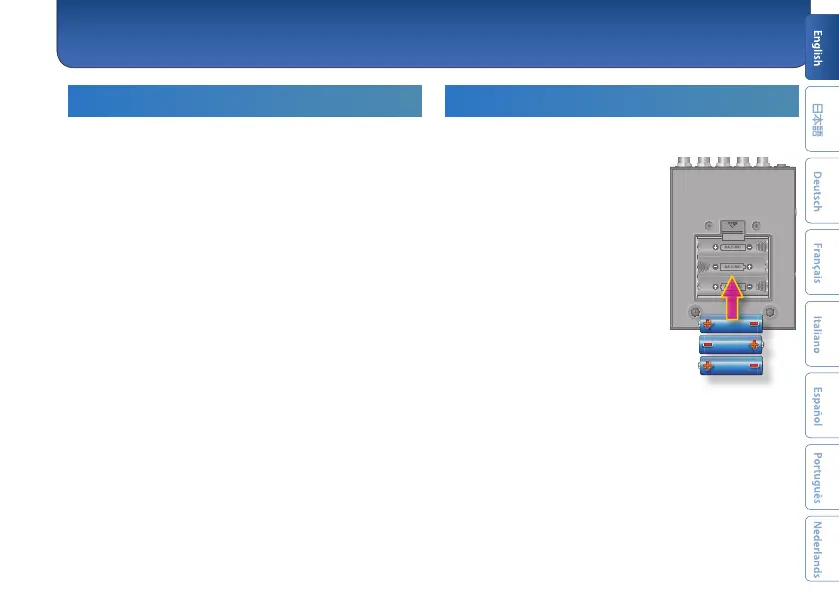
Installing Batteries
Insert the batteries as shown below, being careful to
orient the batteries correctly.
* Batteries should always be installed or
replaced before connecting any other
devices. This way, you can prevent
malfunction and damage.
* If operating this unit on batteries, please
use alkaline batteries.
* Even if batteries are installed, the unit
will turn o if you connect or disconnect
the power cord from the AC outlet while
the unit is turned on, or if you connect or
disconnect the AC adaptor from the unit.
When this occurs, unsaved data may be
lost. You must turn o the power before
you connect or disconnect the power
cord or AC adaptor.
* When turning the unit over, be careful
so as to protect the buttons and knobs from damage. Also, handle the
unit carefully; do not drop it.
* If you handle batteries improperly, you risk explosion and uid
leakage. Make sure that you carefully observe all of the items related to
batteries that are listed in “USING THE UNIT SAFELY” and “IMPORTANT
NOTES” (leaet “USING THE UNIT SAFELY” ).
* “Lo” will appear on the display if the batteries are low. Replace them
with new ones.
Appendix



 To Next Page