111
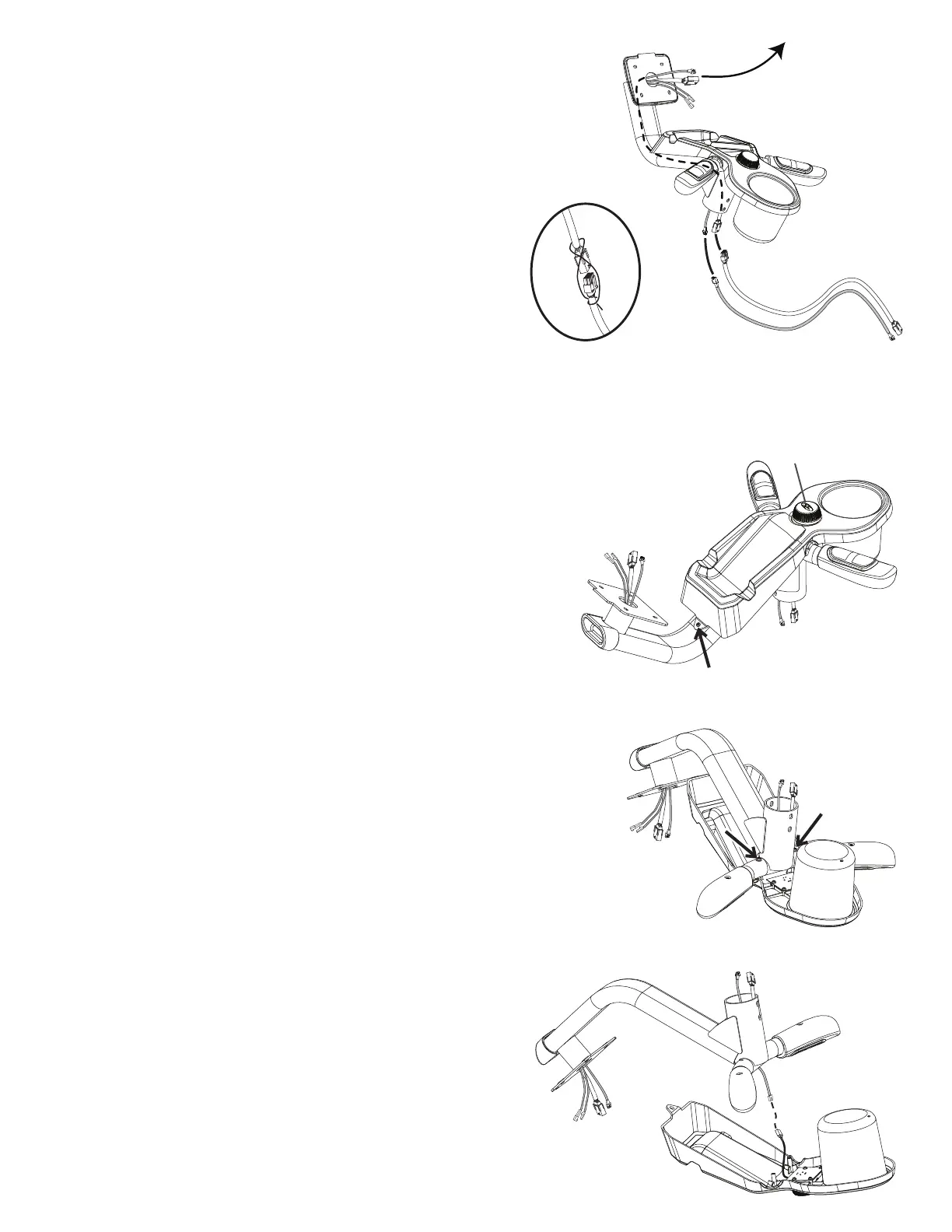
11. To replace the Upper Body Sensor or the Input/Output (I/O) Cables, attach the
ends of the new Cable to the old Cable using a piece of wire or string.
Note: Only replace one Cable at a time because of the limited space.
12. Gently pull the old Cable out of the top of the Static Handlebar Assembly, rout-
ing the new Cable into place.
Note: Do not crimp any of the Console Cables.
13. Remove the piece of wire or string, and discard the old Cable.
If not replacing the Resistance Cable, go to Step 21.
14.ToreplacetheResistanceCablethatconnectstotheResistanceKnob,
remove the hardware (indicated by an arrow) from the Static Handlebar Assembly
usinga#2Phillipsscrewdriver.
15.GentlyipovertheStaticHandlebarAssemblyontoatowelorpieceof
cardboard.
16.Usinga#2Phillipsscrewdriver,removethehardware(indicatedbyarrows)
from the Static Handlebar Assembly.
17. Slightly lift the Static Handlebars from the Tray, and disconnect the Resis-
tance Cable.
Resistance Knob












 To Next Page