Assembly / Owner’s Manual
20
During an Interval workout, the SPRINT segment will be red LEDs, and the RECOVER segment will be green LEDs.
Maximum Burn Rate LED marker
7KH0D[LPXP%XUQ5DWH/('PDUNHULVDQRUDQJH/('WKDWVKRZVWKHKLJKHVWUDWHRIFDORULHEXUQDFKLHYHGGXULQJWKHFXUUHQWZRUNRXW
Total Calories display
7KH7RWDO&DORULHVGLVSOD\VKRZVWKHHVWLPDWHGFDORULHVWKDWKDYHEHHQEXUQHGGXULQJWKHZRUNRXW7KHPD[LPXPGLVSOD\LV
Active User display
7KH$FWLYH8VHUGLVSOD\VKRZVWKHVHOHFWHGXVHUSUR¿OH$XVHUSUR¿OHLVDOZD\VVHOHFWHG
Note: )RUPRUHDFFXUDWHFDORULHFRXQWVDQG%XUQ5DWH7DUJHWVEHVXUHWRHGLW\RXU8VHU3UR¿OH
User button
3XVKWRVHOHFWWKHGHVLUHG8VHU3UR¿OHSXVKDQGKROGIRUVHFRQGVWRHGLWWKHVHOHFWHG8VHU3UR¿OH
Volume button and indicator lights
The Volume button sets the sound level of the Console, and the indicator lights show the current setting; low (1 LED), medium (2 LEDs), high (3
LEDs), or off (no LEDs).
MAX 14 Minute Interval button
Push to start the MAX 14 Minute Interval workout.
PROGRAMS button
Push to select a workout program.
ENTER/START button
Starts the selected Program workout, or resumes a paused workout. Push to accept the displayed value for an option.
Console Features
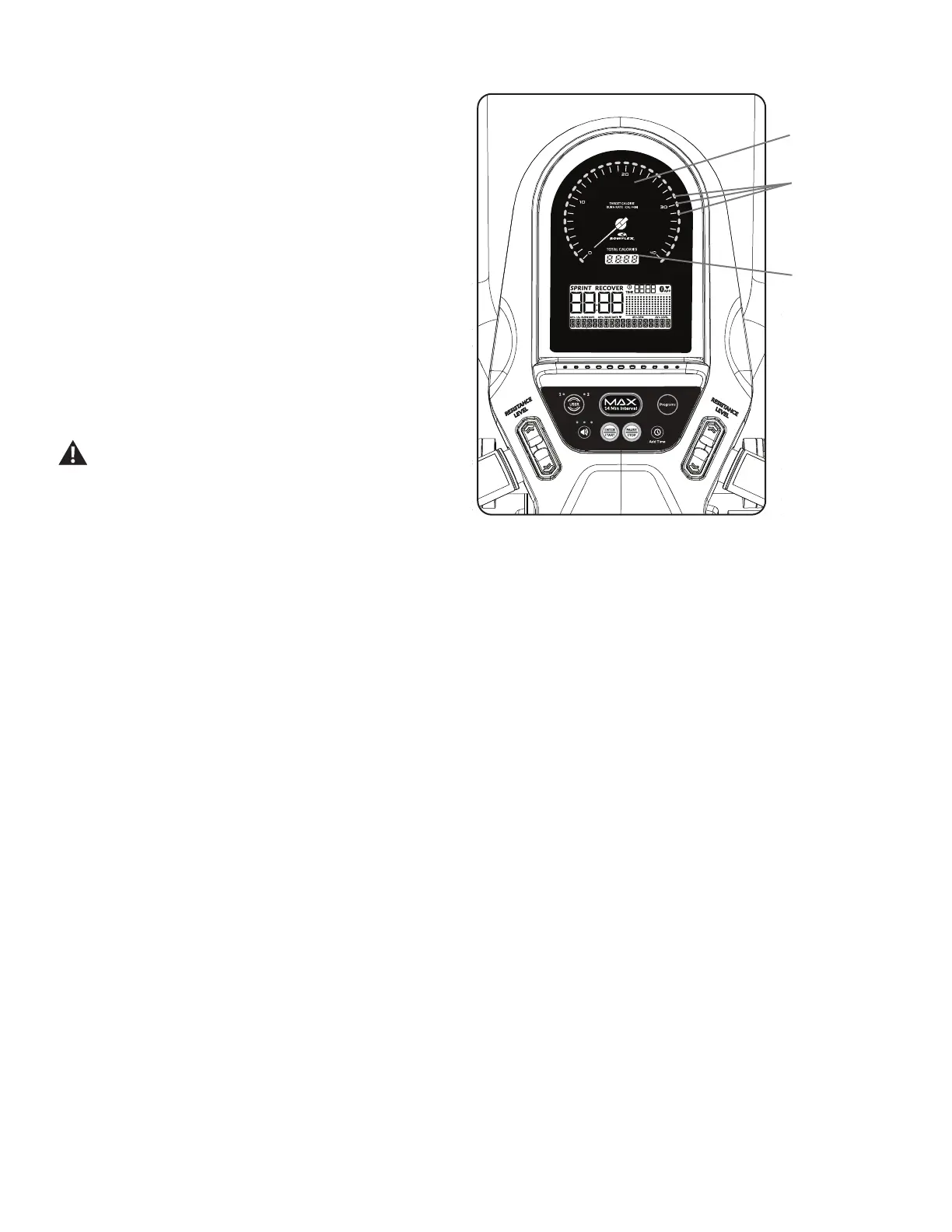
Burn Rate display
The Burn Rate display shows the level of calories being burned per
minute (CAL/MIN). This rate is a function of Intensity, which is the
FXUUHQWOHYHORI530SHGDOVSHHGDQGUHVLVWDQFHOHYHO$V
either of those values increase, the Burn Rate will increase.
Burn Rate Target LED range
The Burn Rate Target LED range is a workout coach based on
WKHVHWWLQJVRIWKHVHOHFWHG8VHU3UR¿OH$UDQJHRIVL[/('¶VDUH
DFWLYDWHGGXULQJDZRUNRXW7KH¿UVWRIWKH/('VLQWKHUDQJHLVD
suggested beginner level, with the higher LEDs being for a more
DGYDQFHG¿WQHVVXVHU7KH,QWHQVLW\RIWKHUDQJHLVEDVHGRQWKH
:RUNRXW3UR¿OH'LVSOD\
Note:%HVXUHWKH8VHU3UR¿OHLVFXUUHQWIRUDPRUHH[DFWFDORULH
burn rate and suggested target range.
7KH7DUJHW/('5DQJHLVDVXJJHVWHGZRUNRXWOHYHODQG
VKRXOGRQO\EHIROORZHGLI\RXUSK\VLFDOÀWQHVVOHYHO
allows.
Target Burn Rate
LED Range
Total Calories
Burn Rate
Display













 To Next Page