Assembly / Owner’s Manual
23
Workout with Other Apps
7KLV¿WQHVVPDFKLQHKDVLQWHJUDWHG%OXHWRRWK
®
connectivity which allows it to work with a number of digital partners. For our latest list of supported
SDUWQHUVSOHDVHYLVLWERZÀH[FRPPD[WUDLQHUDSSKWPO
USB Charging
If a USB Device is attached to the USB Port, the Port will attempt to charge the Device. The power supplied from the USB Port may not be enough to
operate the Device and charge it at the same time.
Secure Your Device for a Workout
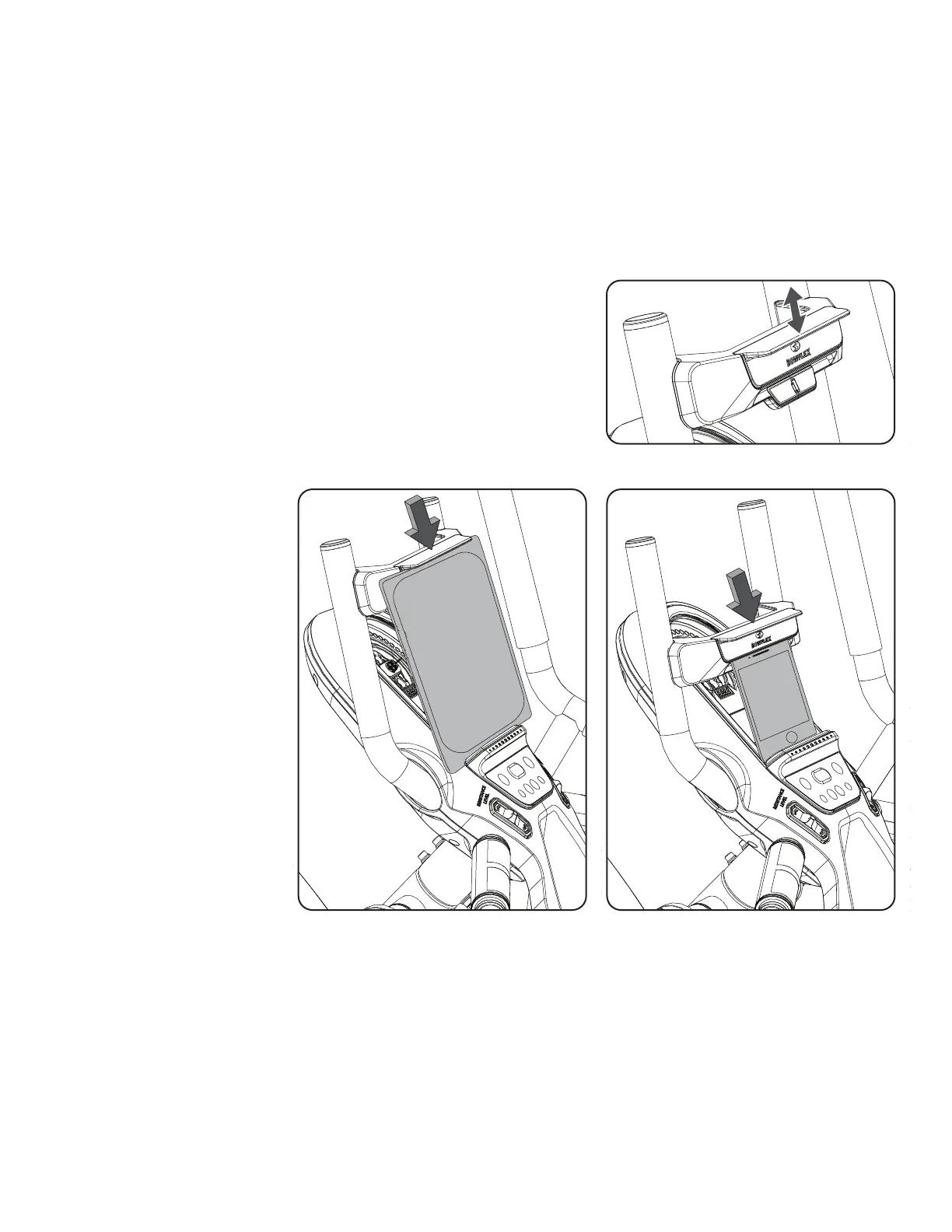
7KLV¿WQHVVPDFKLQHLVHTXLSSHGZLWKD0HGLD&DSWXUH%DUWKDWVHFXUHVDYDULHW\RIVL]HG
devices to the Media Tray. The Media Capture Bar has two tabs to use depending on the size of
your device. The upper, or large device, tab is used for devices such as a tablet or larger phone.
The lower, or small device, tab is used for smaller devices such as a phone or mini tablet.
To secure your device, place the lower edge of your device in the Media Tray. Then shift the
Media Capture Bar downward until your device is captured securely in the appropriate tab and
the Media Tray.
Note: Smaller devices that are placed on their side may not be able to be secured. Rotate the device and secure it in the upright position.
Contact Heart Rate Sensors
Contact Heart Rate (CHR) sensors send your heart rate signals to the Console. The CHR sensors are the stainless steel parts of the Handlebars.
7RXVHSXW\RXUKDQGVFRPIRUWDEO\DURXQGWKHVHQVRUV%HVXUHWKDW\RXUKDQGVWRXFKERWKWKHWRSDQGWKHERWWRPRIWKHVHQVRUV+ROG¿UPEXW
not too tight or loose. Both hands must make contact with the sensors for the Console to detect a pulse. After the Console detects four stable pulse
signals, your initial pulse rate will be shown.
Once the Console has your initial heart rate, do not move or shift your hands for 10 to 15 seconds. The Console will now validate the heart rate.
0DQ\IDFWRUVLQÀXHQFHWKHDELOLW\RIWKHVHQVRUVWRGHWHFW\RXUKHDUWUDWHVLJQDO













 To Next Page