Assembly / Owner’s Manual
25
"FatBurn"BenetZone
"Endurance"BenetZone
"Performance"Benet
Zone
Bene t Zone display
AsuggestedBurnRateTargetZonetogainthefullbenetsfromthecurrentworkout;FatBurn,
Endurance,andPerformanceZones.
Calorie Burn or Fat Burn programs "FatBurn"BenetZone
Manual program "Endurance"BenetZone
Stairs program "Performance"BenetZone
START button
Starts the selected Program workout, or resumes a paused workout. Tap to accept the displayed
value for an option.
STOP button
Ends a paused workout, or goes to the Home Tab.
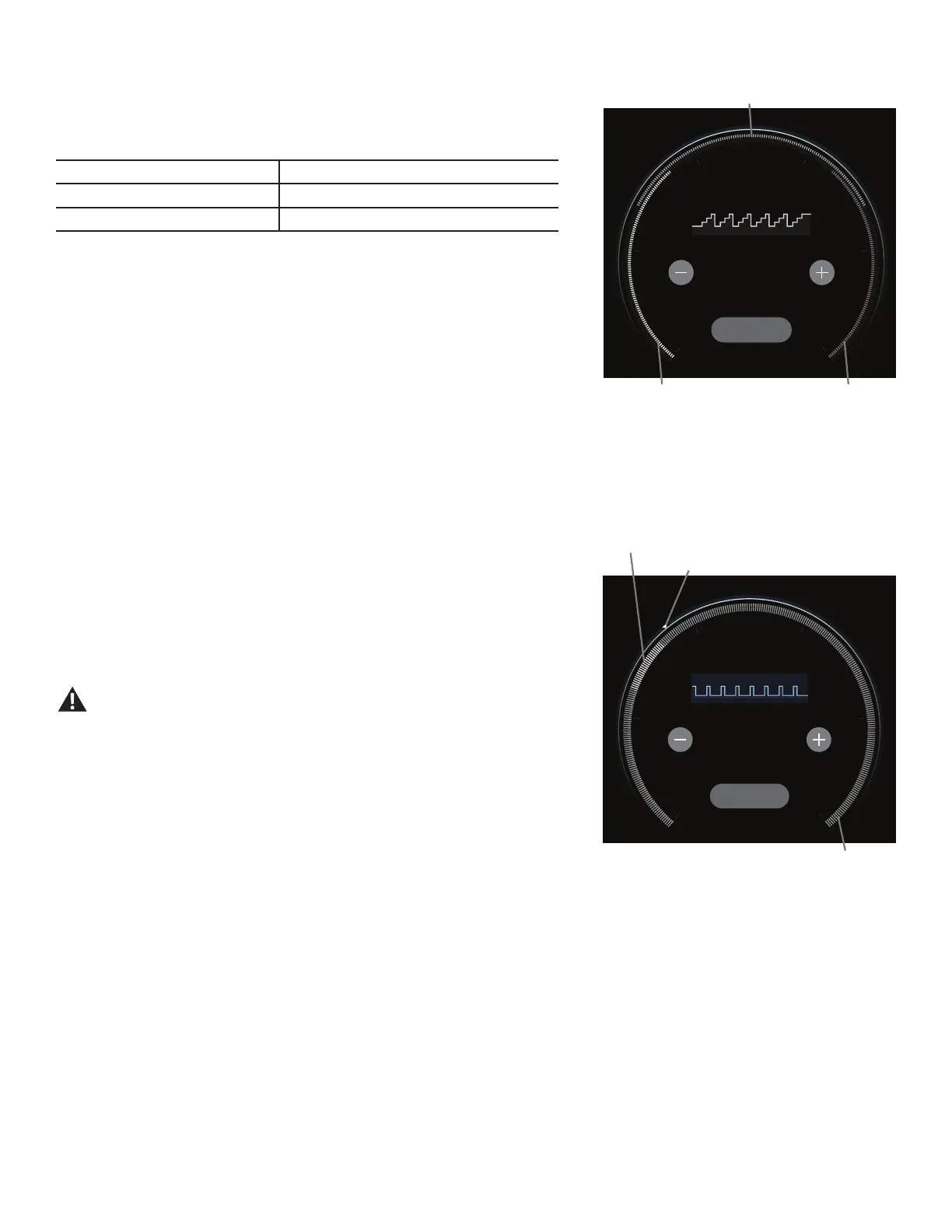
Burn Rate display
The Burn Rate display shows the level of calories being burned per minute. This rate is a function of Intensity, which is the current level of RPM
(pedal speed) and resistance level. As either of those values increase, the Burn Rate will increase.
Burn Rate Target range
The Burn Rate Target range is a workout coach based on the settings of the selected User
Prole.Arangeofredsegmentsareactivatedduringaworkout.Therstoftheredsegmentsin
the range is a suggested beginner level, with the higher segments being for a more advanced
tnessuser.TheIntensityoftherangeisbasedontheWorkoutProleDisplay.
Note:BesuretheUserProleiscurrentforamoreexactcalorieburnrateandsuggested
target range.
The Target Range is a suggested workout level, and should only be followed if
your physical tness level allows.
During an Interval workout, the SPRINT segment will be the red segment, and the RECOVER
segment will be green segment.
Maximum Burn Rate marker
TheMaximumBurnRatemarkerisanindicatorthatshowsthehighestrateofcalorieburn
achieved during the current workout.
SPRINT
The high Intensity segment of an Interval workout. During an Interval workout, the active segment shifts between the SPRINT and RECOVER seg-
mentswithanaudibleconrmation,countingthetimedownforthecurrentlyactivesegment.
RECOVER
ThereducedoutputworkoutsegmentofanIntervalworkout,countingdownuntilthenextSPRINTsegment.
Burn Rate Target range
Burn Rate display
Console Display with Target Coaching
Program
MaximumBurnRatemarker


 To Next Page