25
8. Maintenance and service
Change the lamp module immediately when the lamp life reaches 1500 hrs to
maintain the best projection image.
8.1 Replacing the lamp module
When the lamp is within 30 hours of maximum lamp life, the projector will display
the “Lamp has reached its end of life! Lamp replacement is suggested!” warning.
When this message appears, change the lamp.
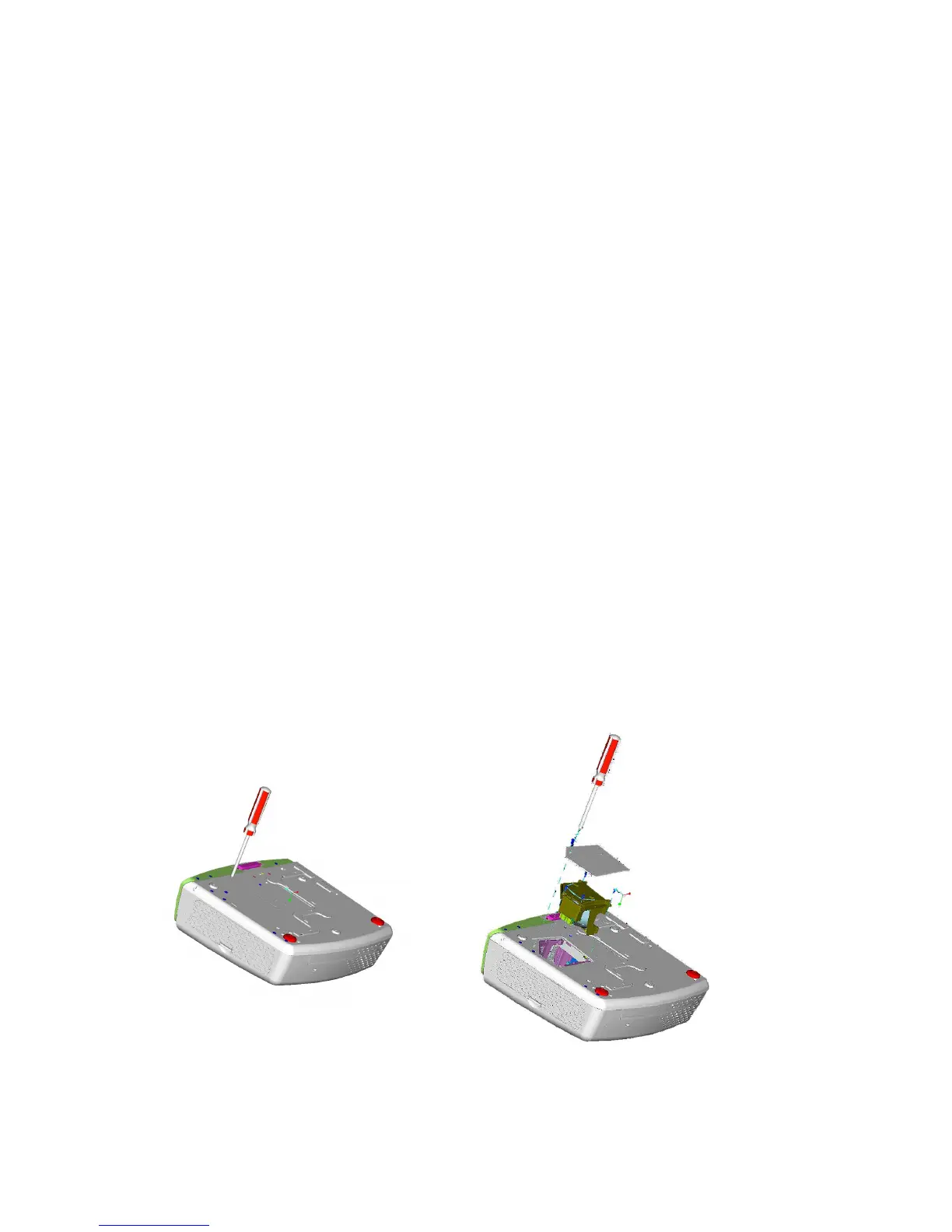
To replace the lamp module:
1. Turn off the projector and wait for the fan to stop.
2. Turn off the main power switch, and disconnect the power cord and all cables.
3. Let the projector lamp cool down completely (approximately 30 minutes).
4. Use a screwdriver to loosen the screws of lamp door and lamp module.
5. Take out the lamp module.
6. Gently insert the new lamp module into the lamp bay, replace the lamp module
retaining screws.
7. Replace the lamp door, and tighten the door screw.
8. Reset the lamp timer using the Lamp Reset function in the Management menu.
Use a screwdriver to loosen the lamp door,
and press down the lock to remove the door.
Remove the three lamp module
retaining screws, unsnap the
lamp removal handle to change
the lam



 To Next Page