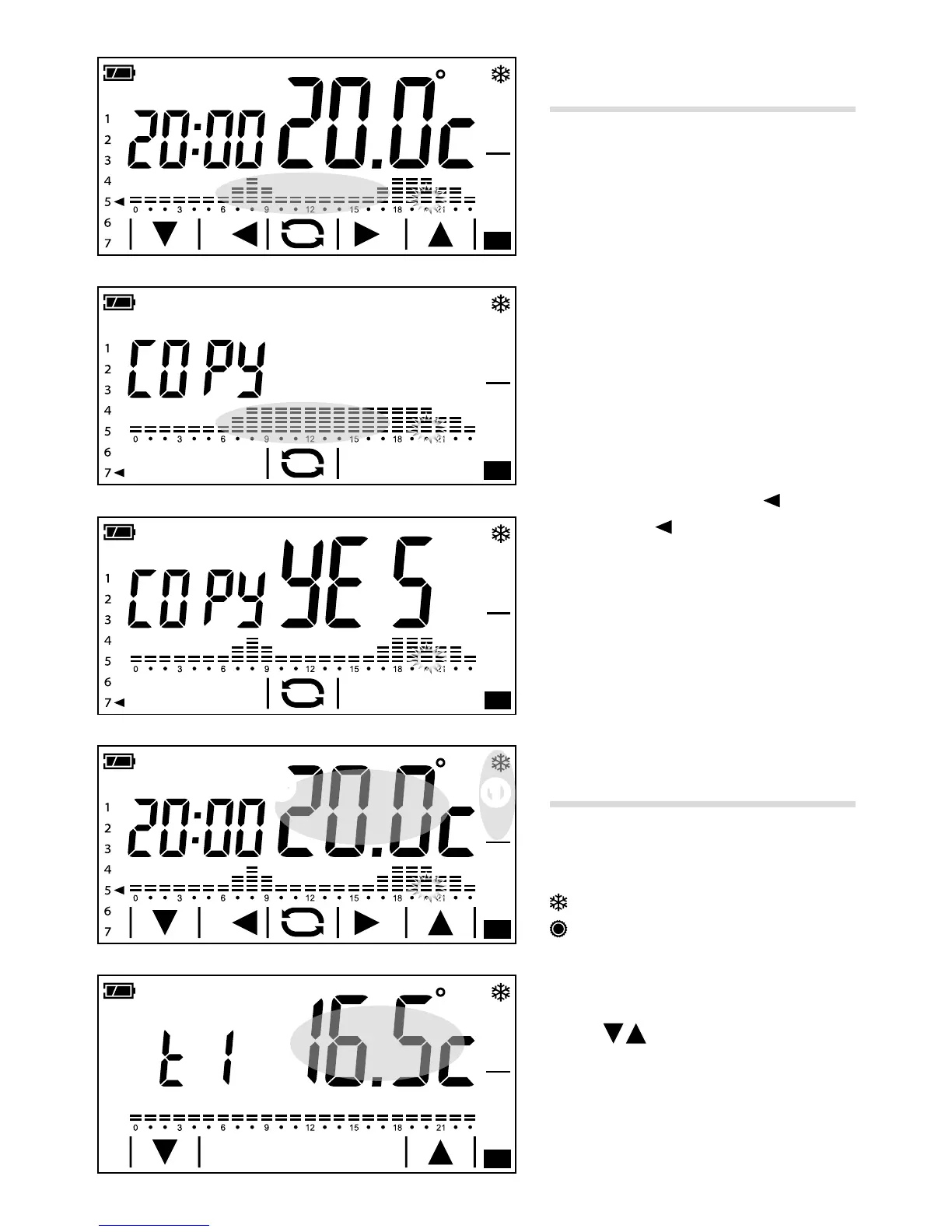
Copying the temperature trend
from one day to other days
Brief touches on the part of the screen
highlighted allow the daily temperature
trend that you want to copy to be displayed.
Keep touching the area highlighted in gure
A until the screen in gure B appears.
Brief touches on the highlighted area of the
screen allow the arrow that indicates the days
of the work to be moved to the day you want
to copy the temperature trend to.
Touch and keep touching the area highlight
-
ed until the screen in gure C appears.
The programming for day 5
has been
copied to day 7
.
Customising T1, T2 and T3
temperature values.
Press and hold down area D ① to select
the operating mode for which you want to
change the levels.
Heating
Cooling
Touch and keep touching the highlighted area
D ② until the screen in gure E appears.
Use the
arrows to set the desired value
for temperature level T1.
Briey press the area highlighted in gure E
to display the screen to change temperature
level T2 F.



 To Next Page