– 22 – – 23 –
9.3 Adjusting the seconds
If the watch loses or gains a few seconds, after some time
on the wrist for instance or following setting operations,
it can be easily reset to the exact second.
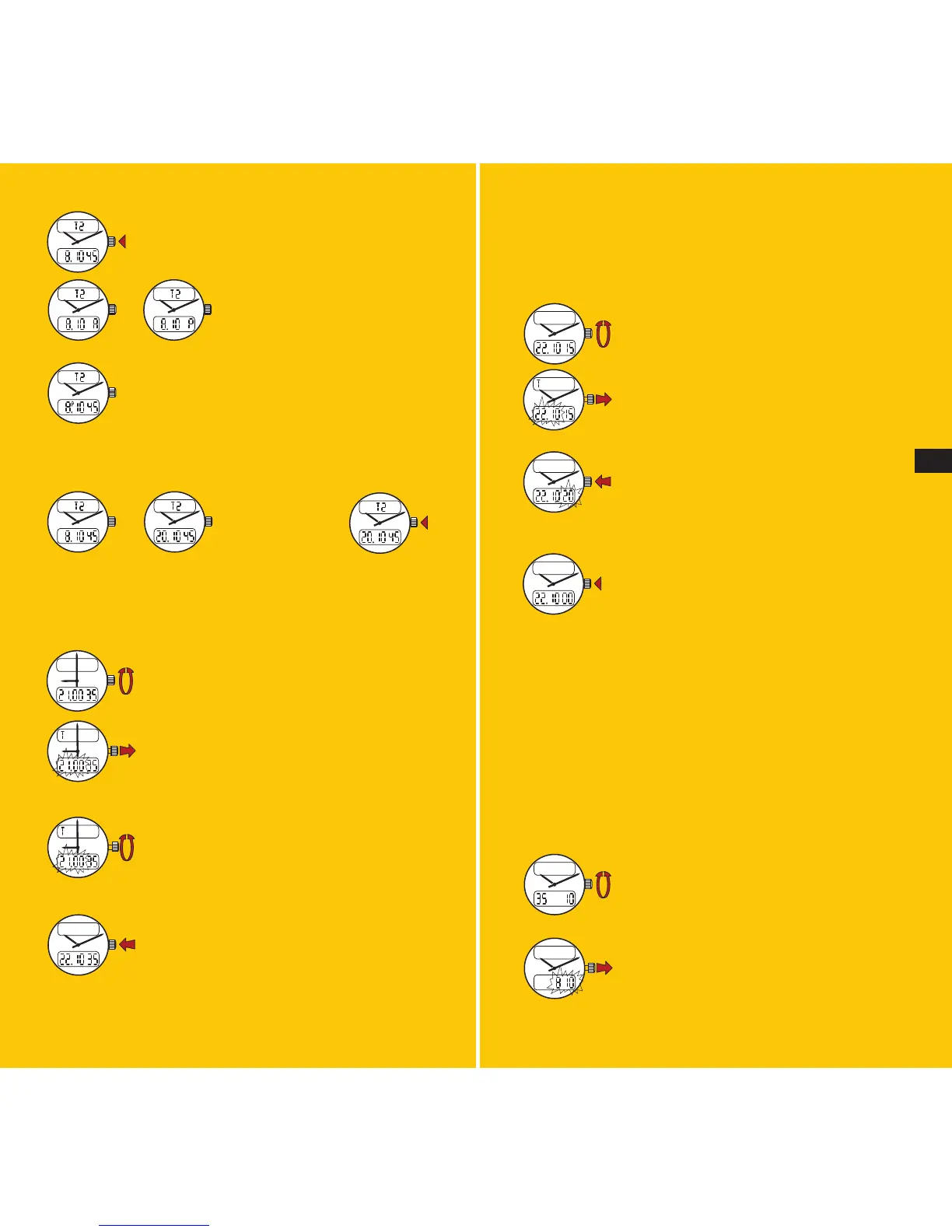
Select and display local time.
Pull the crown out: the hour and minute
digits flash on and off.
Push the crown back in. The seconds digits
flash on and off for 1 minute.
While the seconds digits flash, push the
crown back in precisely at an observatory
time signal or when a reference time source
marks the exact minute: this will return the
seconds digits to zero.
Check that the minute display corresponds to the exact
time; if it does not, add or subtract a minute (see 9.2).
9.4
Correcting the date and the month
Note: the calendar is programmed to provide the exact date
during a full leap-year cycle of four years, thus requiring a
correction every February 29 only.
Select the seconds-date function display.
Pull the crown out: the seconds disappear
and the month appears instead.
Press once on the crown: if the letter A or
P is displayed, the time readout is in the
2x12H mode, as for example:
Note: when the timer readout is in the
2x12H mode, a small P appears next to the
hour figure between noon and midnight.
If no letter is visible, the time readout is in the 24H mode,
as for example:
9.2 Setting the watch to the correct time
Put the watch in the 24H time readout mode (see 9.1).
Select and display local time.
Pull the crown out: the hour and minute
digits flash on and off.
Set the watch to the correct time by rota-
ting the crown: rapid rotation moves the
hands forward or backward by a full hour,
while slow rotation moves them in either
direction by one minute.
Push the crown back in.
If desired, return the watch to the 2x12H mode (see 9.1).
seconds/date
before noon after noon
before noon after noon
To change the
time display
mode, press the
crown twice.
E







 To Next Page