– 26 – – 27 –
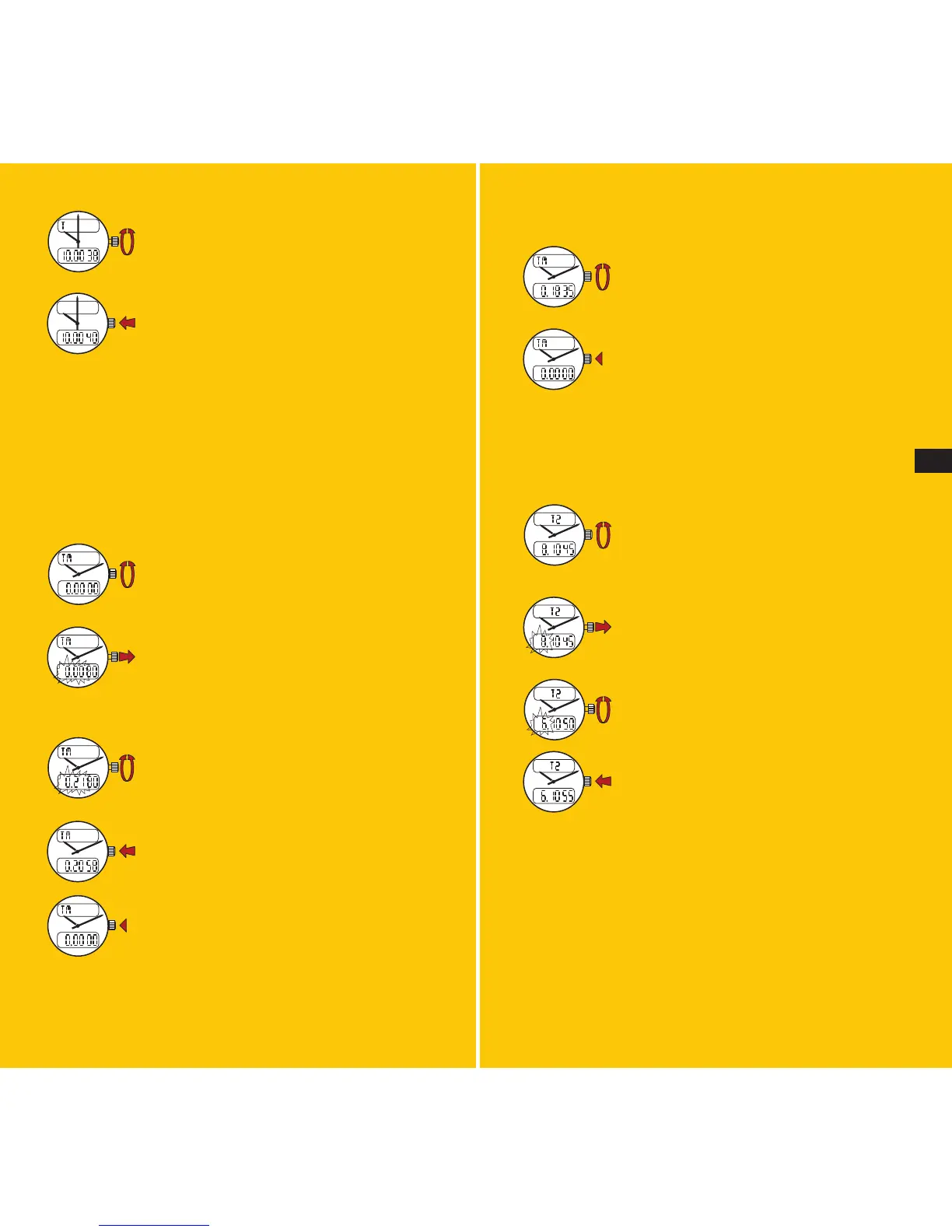
To cancel an ongoing countdown operation:
Select the TM (timer) function.
Press the crown during more than two
seconds: the timer will return to zero.
10.2
Displaying a second timezone
This watch is designed to display, if desired, another
timezone in addition to local time.
Select the T2 (2
nd
timezone) function.
Pull the crown out: the digits correspon-
ding to the 2
nd
timezone begin flashing.
Rotate the crown forward or backward.
Push the crown back in.
Note: the minute and the seconds readouts cannot be
changed and always remain on local time.
Remember to take into account the watch’s time mode
(2x12H or 24H) when selecting and displaying a second
timezone (see 9.1).
Rotate the crown backward or forward
quickly, causing the hands to move in
either direction by a full hour with each
rotation.
Push the crown back in.
Please remember not to rotate the crown slowly after
rotating it rapidly to change timezones.
10. HOW TO USE THE VARIOUS FUNCTIONS
10.1
Using the countdown timer
Select the TM (timer) function.
Pull the crown out: the hours and minutes
will flash.
Set the desired time span by rotating
the crown forward or backward (rapid
rotation changes the hour readout, slow
rotation changes the minute readout).
Push the crown back in: counting down
begins and the watch will buzz at the end
of the preset time span.
Press the crown to end the buzzing.
E







 To Next Page