51
3 CHANNEL Press this button to switch between indoor and channels readings
4 FORECAST Press to view the HI/LO temperature from today to next 3 days
5 RAIN Press to switch between Rain Rate, rainfall
6 MAX / MIN
Press to switch between maximum and minimum values of Daily and Since
last reset
7 WIND
Press to switch between average wind speed, wind gust and Beaufort Scale
Press and hold 2 seconds to switch wind direction between language and
360 bearing
8 SUN Press to switch between Solar Light Intensity and Sunburn time
9 Table stand
10 Wall mount hole
11 UNIT Hold to enter unit of measurements setting
12 ALARM Hold to enter alarm setting
13 SET Hold to enter time and date setting
14 HI / LO / AUTO Sliding to select the back light level mode
15 BARO Switch between relative and absolute air pressure reading
16 SENSOR / WIFI
Press to start sensor synchronization (paring)
Press and hold 6 seconds to enter AP mode, vice versa
17 Battery compartment
18 Power jack
19
/ INDEX
To switch between outdoor temperature, feels like, heat index, dew point and
wind chill reading
Decrease the value in setting
20
/ MODE
To switch between predicted HI & LO temperature, or predicted average
temperature & chance of rain
Increase the value in setting
21 RESET
Press to reset the console
Press and hold 6 seconds to factory reset the console
22 REFRESH Press to update the upload and download data
4.3 CONSOLE FEATURES
4.3.1 MULTI-DAY WEATHER FORECAST FOR TODAY & NEXT 3 DAY
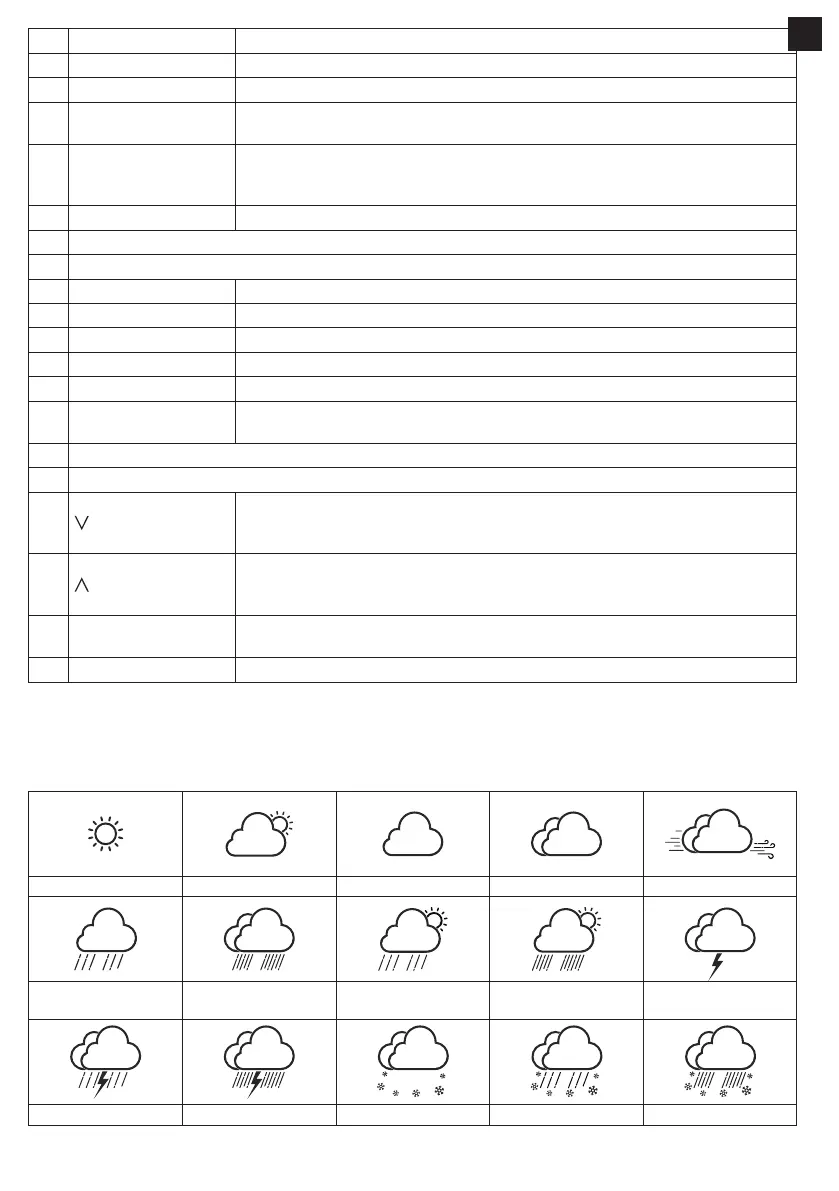
Up to 15 dierent weather icons are provided according to the weather conditions forecasted:
Sunny Partly cloudy Cloudy / Foggy Overcast Windy
Light rain Heavy rain Partly cloudy
with light rain
Partly cloudy
with heavy rain
Thundery
Thundery showers Stormy rain Snowy Snowy rain Heavy Snowy rain
EN


 To Next Page