55
4.3.7 WATER LEAK (OPTIONAL LEAK SENSOR)
You can add up to 7 additional Water Leak sensors (optional, refer to
section 3.2)
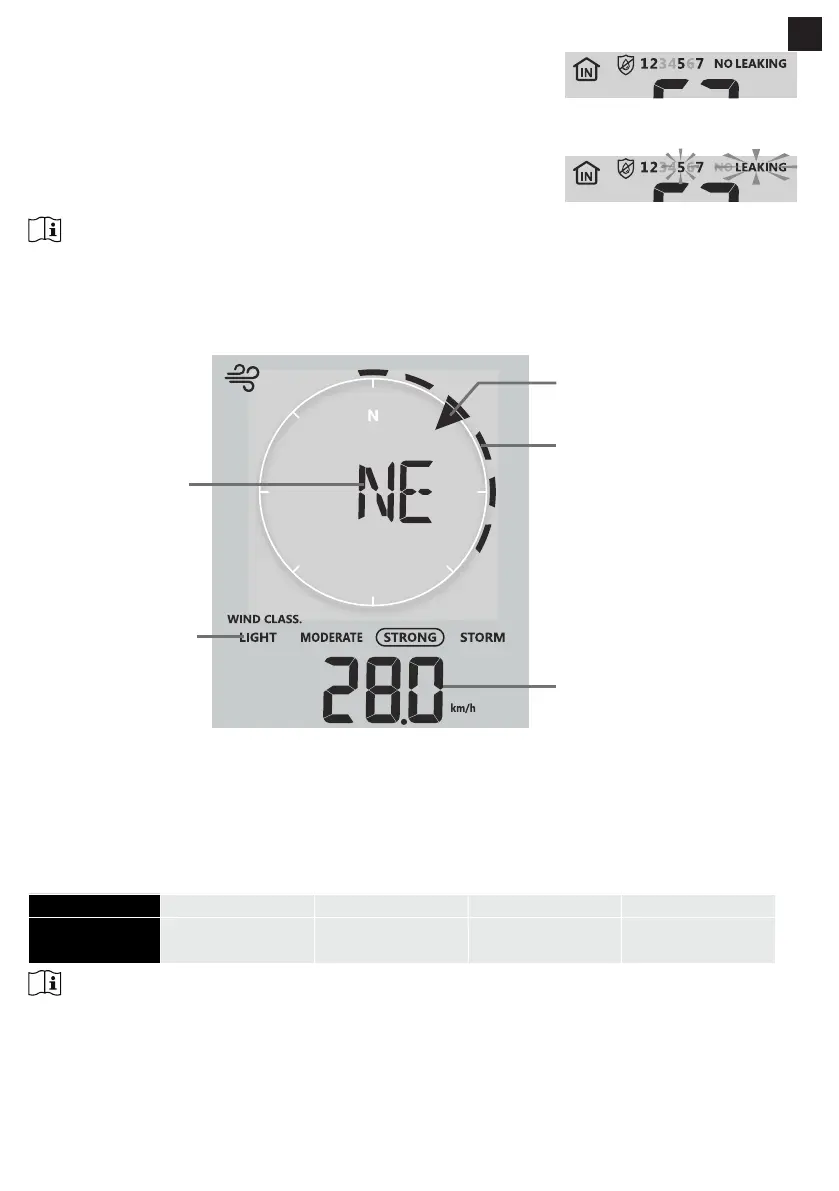
The channel number(s) of the corresponding water leak sensor(s) added to
the console will be shown with the NO LEAKING icon.
When water leaking is detected, the channel number of the sensor
detecting the leaking will ash together the LEAKING icon.
NOTE:
When low battery is detected, the channel number of the sensor detecting the low battery condition will
ash once every 4 seconds.
4.3.8 WIND
4.3.8.1 WIND SPEED AND DIRECTION SECTION OVERVIEW
Past wind directions
indicator of last 5 minutes
(maximum 6)
Real time wind direction
indicator
Average / gust
wind speed or
Beaufort scale
Wind direction
Wind speed level
indicator
A solid arrow indicates the current real-time wind direction, whereas the bars indicate up to six dierent
wind direction of the past 5 minutes.
4.3.8.2 WIND SPEED, GUST AND BEAUFORT SCALE DIPSLAY
Press [WIND] key to switch display between Average wind speed, Gust, and Beaufort scale.
The wind level provides a quick reference on the wind condition and is indicated by a series of text icons
Level LIGHT MODERATE STRONG STORM
Speed
2-8 mph
3-13 km/h
9-25 mph
14-41 km/h
26-54 mph
42-87 km/h
≥ 55 mph
≥ 88 km/h
NOTE:
- Windspeed is dened as the average wind speed in the 12 second update period
- Gust is dened as the peak wind speed in the 12 second update period
4.3.8.3 WIND DIRECTION IN 16-POINT DIRECTIONS AND DEGREES
By default, wind direction is displayed by a 16-point compass, which include N, E, S, W, NE, NW, SE, SW,
NNE, ENE, SSE, ESE, NNW, WNW, SSW, WSW.
EN


 To Next Page