67
6.4.1 CALIBRATION
1. User can input the oset and/or gain values for dierent parameters while current oset and gain values
are shown next to their corresponding blank.
2. Once completed, press
Apply
at the bottom of the SETUP page.
The current oset value will show the previous value that you entered, please input the new value in the
blank if any changes needed, the new value will eective once you press
Apply
icon in SETUP page.
NOTE:
Calibration of most parameter is not required, with the exception of Relative Pressure, which must be
calibrated to sea-level to account for altitude eects.
7. PROWEATHERLIVE (PWL) LIVE DATA & OPERATION
7.1 VIEW LIVE DATA
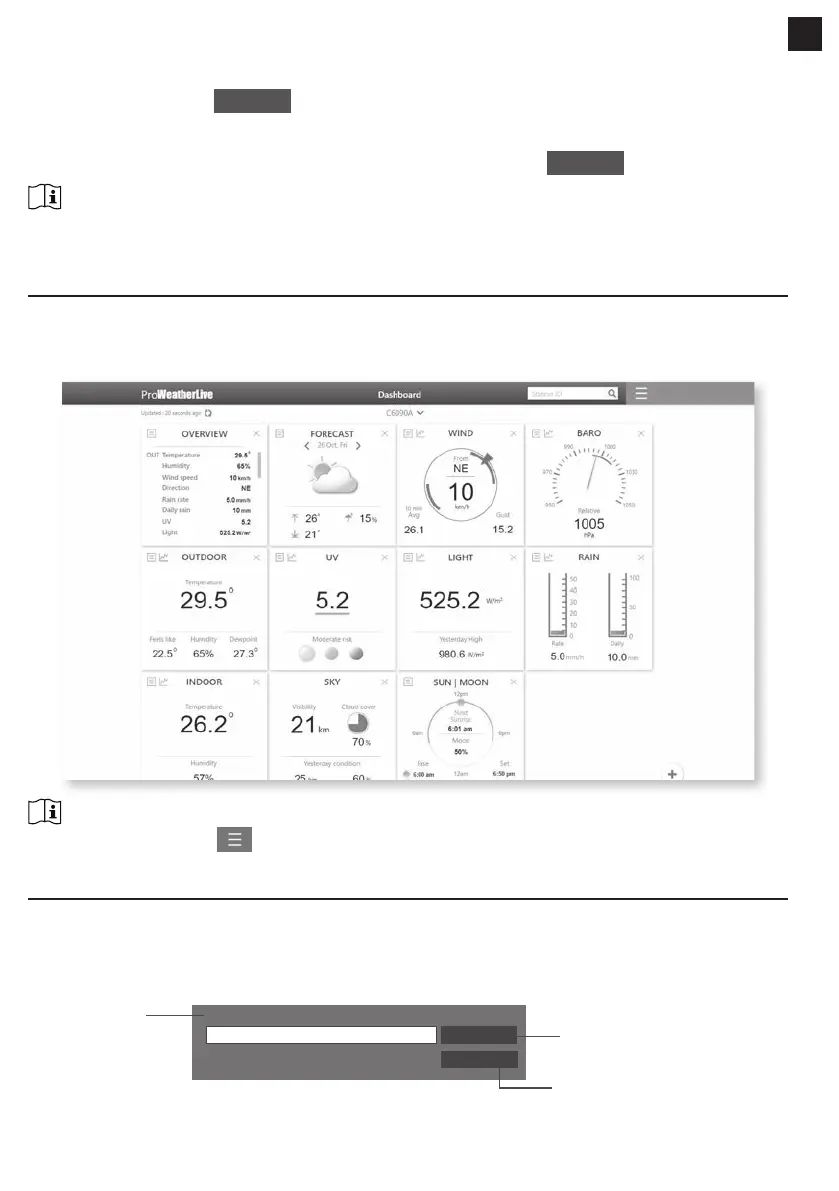
Login your ProWeatherLive account.
Once your device is connected, your device's live weather data will show on the dashboard page.
NOTE:
Please press "Help" in the should you have any query on the PWL operation.
8. MAINTENANCE
8.1 FIRMWARE UPDATE
The console supports OTA rmware update capability. Its rmware may be updated over the air anytime
(whenever necessary) through any web-browser on a PC/Mac with WI-FI connectivity. Update function,
however, is not available through mobile/smart devices.
Upload
Browse
Firmware version: 1.00
Current rmware
version
Firmware update in ADVANCED page
Press to start upload the rmware
to console
Select the rmware le for update
EN


 To Next Page