9
Revision 1.1
09/2024
B1051UL
PROGRAMMING - LANGUAGE SELECTION
PROGRAMMING - LANGUAGE SELECTION
French, German, Spanish, Dutch, Czech, Polish, American, Italian or Portuguese.
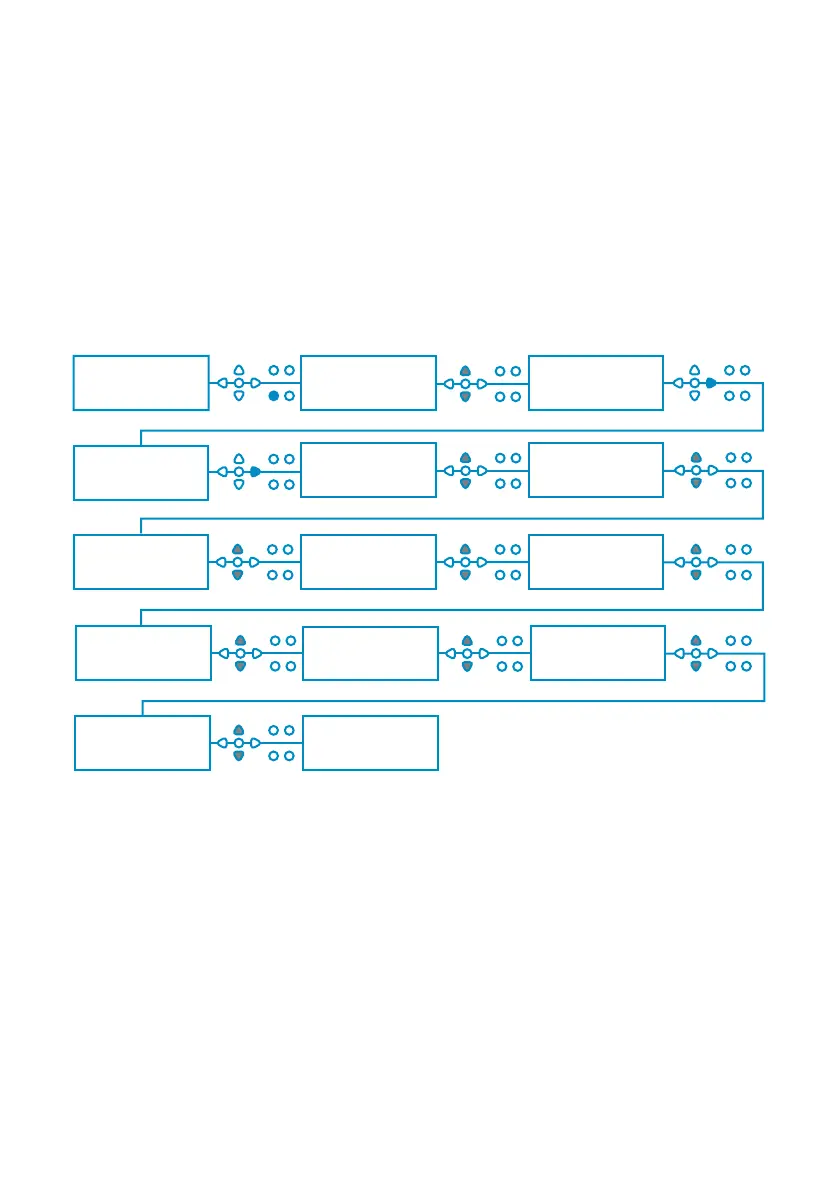
From the default screen, press and hold the TEST key for 2 seconds. The access code screen will
then be displayed. Enter the correct four-digit access code using the UP and DOWN keys to select
a number and the FWD/ACCEPT key to move (see page 15).
Use the UP and DOWN keys to scroll through the language options. Press the FWD/ACCEPT key
to select the displayed
00000 L10 01
BRIGHTWELL
ENTER CODE TO
CHANGE LANGUAGE
----
ENTER CODE TO
CHANGE LANGUAGE
1---
ENTER CODE TO
CHANGE LANGUAGE
1111
ENGLISH FRANCAIS
POLISHPORTUGUESE ITALIAN
AMERICAN
CZECH
ESPANOL
DEUTSCH NEDERLAND


 To Next Page