8
Revision 1.1
09/2024
B1051UL
OPERATING INSTRUCTIONS - CONTROLS
OPERATING INSTRUCTIONS - CONTROLS
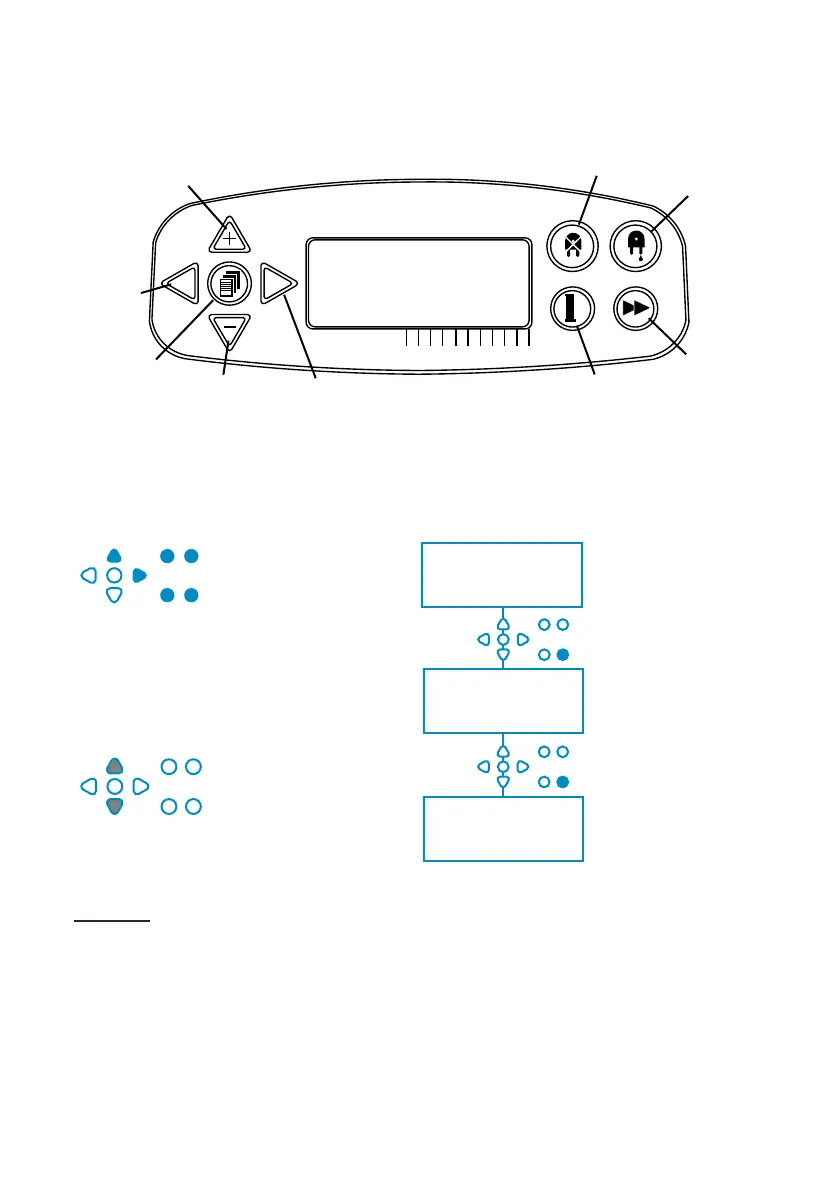
Throughout the
instructions:
If a button or buttons are
shown in BLUE then
they must be pressed
to progress to the next
stage. (If two buttons
are shown, they must be
pressed together)
If buttons are shown in
GREY, they are used
individually to achieve
the desired result. (ie.
Either/or)
SIGNAL
ACCEPTANCE TIME
00 SECONDS
MAN 1: ------------------
MAN 2: ------------------
MAN 3: ------------------
OFF P: -------------------
FLUSH VALVE
TIME
00 MINS 00 SECS
Throughout the
instructions, there are
several screens which
are highlighted BOLD.
From any point within
the program, the user
can transition to the
next BOLD screen via
the SEE/JUMP button.
WARNING - To reduce the risk of re, electric shock, or injury to persons please read the
IMPORTANT SAFETY INSTRUCTIONS before operating the appliance.
OPERATING INSTRUCTIONS - KEY TO INSTRUCTIONS
Up
Back
Program
Forward/Accept Test
See/Jump
Pump Stop
Prime
Down


 To Next Page