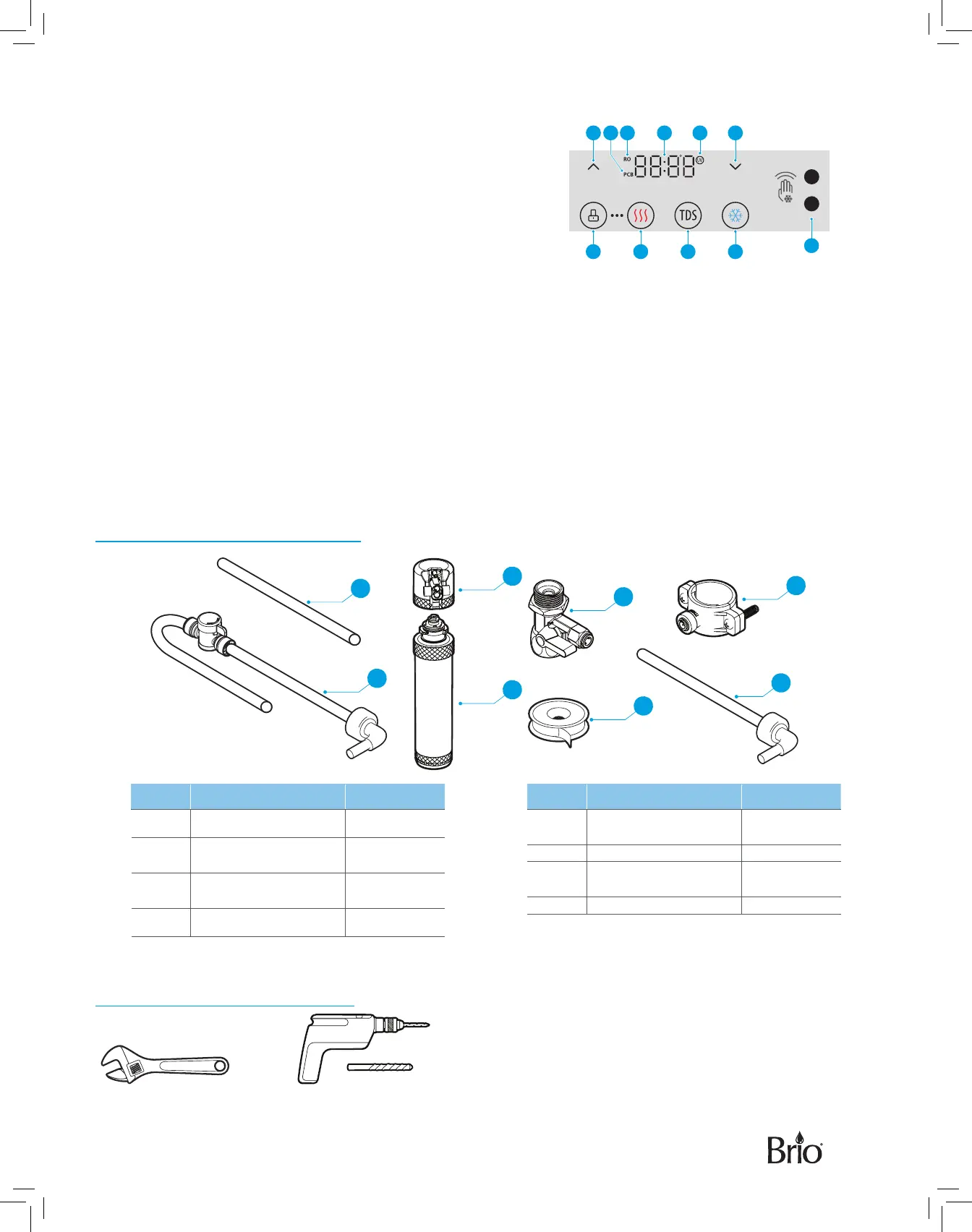
Touch Panel Description
1. Up arrow button – Press to set the time on the clock and increase
temperature settings.
2. PCB indicator – Indicates the PP+C1+C2 filter lifetime.
3. RO indicator – Indicates the RO filter lifetime.
4. Clock/Temperature display – Shows the time and water
temperature setting when setting the temperature of the hot or
cold water.
5. UV indicator – When flashing, indicates when dispenser is in self-cleaning mode.
6. Down arrow button – Press to set the time on the clock and decrease temperature settings.
7. Lock button – Press to lock the hot water button and to confirm temperature and time settings.
8. Hot water button – Press to dispense hot water.
9. TDS button – Press to check the total dissolved solids (TDS) of the water. This indicator light is always on. The
TDS displays for 2 seconds before water enters the system and then displays another 2 seconds when the water
exits.
10. Cold water button – Press to dispense cold water.
11. Touchless Motion Sensor - Hold hand over sensor for 1 second to dispense cold water. To disable touchless
dispensing, simultaneously press Lock button (7) and TDS button (9).
Package Contents
A
B
G
C
D
E
F
H
Part Description Quantity
A Filter flushing tube 1
B
Shut-o valve tube
(7 ft)
1
C
Filter housing (for
filter flushing)
1
D Filters 4
Part Description Quantity
E
Feed water adapter
(with extra nut)
1
F Plumber’s tape 1
G
Drain saddle with
foam gasket
1
H RO water outlet tube 1
Materials Needed
Wrench Electric drill with 1/4 in. drill bit
7 8 9 10
1 65432
1 Second
11


 To Next Page