142
EMBROIDERY — — — — — — — — — — — — — — — — — — — — — — — — — — — — — — — — — — — — — — — — — — — — —
Thread runs out partway
through a design
When the upper thread or the bobbin thread runs out
while sewing, the sewing machine stops. Move the
needle back about ten stitches and resume sewing.
a
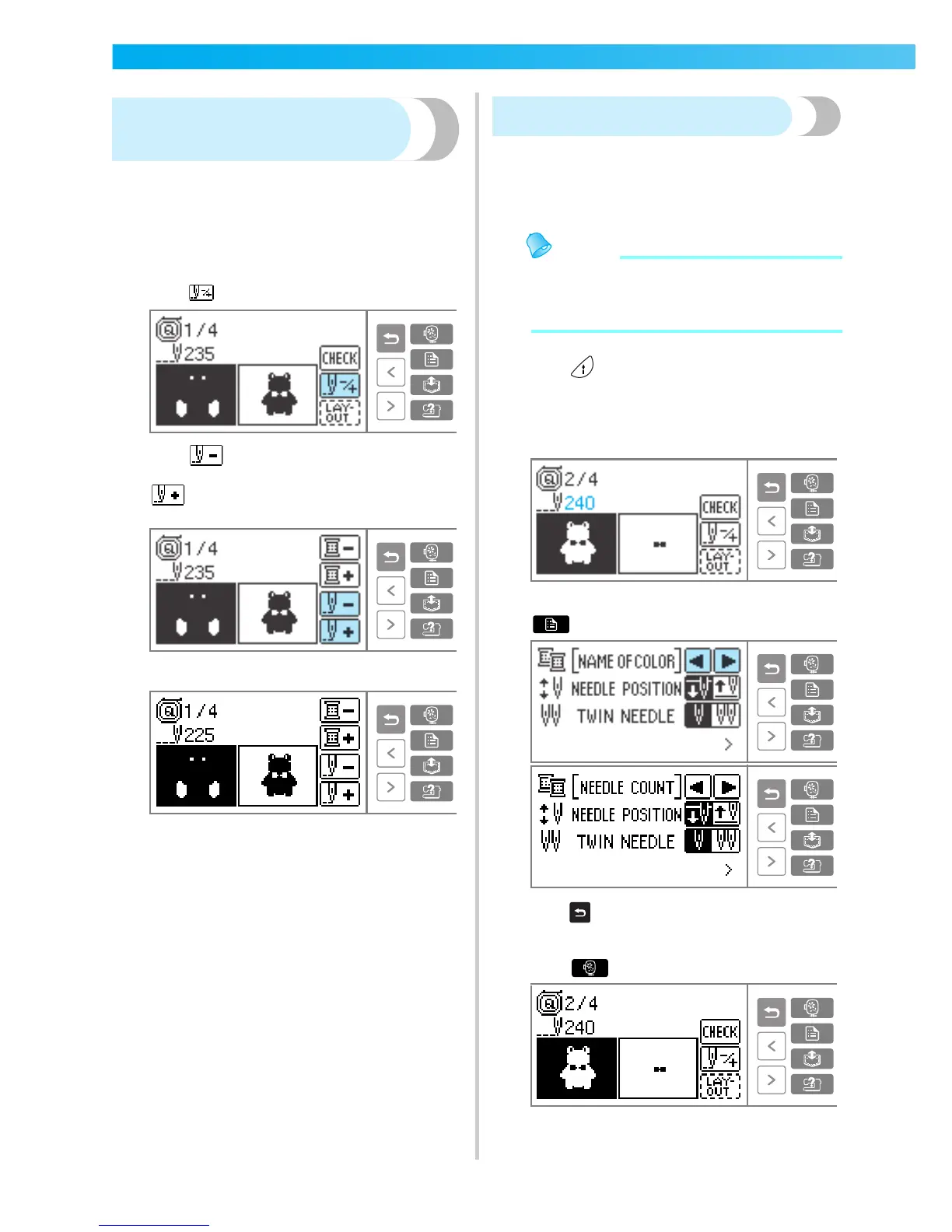
Set up the upper or bobbin thread.
b
Press .
c
Press (Back one stitch) to move the
needle back about 10 stitches.
(Forward one stitch) increases the stitch
number.
d
Restart the embroidery.
Stopping while embroidering
If the embroidery is stopped before it is complete,
check the current needle count before turning off the
sewing machine.
Memo
z When the sewing machine is turned off, the
embroidery size and layout return to the
original setting.
a
Press (Start/stop button) to stop the
sewing machine.
b
Check the current needle count on the LCD
and make a note of it.
If the needle count is not displayed, press
(Settings key) to switch the display.
Press (Back key) to return to the embroidery
screen.
c
Press (Embroidery key).
X The screen for checking the pattern is
displayed.











 To Next Page