6
Removing the Transport Packing
Materials
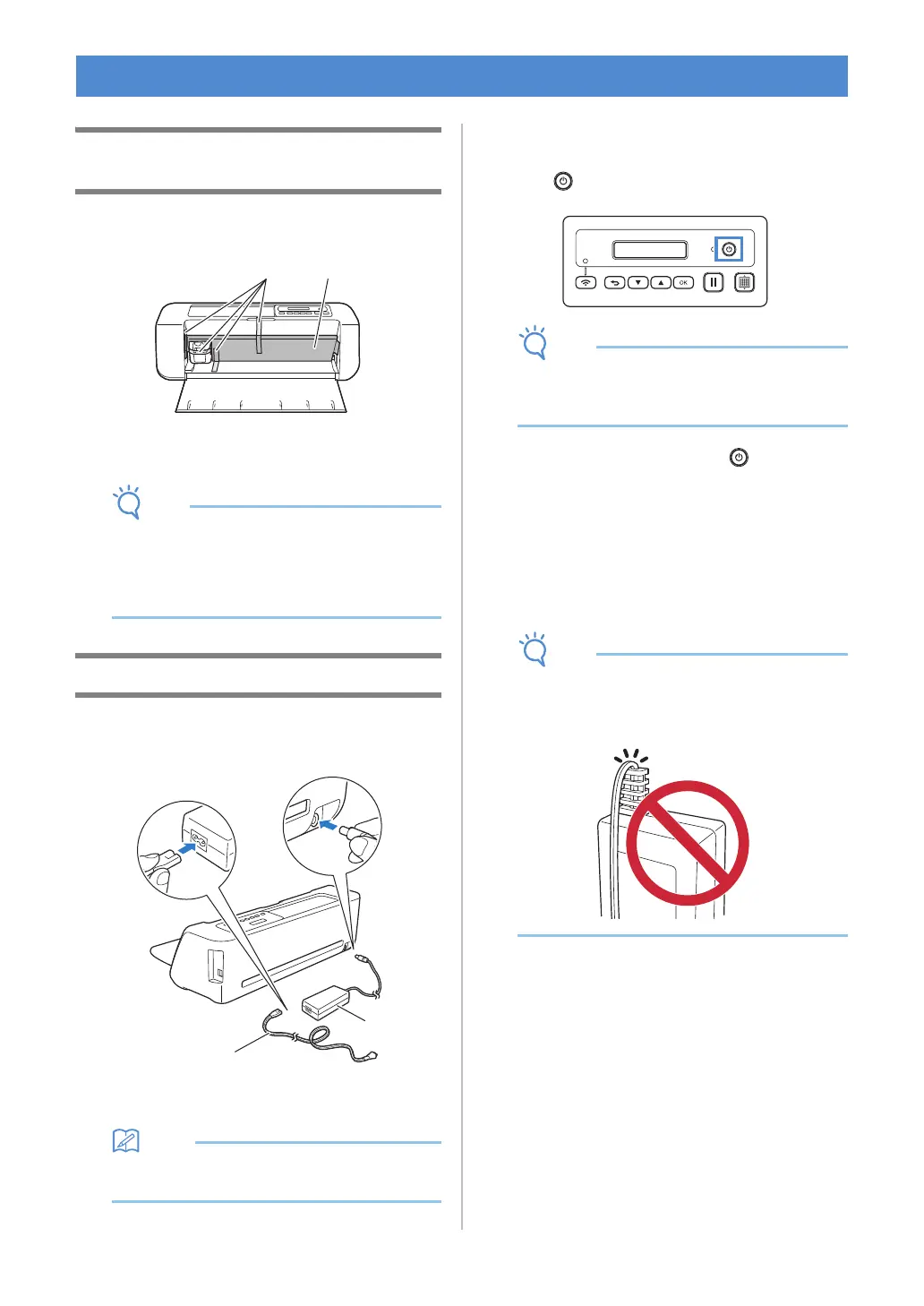
Before turning on the machine, remove the shipping
tape and the cardboard shock-absorbing material.
a Shipping tape
b Cardboard shock-absorbing material
• If the packing materials were removed after the
machine was turned on, turn the machine off,
then on again. Continuing to use the machine
without restarting it may result in incorrect
operation.
Turning On/Off the Machine
a Connect the power cord to the AC adapter, and
then connect the AC adapter to the machine.
a Power cord
b AC adapter
• When using the AC adapter, untie the bundled
cord.
b Plug the power cord into an electrical outlet.
c Press in the operation panel.
• The carriage and mat move to their initial
positions. Be sure to keep your hands away
from the carriage.
d To turn off the machine, press in the
operation panel.
e Unplug the power cord from the electrical
outlet.
f Disconnect the AC adapter from the machine,
and then disconnect the power cord from the
AC adapter.
• Do not wind the AC adapter cable around the
adapter or bend the cable, otherwise the cable
may be damaged.
TURN ON THE MACHINE


 To Next Page