26
Ch. 2 Getting Started
Getting Started
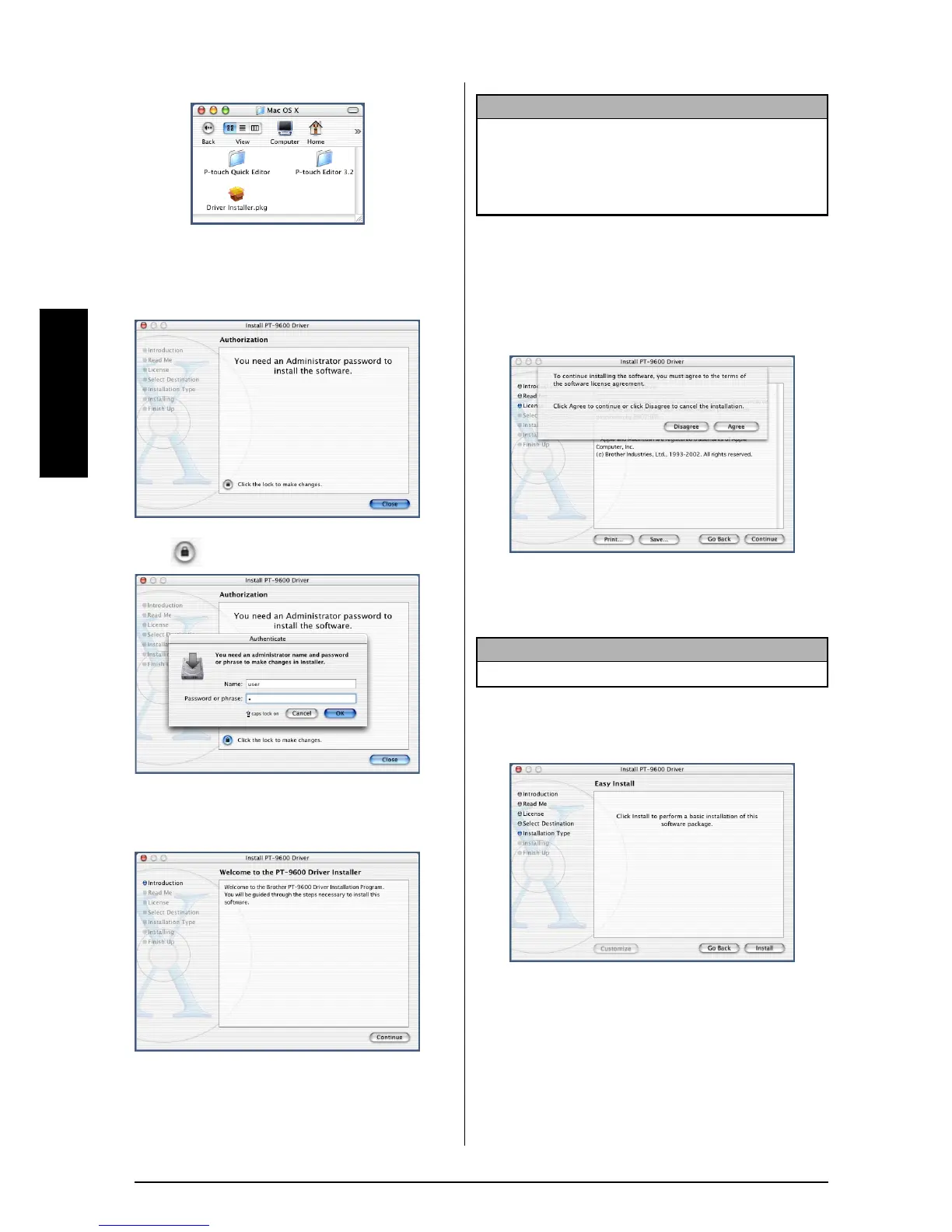
4 Double-click the Mac OS X folder to open it.
5
Double-click the Driver Installer icon in the folder
that appears. The installer starts up, and then a
dialog box appears, stating that the administrator
password is required in order to install software.
6
Click . The Authenticate dialog box appears.
7
Type the administrator name and password into
the appropriate boxes, and then click the OK
button. The Introduction dialog box appears.
8 Click the Continue button. A dialog box
describing the system requirements appears.
9
After checking that your computer meets the speci-
fied requirements, click the Continue button. A dia-
log box containing the license agreement appears.
0 After reading the license agreement, click the
Continue button. A message asking if you
agree to the license agreement appears.
A
If you agree, click the Agree button. A dialog
box appears, allowing you to select the vol-
ume where the printer driver will be installed.
B
Select the desired volume, and then click the
Continue button. A dialog box appears, describ-
ing how the printer driver will be installed.
C Click the Install button. A message appears,
explaining that the computer must be
restarted after the printer driver is installed.
D
Click the Continue Installation button. After the
printer driver is installed, a dialog box appears,
indicating that the installation is finished.
E
Click the Restart button to restart the computer.
NOTE
When the Continue button is pressed, a message may appear,
warning that an older version of the printer driver is installed. Be
sure to uninstall the older version of the printer driver before try-
ing to install the new driver. For details on uninstalling the
printer driver, refer to To uninstall the printer driver: on page 37.
NOTE
If the Disagree button is clicked, the installation will be cancelled.



 To Next Page
 Loading...










