ASSEMBLY TO TRACTOR
SET-UP INSTRUCTIONS.
WARNING
Use a overhead hoist/crane, or forklift, and Lift
Straps with adequate capacity to lift the Conveyor
Assembly.
Fit a C-Clamp at the tip of the forks, to prevent the
possibility of the Lift Straps sliding off the end of
the forks.
Work on a firm level area, preferably concrete, that
is free of obstructions.
To remove the Conveyor from the tractor shipping
mounts:
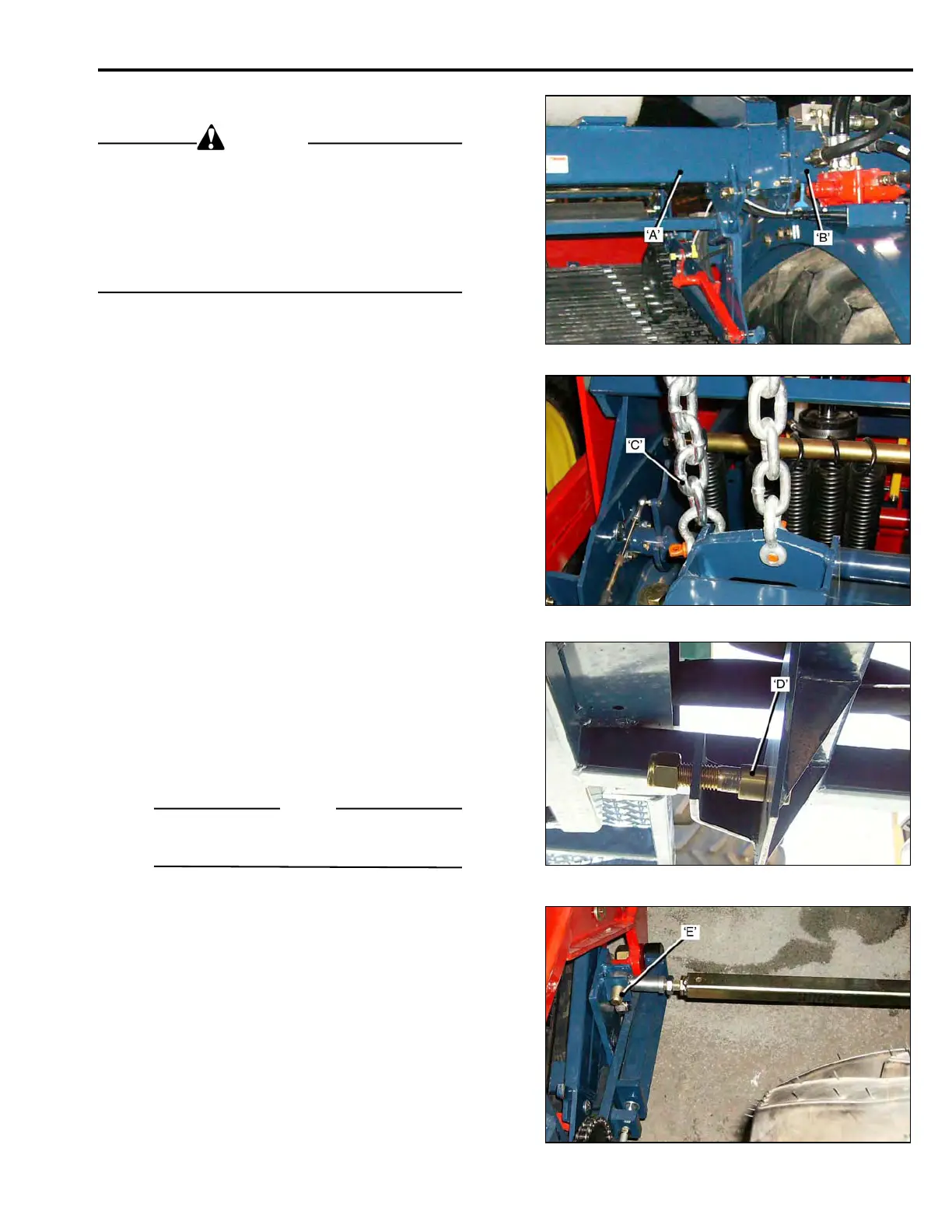
• Attach Lift Straps around the Main Beam Ext-
ension ‘A’, and the Depth Control Bracket.
• Remove the fasteners securing the Conveyor
to the shipping brackets on the tractor, and
carefully lift the Conveyor clear, and position
it alongside the tractor.
To attach the conveyor to the tractor:
• Raise the Conveyor Assembly until the Conveyor
Beam Extension ‘A’, is aligned with the Tractor
Main Beam ‘B’, and bolt them together.
• Attach the Lift Arm Chains ‘C’,. Secure the
Shackle Pins with wire.
Install the Track-Rod:
• Attach the Track-Rod to the Mounting Brackets ‘D’,
on the Tractor.
• Attach the Track-Rod to the Bracket ‘E’, on the
Conveyor Frame.
NOTE
The Track-Rod length is set at the factory, do
not adjust.
2-01



 To Next Page