Power
24
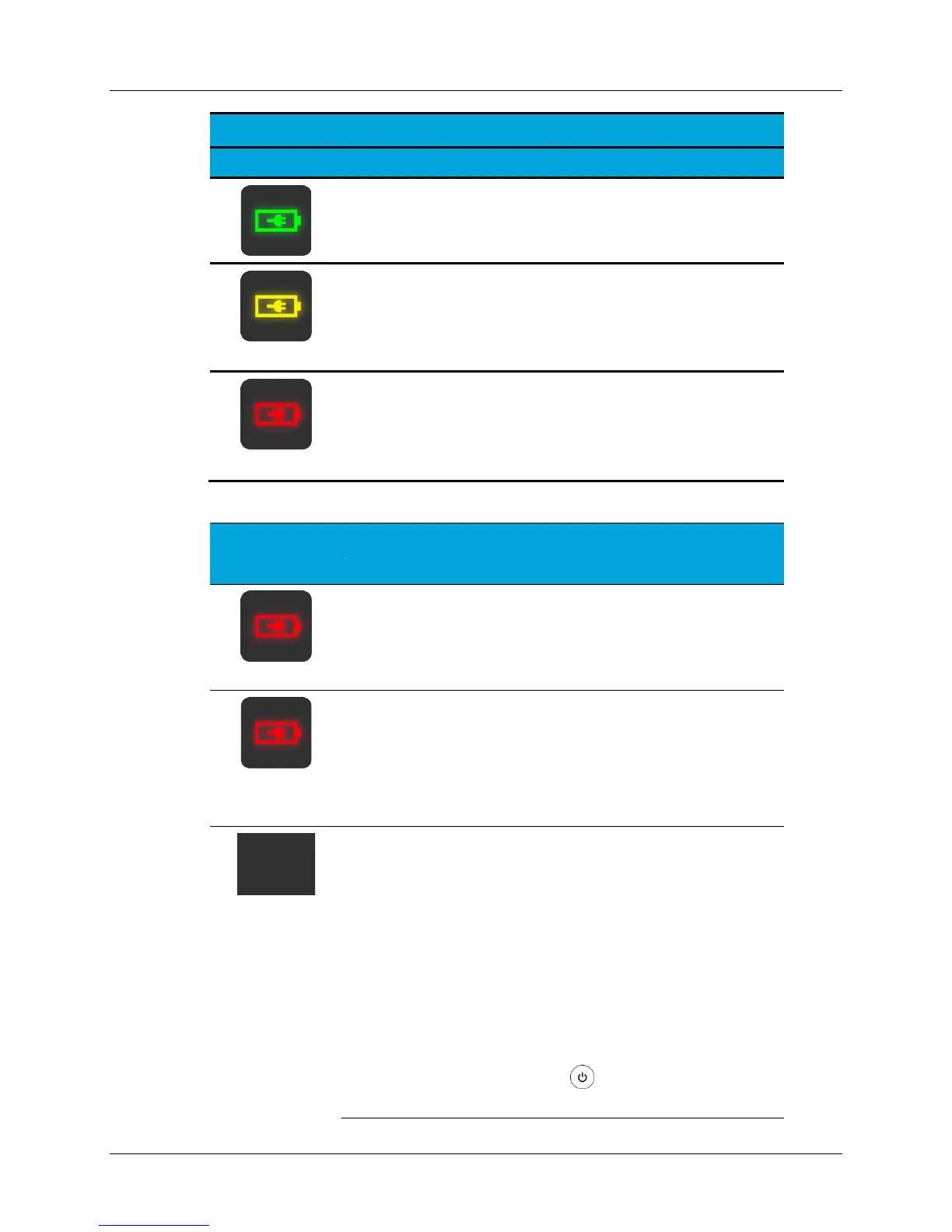
Control Unit Turned Off & AC Connected
Steady green indicates Control Unit is connected to AC
power and battery is fully charged.
Steady yellow indicates Control Unit is connected to AC
power and battery is charging.
(Blinking)
Blinking red (once per second) indicates Control Unit is
connected to AC power and has a battery error.
Control Unit Turned Off & AC Not Connected
(Blinking)
Blinking red (once every 10 seconds) indicates Control
Unit is not connected to AC power and reminds to plug
into AC power (Charge greater than 30%.)
(Blinking +
Audible Alert)
Blinking red (once every 10 seconds) and an audible
alert indicates Control Unit is not connected to AC, the
battery has reached a low charge state, and reminds to
plug into AC power immediately. (Charge between 20%
and 30%.)
(Not illuminated)
Battery icon not illuminated while the Control Unit is
turned OFF indicates:
AC power is not connected and battery has reached a
critically low state, causing the Control Unit to enter
battery saving mode. (Charge less than 20%.) Plug into
AC power immediately.
OR
AC power is not connected and battery has an error.
Note: Connecting the Control Unit to AC power and
pressing the
Power button will bring the Control
Unit out of its low power/battery saving mode.


 To Next Page