Overview
5
Indictor/
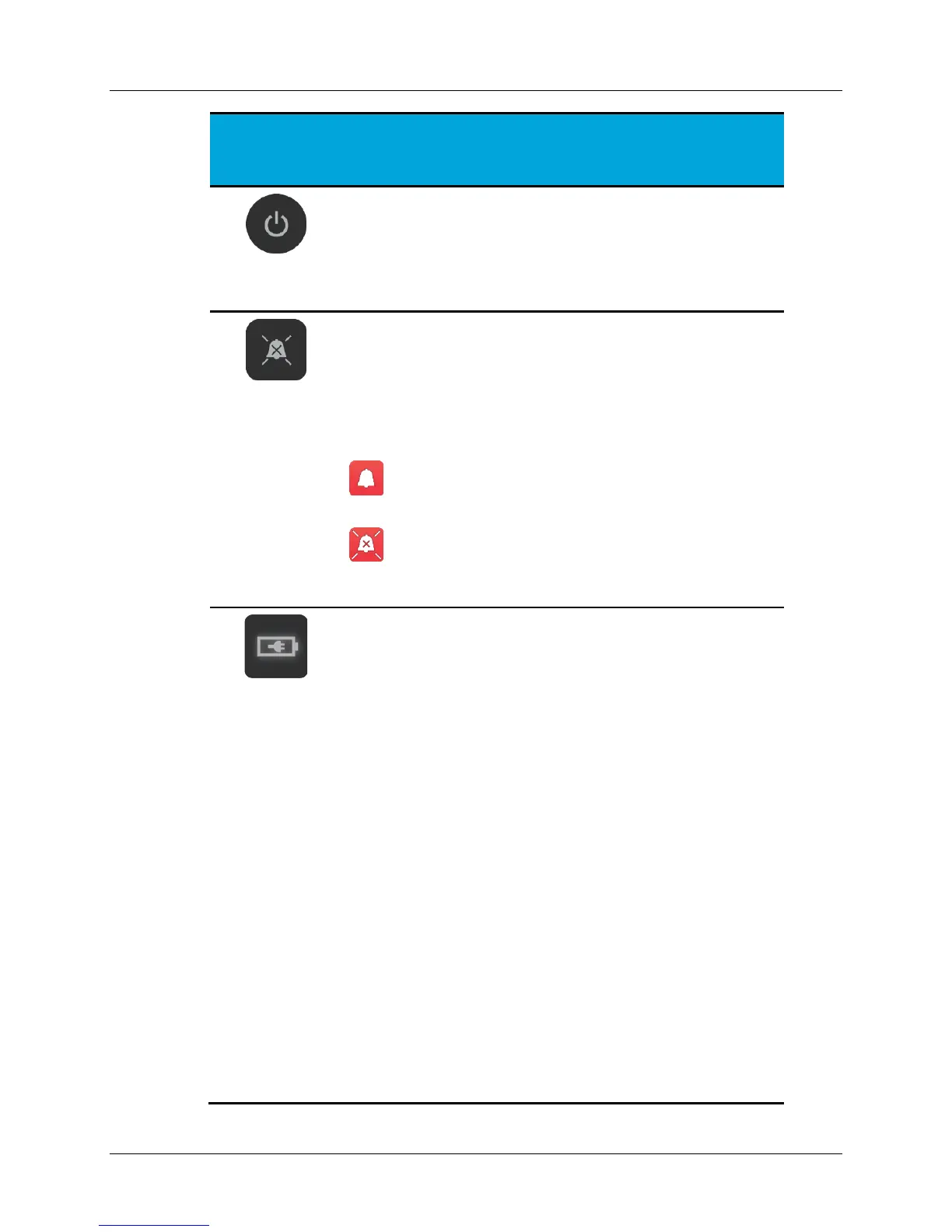
Turns the Control Unit ON and OFF. When the Control
Unit is ON, a green LED illuminates. Press and hold the
button for 3 seconds to turn the Control Unit OFF.
Silences the audio alert tone for 5 minutes when
pressed. Pressing the button when audio is silenced
turns ON the audio alert tone.
Note:
When audio alert tone is ON, the alert icon
displays on the screen.
When the audio alert tone is silenced, the alert
icon is crossed-out indicating audio is silenced.
AC Power/Battery Charging Indicator:
Illuminates when the Control Unit is OFF, indicating
battery charge status. (Note: this icon is not visible when
the Control Unit is ON.)
When the Control Unit is connected to AC power:
• Steady green indicates battery is fully charged.
• Steady yellow indicates battery is charging.
• Blinking red (once per second) indicates a
battery error.
When the control Unit is not connected to AC power:
• Blinking red (once every 10 seconds) reminds to
plug into AC power. (Charge is greater than
30%.)
• Blinking red (once every 10 seconds) and an
audible alert indicates the battery has reached a
low charge state and reminds to plug into AC
power immediately. (Charge between 20% and
30%.)
• No light indicates the battery has reached a
critically low state causing the Control Unit to
enter a battery saving mode. (Charge less than
20%.) Plug into AC power immediately. If the


 To Next Page