Installation and Connections
SM-DIN/MULTILOOP.. - 2.10 -
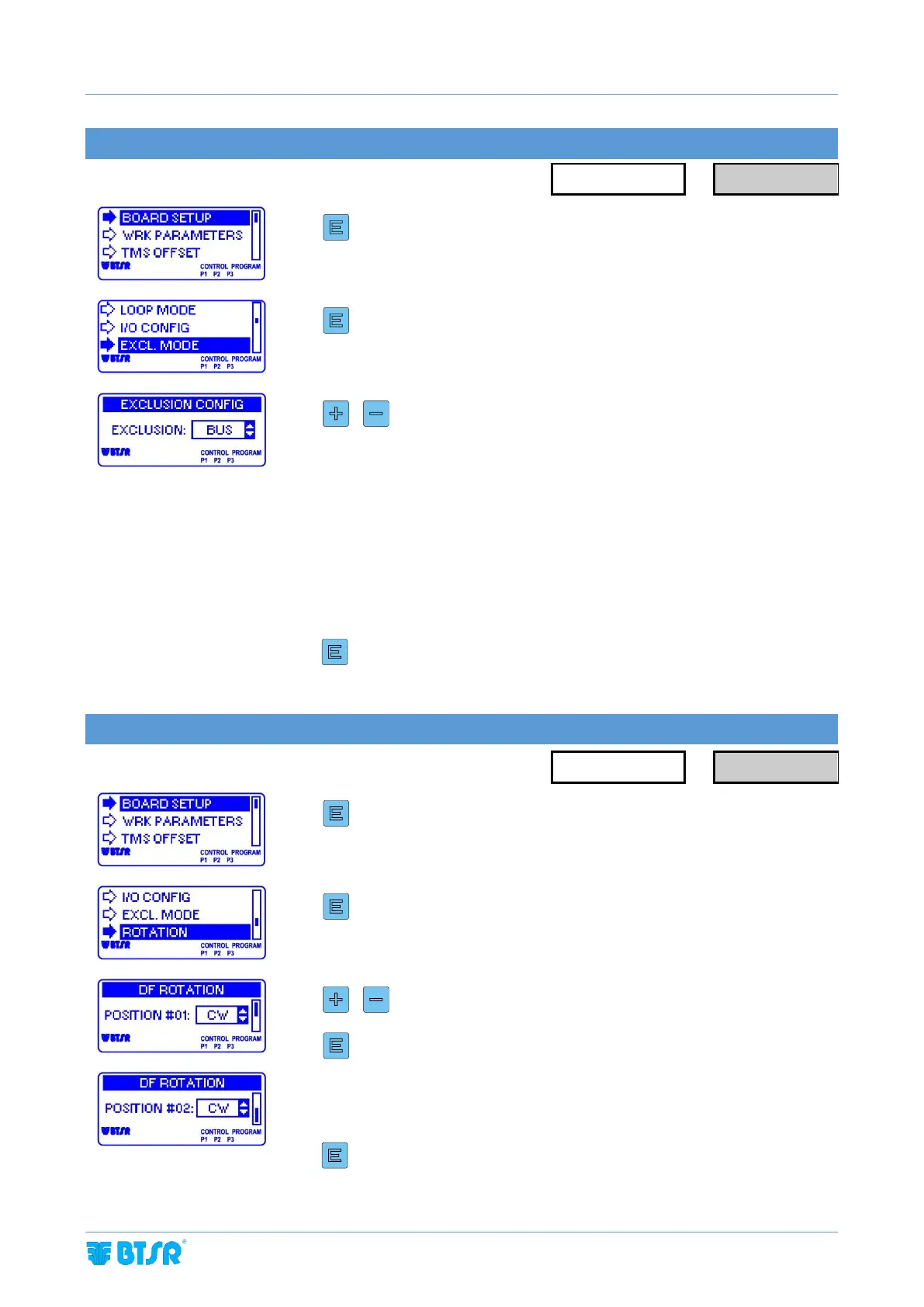
EXCLUSION SIGNAL CONFIGURATION
Enter the BOARD SETUP menu.
To change the parameter value
BUS = The exclusion signal is activated by field Bus or PLC
EXT = The exclusion signal is activated by a digital I/O line of the machine
PLC
AUTO = The exclusion signal is activated in automatic mode according to the
yarn feeding speed (to be used only in case of unavailability of BUS
or external signal)
3 sec to confirm and go back to BOARD SETUP menu
DIAPER FEEDER DEVICE MOTOR ROTATION CONFIGURATION
Enter the BOARD SETUP menu.
Select ROTATION. This parameter allows you to set the Diaper
Feeder device motor rotation direction
To change the parameter value
CW = clockwise rotation
CCW = counterclockwise rotation
3 sec to confirm and go back to BOARD SETUP menu



 To Next Page