28
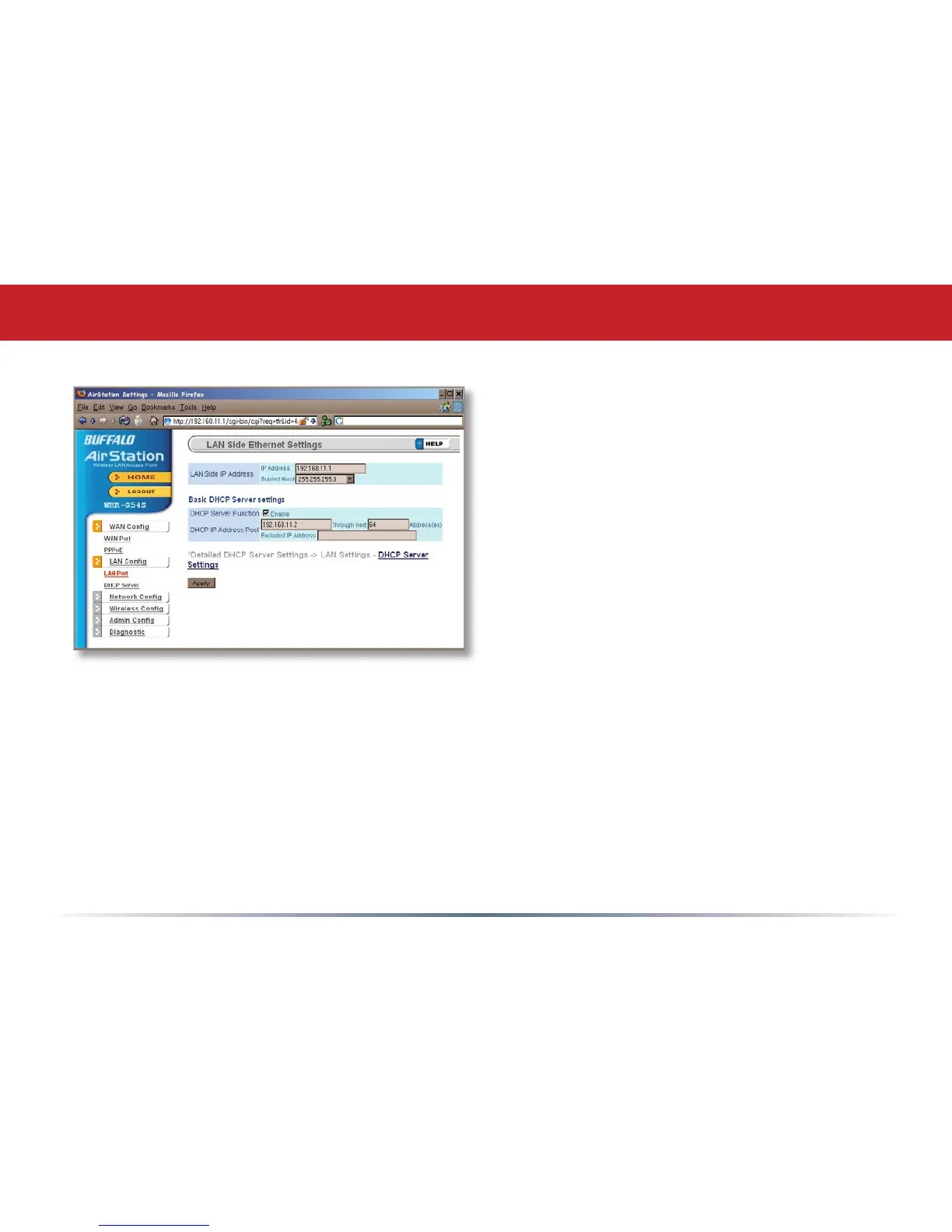
LAN Config (LAN Port)
Default for the LAN side IP address is
192.168.11.1. To add the AirStation to an
existing LAN, specify a unique IPaddress, not
used elsewhere in the network.
The default Subnet Mask is 255.255.255.0.
To connect AirStation to an existing LAN,
specify the Subnet Mask that the LAN uses.
If there’s more than one DHCP server on
a network, disable all but one of them.
To have DHCP assign addresses from a
specic range, enter a begining address by
Assigned IP Address and give the number
of addresses to assign in the Addresses box. To exclude specic addresses from being
assigned by DHCP, specify them in the Excluded IP Address box. Multiple IP addresses
may be specied by seperating them with a comma, e.g. 192.168.11.7,192.168.11.9. You
can also specify an IP address range by start and end address connected by a dash, e.g.
192.168.11.15-192.168.11.21. The ‘,’ and ‘-’ can be used at the same time, e.g. 192.1
68.11.7,192.168.11.9,192.168.11.15-192.168.11.21, up to a total string length of 128
characters.
Click the Help link in the top right corner for more information.



 To Next Page
 Loading...










