Nivotemp NT MD
5.7.4 Switching output x: Switch-on delay
The menu
Advanced Functions
EFx is used to configure additional settings for switching output x. The submenu is at the second
submenu level.
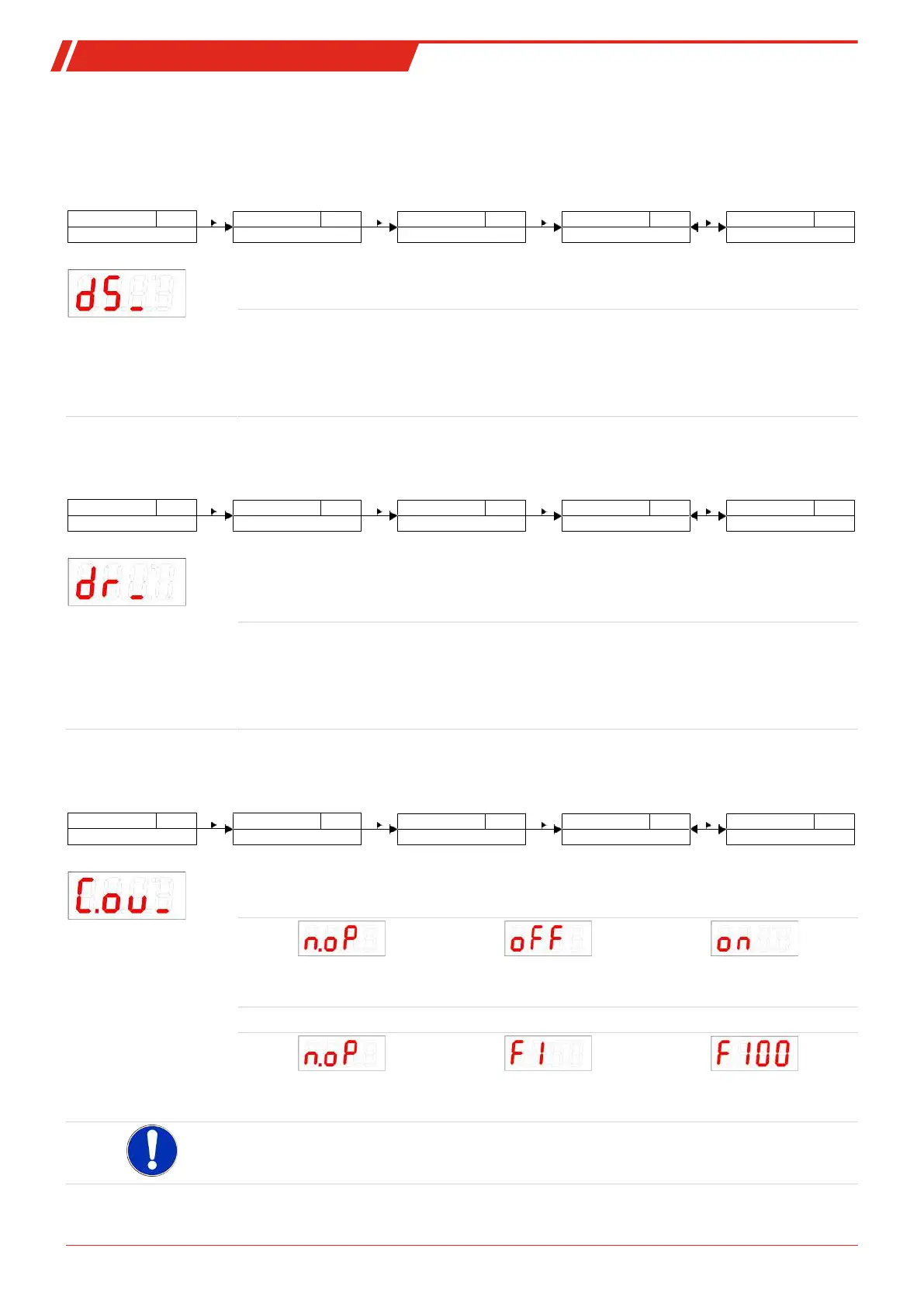
The switching and switch-back delay prevents the alarm being triggered too frequently in unstable conditions. The switching
delay can be configured with the following menu:
Measured variable
____
out_
Measured variable main menu
Out X
EF_
EF X
Advanced Functions
dS_
Delay SP X
Delay OUTX On
___
Selection menu
0 - 100
Settings menu OUTX
Setting range:
0…100 seconds
Time span in seconds during which the signal must be continuously present for the switching out-
put to respond.
Note:
– If switching output OUTx was assigned the function
Window
, the setting corresponds to the
switch-on delay which detects valid reaching of the measuring window.
– If switching output OUT x was assigned the function
Frequency output
, this value will have no
affect.
5.7.5 Switching output x: Switch-back delay
The switch-back delay can be configured with the following menu:
Measured variable
____
out_
Measured variable main menu
Out X
EF_
EF X
Advanced Functions
dr_
Delay RP X
Delay OUTX Off
___
Selection menu
0 - 100
Settings menu OUTX
Setting range:
0…100 seconds
Switch-back signal delay for OUT x.
Time span in seconds during which the signal must be continuously present for the switching out-
put to respond.
Note:
– If switching output OUTx was assigned the function
Window
, the setting corresponds to the
switch-on delay which detects valid closing of the measuring window.
– If switching output OUTx was assigned the function
Frequency output
, this value will have no
affect.
5.7.6 Switching output x: Testing the switching output
The switching output test can be started with the following menu:
Measured variable
____
out_
Measured variable main menu
Out X
EF_
EF X
Advanced Functions
C.ou_
Check Out X
Functional test OUTX
____
Selection menu
n.oP - on
Settings menu OUTX
Switching output test option
Options when setting ou1 to Hno / Hnc / Fno / Fnc:
Normal switching output opera-
tion
Switching output permanently
off disabled
Switching output permanently
activated
Options when setting ou1 to FM:
Normal mode as frequency out-
put
Output
Frequency 1 Hz
Output
Frequency 100 Hz
Note:
–
After completing the test, set the function to normal mode
n.oP
.
20 Bühler Technologies GmbH BE100022 ◦ 11/2020



 To Next Page