OPERATION
54
BACKLIGHTING ADJUSTMENT:
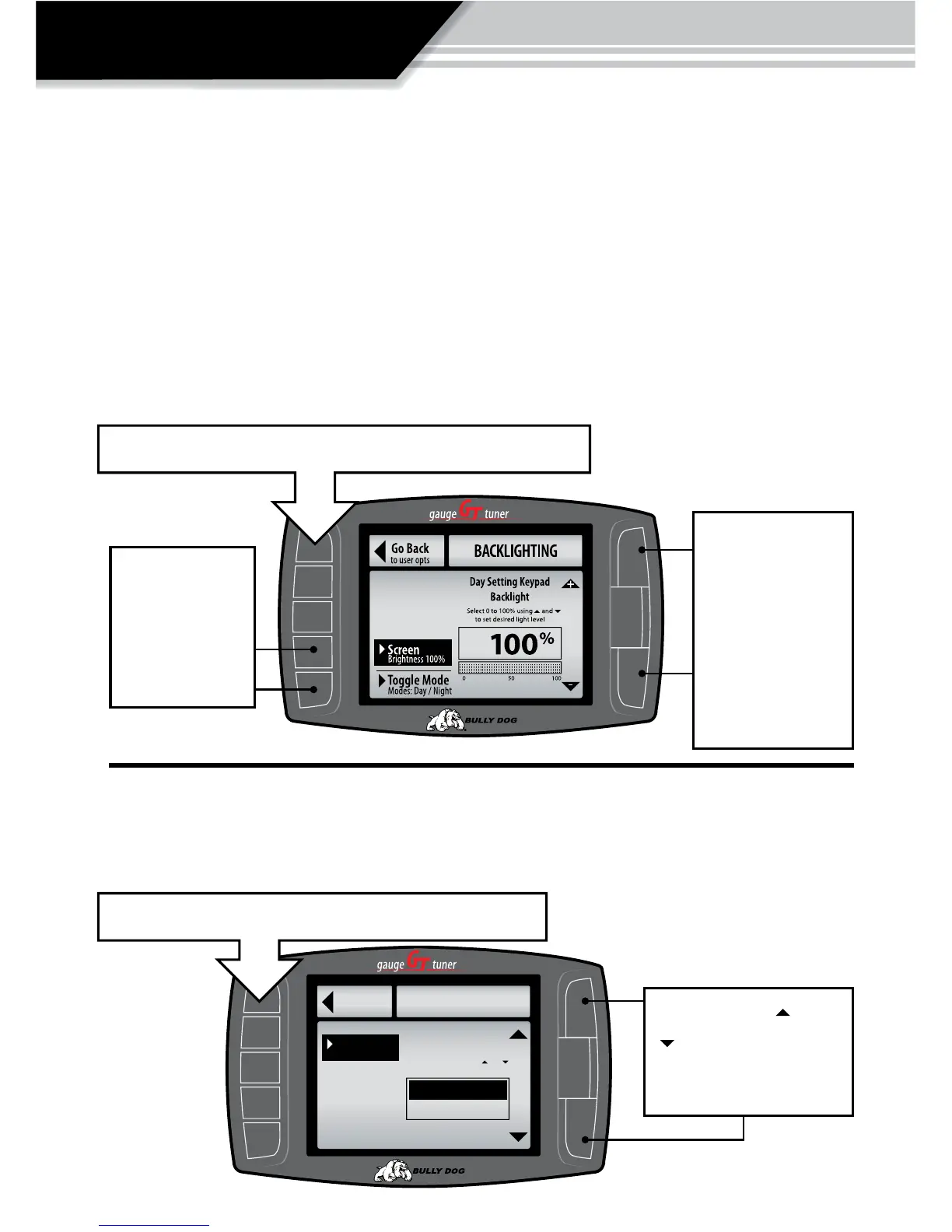
The backlighting for the GT can be set for both a Day and Night mode. The GT switches be-
tween day and night modes based on whether the vehicle head lights are turned on or o. If
the vehicle headlights are turned o the GT backlighting will switch to day mode settings, if
the lights are on the backlighting will switch to night mode settings. See the diagram below
for an illustration of the “Backlighting Menu,” items.
Once day and night mode settings are set to the preference of the driver, simply touch the
“Go Back,” button to exit this menu and the settings will automatically take eect.
Use these
buttons to select
either screen
brightness or
Day/Night mode
Use the Up &
Down arrow keys
to adjust the total
percentage of light
emitted by the
screen in either
Day mode & Night
mode.
SCREEN COLORS
There are over a dozen to choose from and many more will be added. The GT color theme
will change as a new theme is highlighted to provide a preview.
®
Go Back
Background
COLOR SETUP
Black
Background
Select 0 to 100% using and
to change the gauge function
to user opts
Black
Red
simply exit the menu and the selection will automatically take eect.
Exit the menu and the selection will automatically take eect.
Use the large Up Down
Buttons to scroll up and
down through the color
options.



 To Next Page