1067
POSITIONER TYPE 1067
E-17-
4 OPERATION
4.3 Setting up
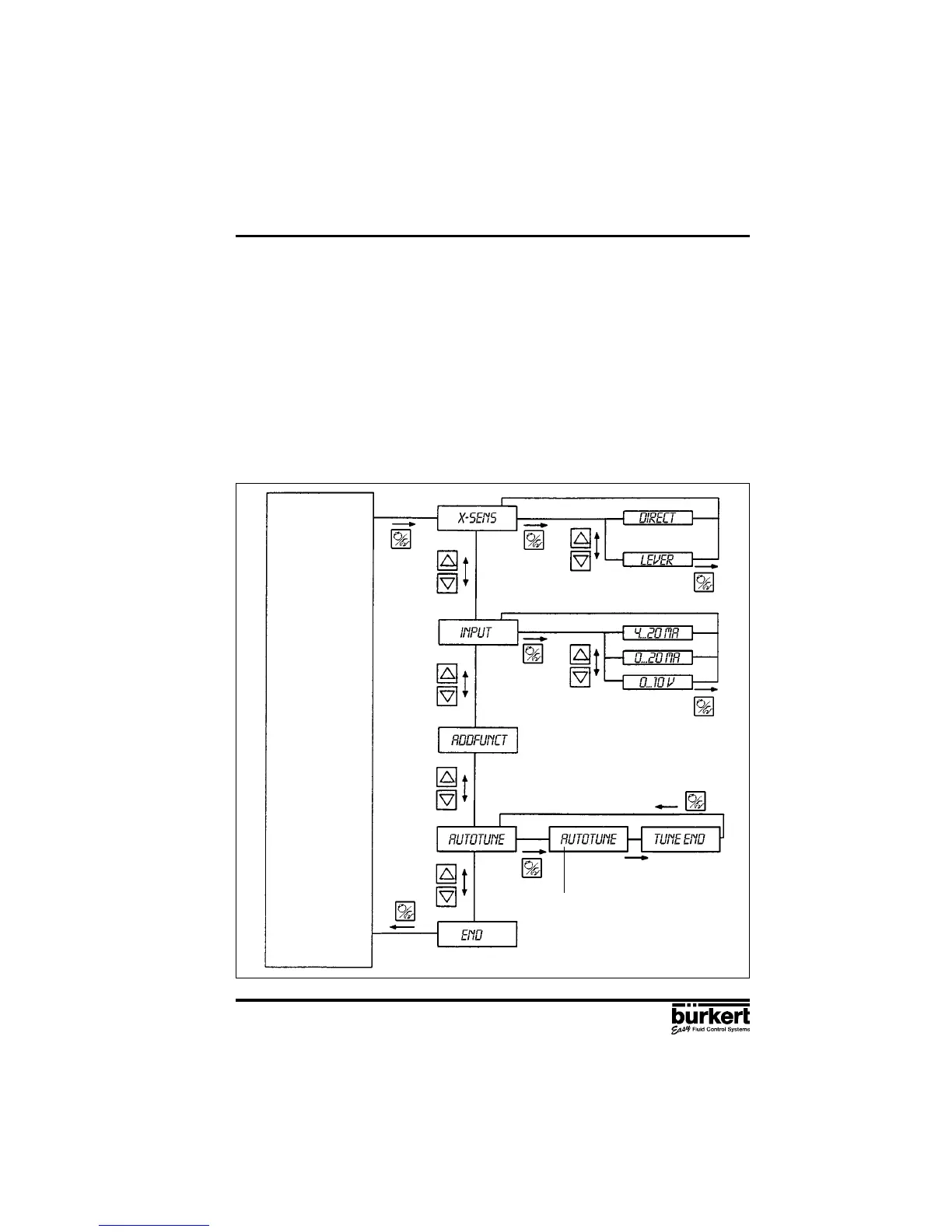
The following basic settings are to be carried out on the initial setting up (commissioning) of the
positioner in conjunction with the 2632 angle-seat control valves (specification of basic functions):
- Specification of the positional feedback of the continuous valve to the positional transducer (direct
or lever),
- Specification of the unit signal input chosen for entering the set position (0 ... 20 mA, 4 ... 20 mA
or 0 ... 10 V),
- Initiating the automatic adaptation of the actuator to the valve being used.
When the power is switched on, the positioner is in the process control level. It is necessary to switch
to the configuration level for specification of the basic functions. To do this, press the MANUAL/
AUTOMATIC key and hold for 5 seconds. The first menu point X-SENS of the main menu is then
displayed.
Fig. 21 Main menu for first setting up
Function
AUTOMATIC
or
MANUAL
after 30 to 120 sec.
BLINKING



 To Next Page