10
3.0 Presets
AURORA has 10 preset memories for FM, which work in the same way as DAB mode
presets
3.1 Now playing information
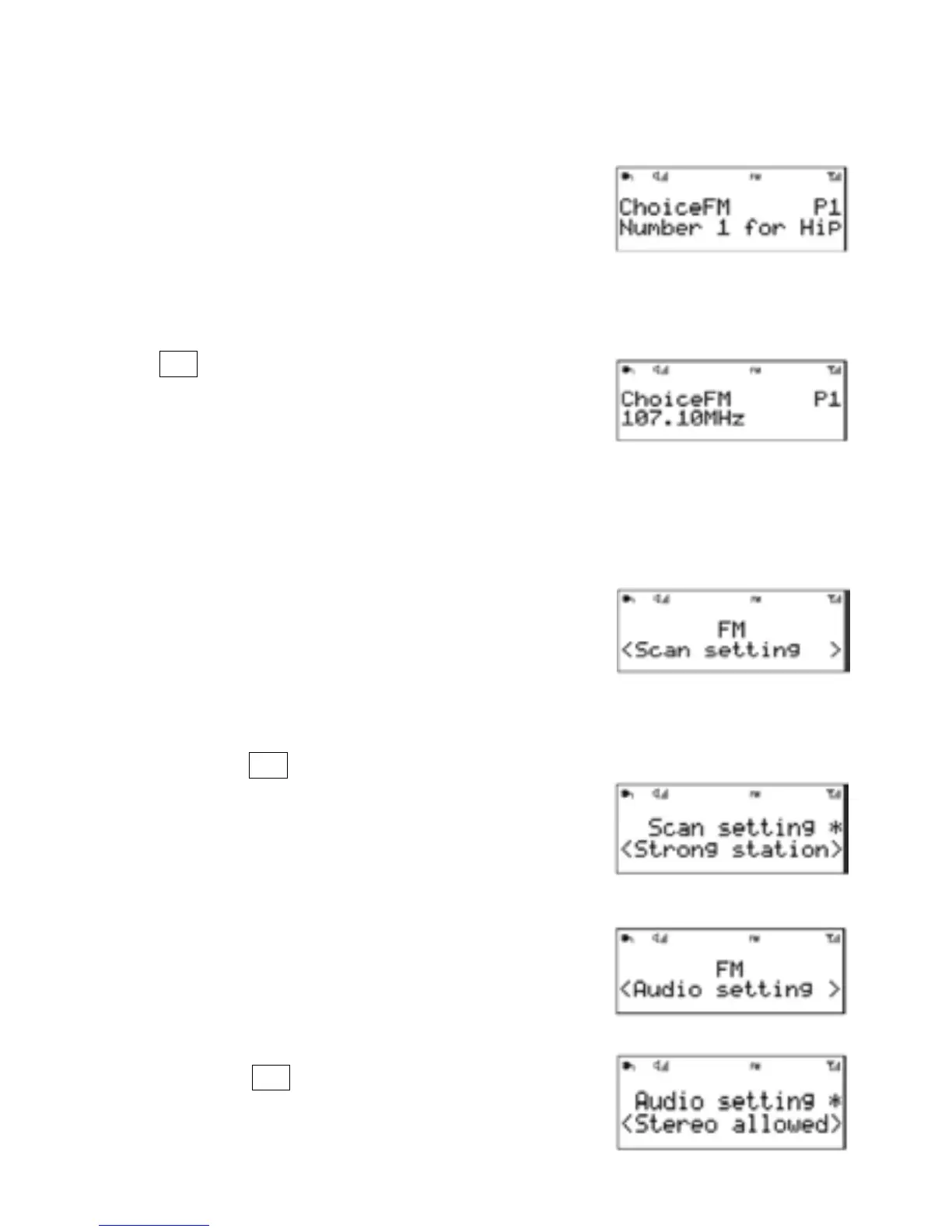
1. While FM radio is playing, the screen shows its
frequency, or if RDS information is available, station
name and any further ‘RadioText’ information.
2. If no information is available, just the frequency and a No
RadioText message is shown.
3.To view further information about the broadcast
Press .
Each time you press Info , the next set of
information is displayed, cycling through:
RDS RadioText, programme type, station name,
mono/stereo, time,date.
3.2 Settings
3.2.1 Scan settings
1. By default, FM scan stops at any available station
(All stations). This may result in poor quality audio
from weak stations.
2. Options: All stations | Strong stations only
To change the scan settings, to stop only at stations with good signal strength
1.Press and hold > Scan setting then Strong stations only.
2.Note: In the example screen on the right, the
asterisk indicates ‘Strong stations only’ is the
currently set value.
3.3 Audio settings
1. By default, all stereo stations are reproduced in stereo.
2 . For weak stations, this may result in poor quality audio.
The audio quality can be improved using mono.
Options: Stereo allowed | Forced mono
To play weak stations in mono
3. Press and hold > Audio setting > Forced mono.
4. Note In the example screen on the right, the
asterisk indicates ‘Stereo allowed’ is the currently
set value.
Menu
Info
Menu
Info
Menu
Info


 To Next Page