Getting to know your TV
You’ll be up and running in no time
Getting to know your TV
14
If you require any technical guidance or find that your TV is not operating as intended, a simple solution can often be found in the Troubleshooting section of these instructions,
1
2
3
4
5
6
0
LANG.
BACK
MENU
OK
EXIT
Q.MENU
/
V
/
V
P
P
7 8
9
.,/@
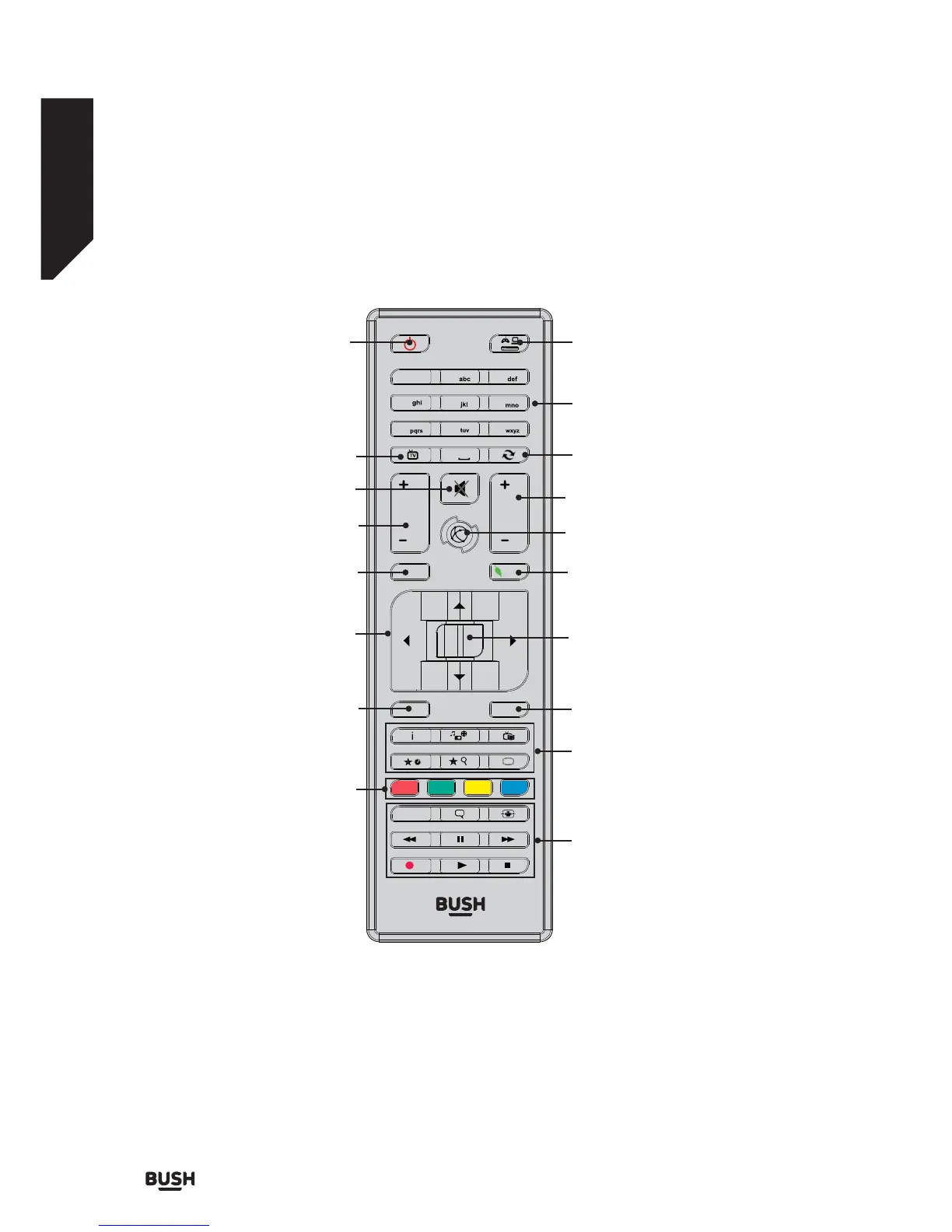
Coloured buttons: See page 15
for button functions
Directional buttons: Helps navigate
menus, content, etc. and displays the
subpages in TXT mode when pressed
right or left
OK: Confirms user selections, holds the
page (in TXT mode), views channel list (in
DTV mode)
Swap: Quickly cycle between previous and
current channels or sources
Standby: Switches TV
on/off
See page 15 for button functions
Volume +/-
Menu: Displays TV menu
TV: Displays channel list /
switches to TV source
Exit: Closes and exits from displayed menus or
returns to the previous screen
Back/Return: Returns to previous screen,
opens index page (in TXT mode)
Numeric buttons (0-9):
Switches the channel, enters a number or
letter in a text box on screen
Source:
Shows all available broadcast and content
sources
Mute: Completely turns off the
TV volume
Button not used
Quick Menu: Displays a list of menus for
quick access
Programme +/-
See page 15 for button functions














 To Next Page