SETTING UP YOUR LED LCD TV
How to install the TV Stand
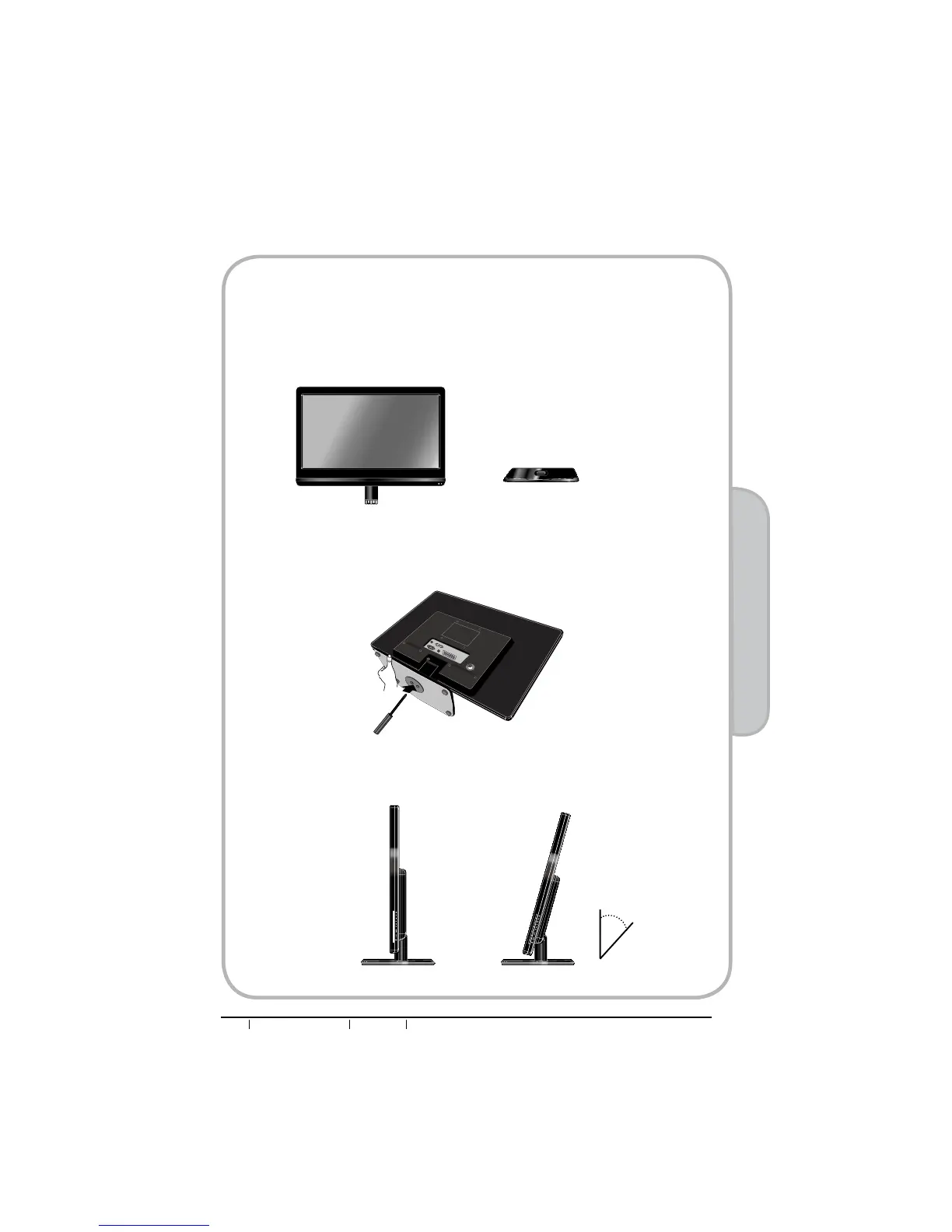
Follow the instructions below to install the TV stand:
nOpen the box, and make sure all necessary parts are in the box. The package contains:
oCover an even stable surface with a soft cloth. Place the LED LCD TV unit face-down on the
cloth. Fit the stand onto the bottom of the LED LCD TV unit as shown, then use a screw
GULYHUWRWLJKWHQWKHVFUHZRQWKHERWWRPRIWKHVWDQGXQWLOWKHVFUHZLV¿UPO\¿[HGLQSODFH
LED LCD TV
Stand
pIn order to ensure a healthy and relaxed body position when using the TV at
visual display workstations, you are able to adjust the TV’s angle of the stand.
The angle of the LED LCD TV may be adjusted approximately 20 degrees.
20
o


 To Next Page