27
BUSH HD Ready LED LCD TV User Manual Helpline: 0845 604 0105
04 Using the features
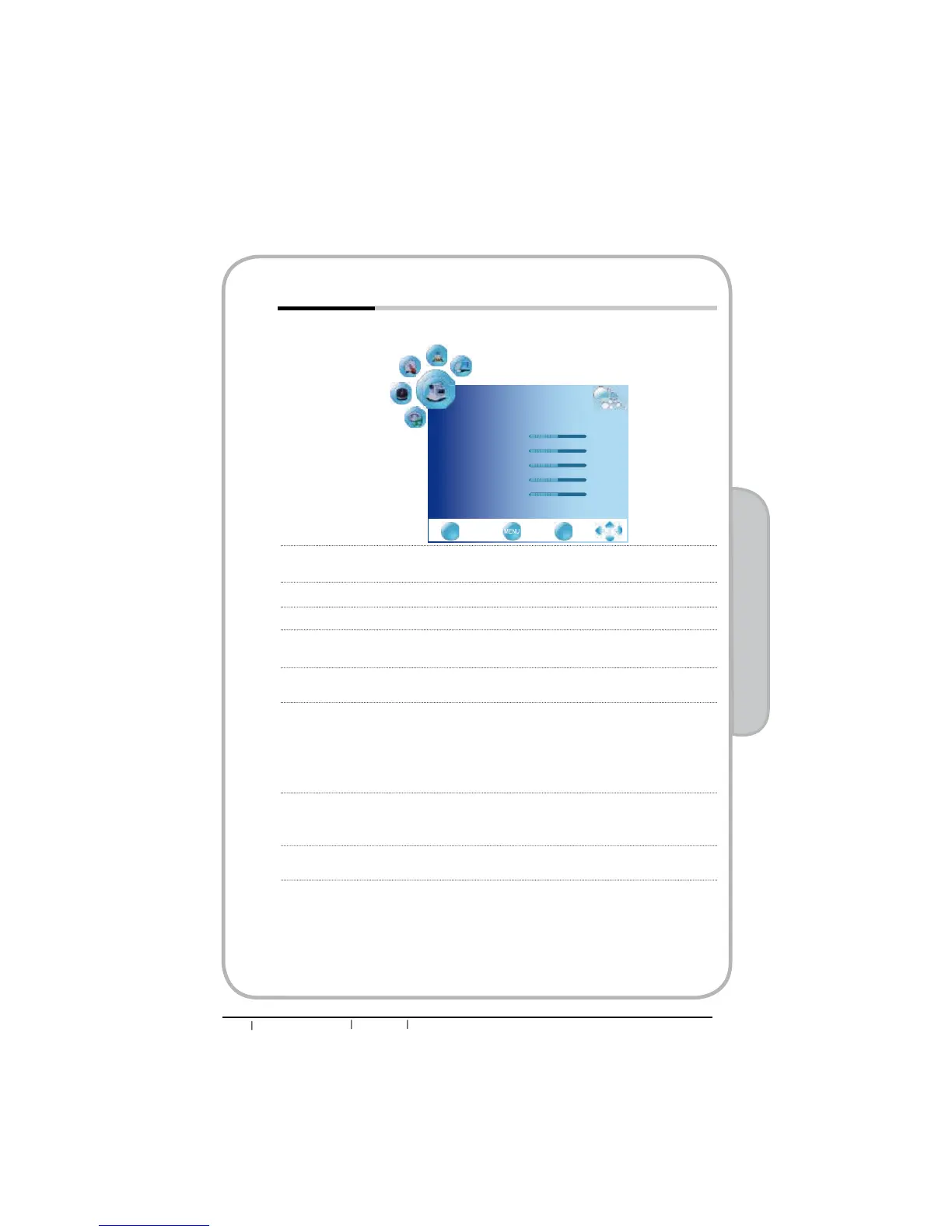
qThe PICTURE menu includes the following options:
Picture Mode Cycles among display types: User/Mild/Standard/Dynamic
User: Allows to store your preferred settings.
Contrast Controls the difference between the brightest and darkest regions of
the picture.
Brightness Controls the overall brightness of the picture.
Color Controls the color intensity.
Sharpness Increase this setting to see crisp edges in the picture; decrease it for
soft edges.
Tint Controls the difference between the green and red regions of the
picture.
Color Temperature Adjusts color components independently to achieve a warm or cool
effect: Cool/Warm//Standard/User
ƒWarm: Increases red tint
ƒCool: Increases blue tint
ƒUser: Allows the user to adjust red, green and blue color
component levels independently.
Aspect Ratio Selects through Wide mode settings :
In TV and video mode: Auto/4:3/16:9/ZOOM1/ZOOM2
In VGA/DVI mode:4:3/16:9
Noise Reduction
Select to reduce the noise level of connected equipment: Off/On
PICTURE
Picture Mode User
Contrast 50
Brightness 50
Color 50
Sharpness 50
Tint 50
ź
EXIT
Quit Back Select
OK


 To Next Page