If you require any technical guidance or find that your product is not operating as intended, a simple solution can often be found in the
Troubleshooting section of these instructions
16
Getting to know your DVD player
You’ll be up and running in no time
Charging the internal battery
The internal Lithium polymer DVD battery is supplied with a small amount
of charge but it will be necessary to charge for 4 hours before using in
battery mode.
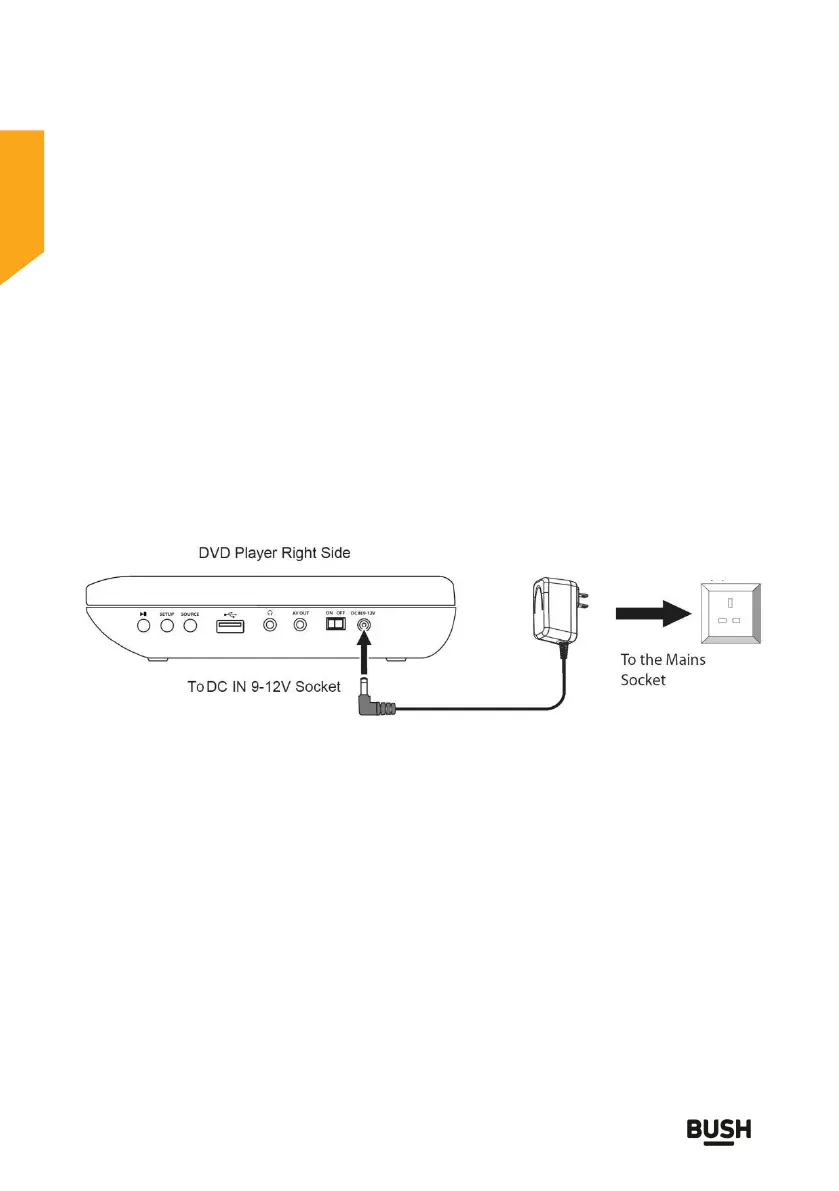
1. Connect the mains adaptor cable into
the DC jack at the side of the player and plug the mains adaptor into
the mains. Ensure the ON/OFF button on the side of the DVD player is
OFF. The indicator (at front of the player) will illuminate green and flash
to show that the unit is connected to the mains and is in charging
mode.
2. Allow the unit to fully charge. When
the unit is fully charged the indicator will stop flashing.
Fig. 2
Notes
Only charge or recharge the battery indoors.
Do not recharge the battery when the air temperature is below
0°C or above 45°C.
Do not overcharge (e.g. longer than 24 hours) as this may shorten
the battery life.
Batteries become hot after heavy use and will become difficult to
charge. Allow DVD to cool and wait about an hour between
recharges.



 To Next Page